Syslog
All actions, requests, connections, applications, and processes generate logs that help define normal user behavior and identify unusual or malicious activities. Syslog standardizes the generation and handling of log messages. When used over a network, Syslog employs a client-server architecture to collect logs from various devices. It is available for all major operating systems.
Rsyslog is an open-source implementation of the Syslog protocol for UNIX-based systems, configurable as either a client or server. It is known for its ease of installation and configuration and offers advanced features such as content-based filtering.
Rsyslog logs are usually stored in /var/log/syslog.
To view them, open a terminal and run: `sudo cat /var/log/syslog
The output shows log messages containing the day when they occurred, the time, the device name, the application that generated the logs, and the message.
The logs indicate that a cron job is running continuously, executing a file named backdoor.sh. This script establishes a reverse shell connection, opening a port and providing a bash session to anyone who connects. This suggests that an attacker has gained access to the system and is using cron jobs for persistent access. To remove this threat, delete the backdoor.sh file:
`sudo rm /backdoor.sh
Which transport protocol is commonly used by syslog for sending log messages? UDP
SIEM
Security Information and Event Management, known as SIEM, is a software solution that aggregates and analyzes activity from many different resources across an entire IT infrastructure. SIEM collects security data from network devices, servers, domain controllers and allows organizations to normalize, aggregate and analyze data to detect threats. It stores, normalizes, aggregates, and applies analytics to that data to detect threats, discover trends, and allow organizations to investigate any alerts that occur.
Splunk is a widely used platform for monitoring, analyzing and visualizing data. To access its web interface, open a web browser and type the following IP address and port number in the URL: `http://172.20.1.12:8000
Type admin for the username and P@ssw0rd for the password.
Splunk
After authenticating, click on Settings > Add Data.
To analyze an Apache log file for suspicious login attempts, click on Add Data, then select Upload.
Click on Select File, navigate to /home/ubuntu-user in the pop-up window, select access.log, and import it. Click on Next.
On the Set Source Type page, assign the data type access_combined to ensure proper formatting during indexing.
Click Next, then Review, and finally Submit. When you see “File has been uploaded successfully,” click Start Searching to analyze the logs.
SIEM platforms aggregate logs to assist system administrators and security professionals. Splunk, for instance, groups similar requests and shows their overall traffic volume. To view patterns in the file, click on Pattern.
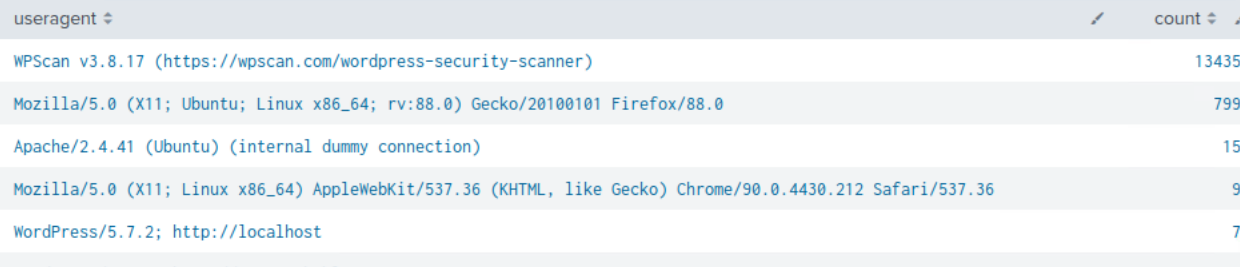
If most requests are directed at /wp-login.php and the user agent is WPScan, a WordPress security scanner, this indicates a possible brute-force attack.
To view all requests by WPScan, use the following search query: `| stats count by useragent | sort - count
Patterns in requests are more than common. However, if they are directed at sensitive resources or login pages, they should be looked into, especially when the user agent is a tool known for enumeration and exploitation.
How many events were generated by the WPScan user-agent? 13435
SIEM Rule writing - IP addresses
To extract information about the client IP addresses that sent requests, use the following rule:
| stats by clientip | sort ‑ count clientip
The stats keyword shows statistics such as the average, count, and sum. The sort - count displays the result based on which client IP address generated more logs.
To see which IP address is associated with the WPScan user agent, filter the logs based on the useragent field:
`useragent=“WPScan*” | stats by clientip
Based on the output, which client IP address sent the WPScan requests? 172.20.0.9
Phishing Emails
A phishing attack is a scam where a user gets tricked into giving out personal information such as bank details, credit card numbers, and login credentials including passwords. Most attacks occur via email communication, which contains a link that sends users to what (at first glance) looks like an official site. One popular example of email phishing is from your bank, asking for login or verification of personal information.
Indicators that give away phishing emails are:
- The email is sent from a public email domain.
- Misspelled domain name.
- Poor grammar.
- Suspicious attachments or links.
- The message creates a sense of urgency.
Which of the following characteristics is a common indicator of a phishing email? Email sent from public domain
Email Analysis
Open a browser window and go to http://172.20.1.12:8025 to access a mail inbox. A few emails are shown.
The second email received (the subject is “You’re doing amazing!”) contains a link.
To verify if the link in the email points to a legitimate Infosec Institute blog post, check the email headers. Click on the Show Header button in the upper right corner to view detailed header information.
Both the sender and return-path email addresses feature the Infosec Institute domain, which suggests the email is legitimate. The return-path address specifically handles bounced emails-messages that are rejected by mail servers.
One of the emails listed in the mailbox is a phishing email called “Your next challenge!“. Find it and download it for further examination by clicking the download button:
Downloaded files are commonly saved with random names. To properly document events for further analysis, give files descriptive names. Open a terminal and navigate to Downloads: `cd Downloads
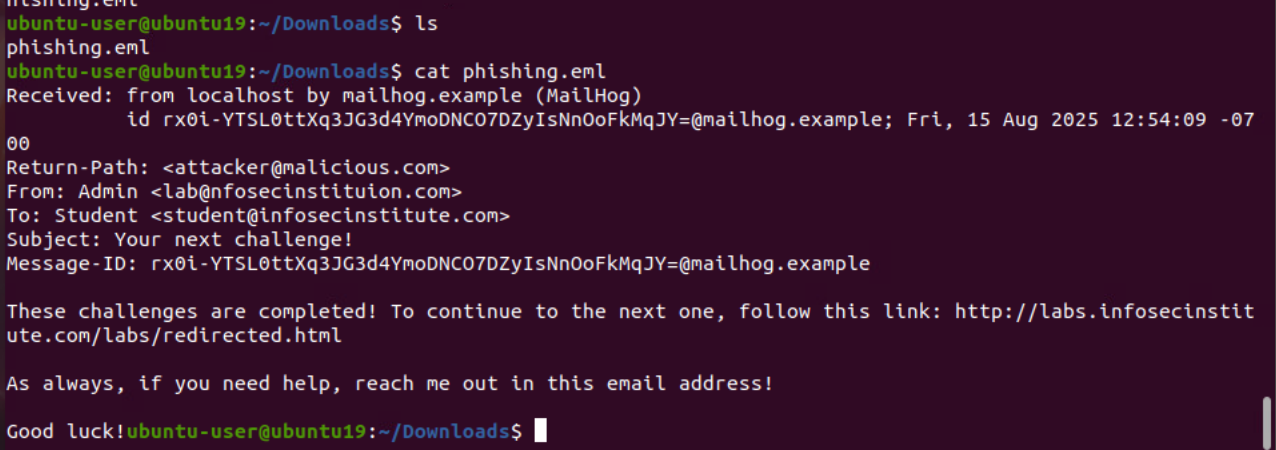
Use the ls command to check the downloaded files: `ls
And change the name of the file from default name to phishing.eml. `mv “phishing email file” phishing.eml
What is the Return-Path address in the downloaded email? attacker@malicious.com
Malicious payloads
Because of the diversity of the payloads and their delivery mechanisms, there are different methods used to inspect these attack vectors.
To see an example, go to the http://172.20.1.12:8025 mailbox and download the email with the subject “Malicious payloads!“.
After clicking the link, the content of the lab.nfosecinstitution.com will be shown.
Try to download the PNG file by clicking on it and note how the file extension changes when doing so:
Note the _gnp character in the filename. This Unicode character is used for right-to-left overriding of text, meaning all text after this character will be shown in reverse. The character does not get interpreted in the target machine. For this reason, when the file gets downloaded, its original filename is shown (d87d7qsd7ef_gnp.elf). The browser, however, interprets the Unicode character and reverses the text after it, meaning the gnp.elf substring located after gets shown as lfe.png (file d87d7qsd7effle.png shown in the browser). In this way, the user gets tricked into thinking they are downloading a PNG file.
To validate this assumption, use the binwalk command. Binwalk is a command-line tool that inspects files for embedded code. To use it, type binwalk followed by the name of the file to be inspected: _gnp binwalk “ELF FILE” > binwalk_output.txt
To view the command output, use the head command:
head binwalk_output.txt
According to binwalk, the file is indeed an executable masked as a .png file.