Websites are usually static but, Web Apps are dynamic, allowing users to interact and get updated based on their interaction.
Security Risks of Web Applications
A successful web application attack can lead to significant losses and massive business interruptions. Since web applications are run on servers that may host other sensitive information and are often also linked to databases containing sensitive user or corporate data, all of this data could be compromised if a web site is successfully attacked. This is why it is critical for any business that utilizes web applications to properly test these applications for vulnerabilities and patch them promptly while testing that the patch fixes the flaw and does not inadvertently introduce any new flaws.
We will always come across various web applications that are designed and configured differently. One of the most current and widely used methods for testing web applications is the OWASP Web Security Testing Guide.
General steps:
- One of the most common procedures is to start by reviewing a web application’s front end components, such as
HTML,CSSandJavaScript(also known as the front end trinity), and attempt to find vulnerabilities such as Sensitive Data Exposure and Cross-Site Scripting (XSS). - Once all front end components are thoroughly tested, we would typically review the web application’s core functionality and the interaction between the browser and the webserver to enumerate the technologies the webserver uses and look for exploitable flaws.
- We typically assess web applications from both an unauthenticated and authenticated perspective (if the application has login functionality) to maximize coverage and review every possible attack scenario.
Attacking Web Application
We often find SQL injection vulnerabilities on web applications that use Active Directory for authentication. While we can usually not leverage this to extract passwords (since Active Directory administers them), we can often pull most or all Active Directory user email addresses, which are often the same as their usernames. This data can then be used to perform a password spraying attack against web portals that use Active Directory for authentication such as VPN or Microsoft Outlook Web Access/Microsoft O365.
A few more real-world examples of web application attacks and the impact are as follows:
| Flaw | Real-world Scenario |
|---|---|
| SQL injection | Obtaining Active Directory usernames and performing a password spraying attack against a VPN or email portal. |
| File Inclusion | Reading source code to find a hidden page or directory which exposes additional functionality that can be used to gain remote code execution. |
| Unrestricted File Upload | A web application that allows a user to upload a profile picture that allows any file type to be uploaded (not just images). This can be leveraged to gain full control of the web application server by uploading malicious code. |
| Insecure Direct Object Referencing (IDOR) | When combined with a flaw such as broken access control, this can often be used to access another user’s files or functionality. An example would be editing your user profile browsing to a page such as /user/701/edit-profile. If we can change the 701 to 702, we may edit another user’s profile! |
| Broken Access Control | Another example is an application that allows a user to register a new account. If the account registration functionality is designed poorly, a user may perform privilege escalation when registering. Consider the POST request when registering a new user, which submits the data username=bjones&password=Welcome1&email=bjones@inlanefreight.local&roleid=3. What if we can manipulate the roleid parameter and change it to 0 or 1. We have seen real-world applications where this was the case, and it was possible to quickly register an admin user and access many unintended features of the web application. |
Web Application Layout
Web application layouts consist of many different layers that can be summarized with the following three main categories:
| Category | Description |
|---|---|
Web Application Infrastructure | Describes the structure of required components, such as the database, needed for the web application to function as intended. Since the web application can be set up to run on a separate server, it is essential to know which database server it needs to access. |
Web Application Components | The components that make up a web application represent all the components that the web application interacts with. These are divided into the following three areas: UI/UX, Client, and Server components. |
Web Application Architecture | Architecture comprises all the relationships between the various web application components. |
Web Application Infrastructure
- Client-Server
- One Server
- Many Servers - One Database
- Many Servers - Many Databases
Client - Server
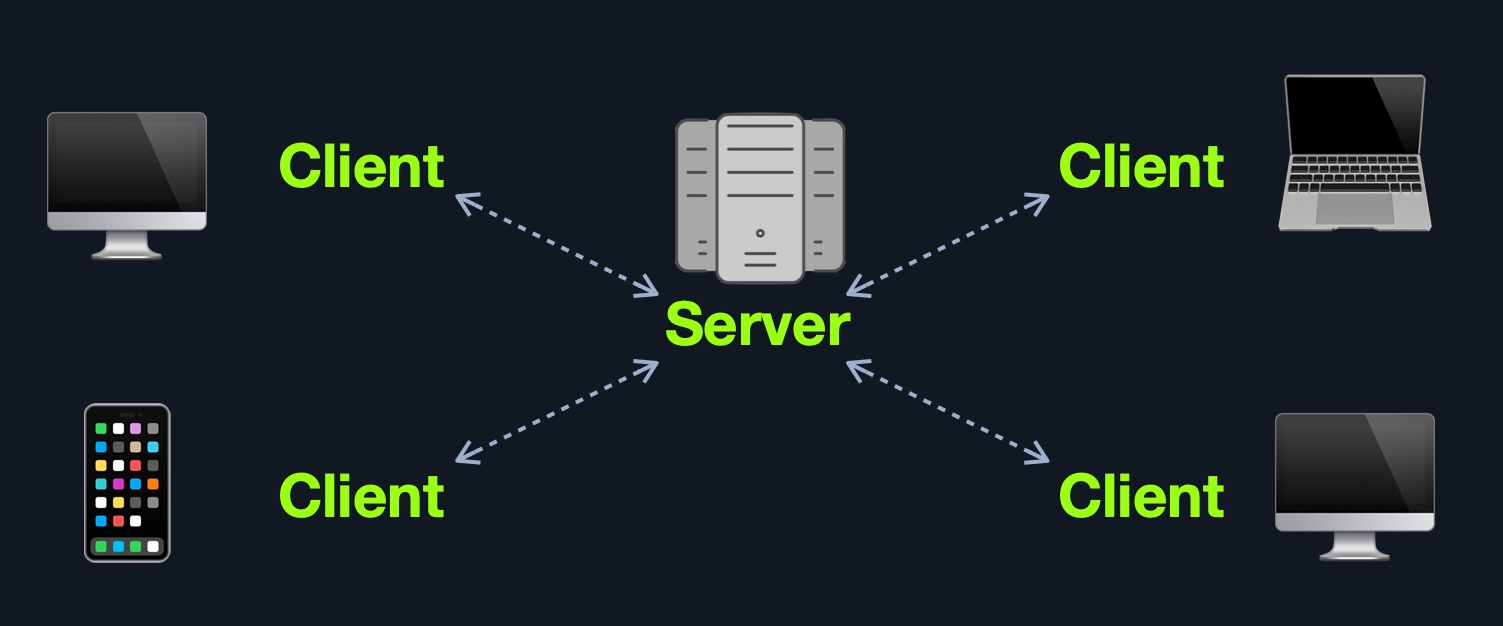
Web applications often adopt the client-server model. A server hosts the web application in a client-server model and distributes it to any clients trying to access it.
One Server
In this architecture, the entire web application or even several web applications and their components, including the database, are hosted on a single server.
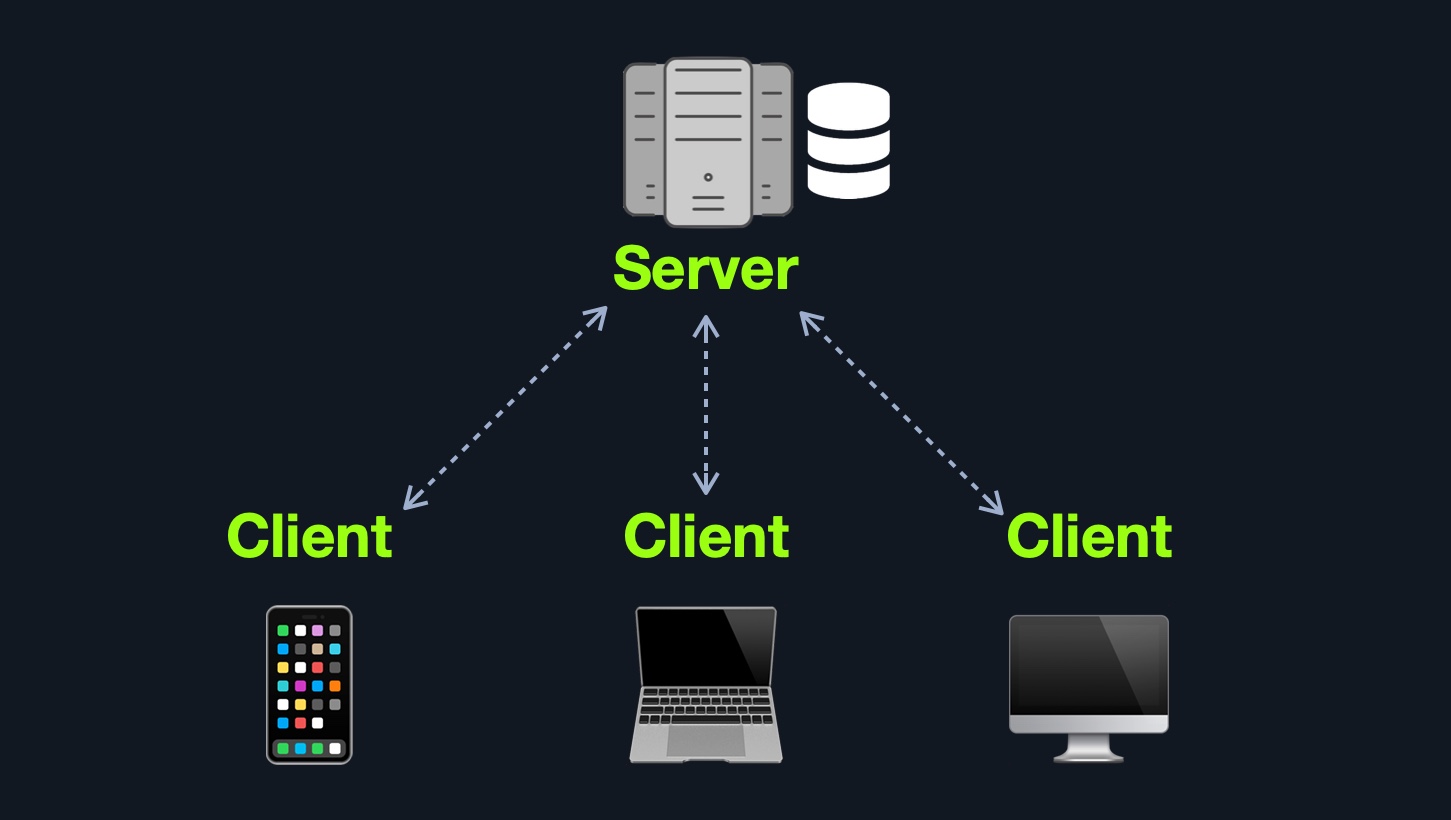 This design represents an “
all eggs in one basket” approach since if any of the hosted web applications are vulnerable, the entire webserver becomes vulnerable.
Many Server - One Database
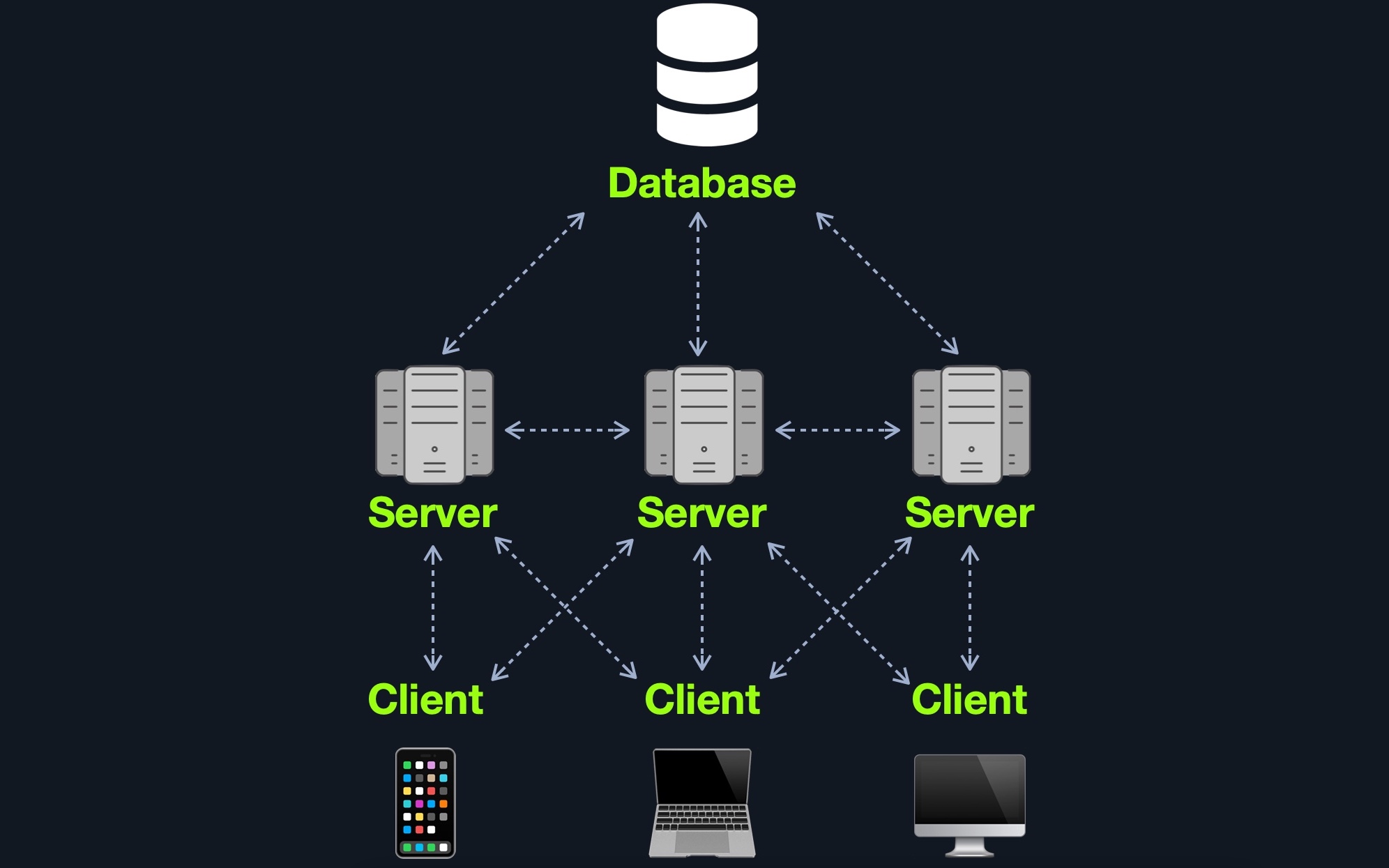
This model separates the database onto its own database server and allows the web applications’ hosting server to access the database server to store and retrieve data. It can be seen as many-servers to one-database and one-server to one-database, as long as the database is separated on its own database server.
Many Server - Many Databases
This model builds upon the Many Servers, One Database model. However, within the database server, each web application’s data is hosted in a separate database. The web application can only access private data and only common data that is shared across web applications. It is also possible to host each web application’s database on its separate database server.
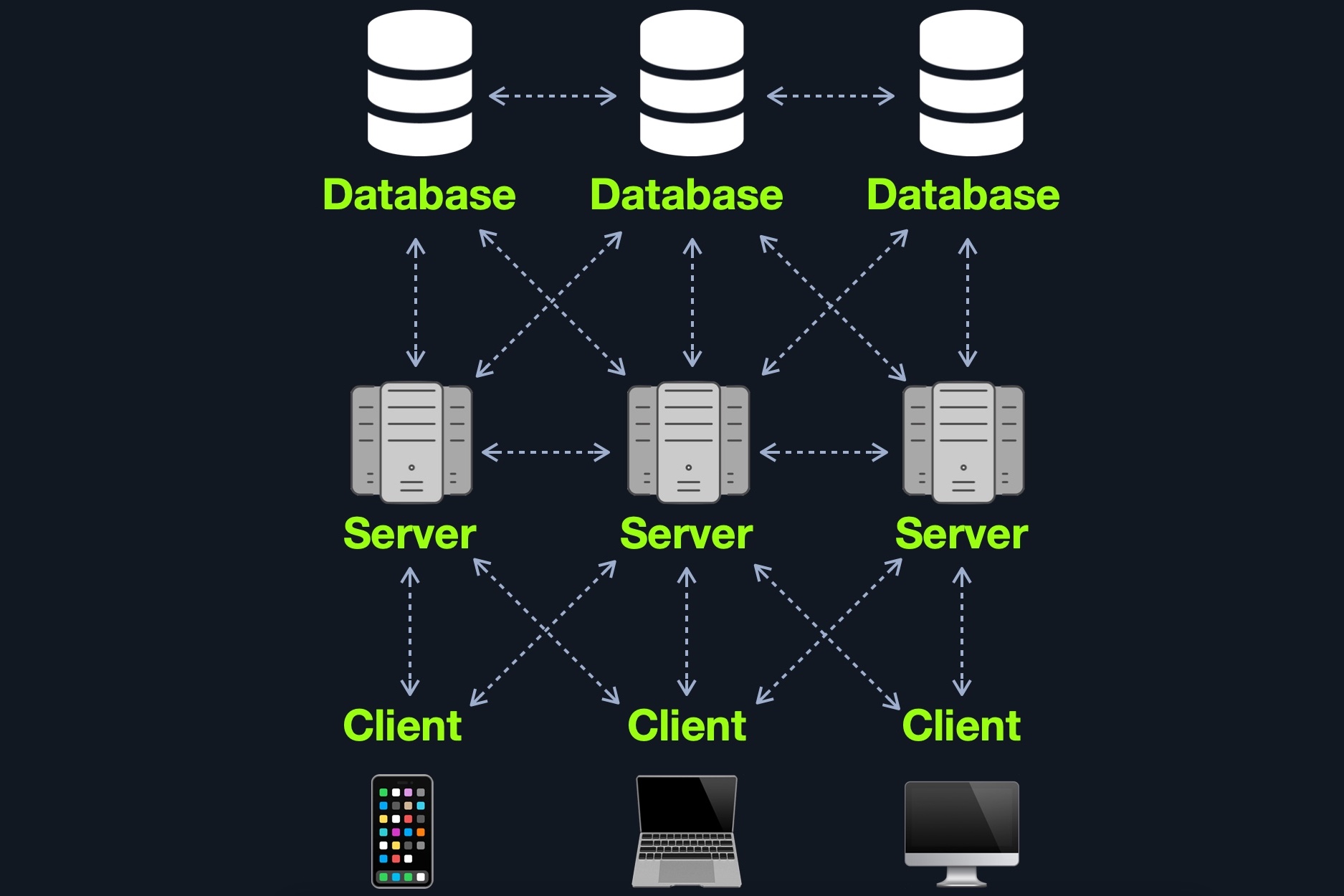
Although this may be more difficult to implement and may require tools like load balancers to function appropriately, this architecture is one of the best choices in terms of security due to its proper access control measures and proper asset segmentation.
Aside from these models, there are other web application models available such as serverless web applications or web applications that utilize microservices.
Web Application Components
All of the components of the models mentioned previously can be broken down to:
ClientServer- Webserver
- Web Application Logic
- Database
Services(Microservices)- 3rd Party Integrations
- Web Application Integrations
Functions(Serverless)
Web Application Architecture
The components of a web application are divided into three different layers (AKA Three Tier Architecture).
| Layer | Description |
|---|---|
Presentation Layer | Consists of UI process components that enable communication with the application and the system. These can be accessed by the client via the web browser and are returned in the form of HTML, JavaScript, and CSS. |
Application Layer | This layer ensures that all client requests (web requests) are correctly processed. Various criteria are checked, such as authorization, privileges, and data passed on to the client. |
Data Layer | The data layer works closely with the application layer to determine exactly where the required data is stored and can be accessed. |
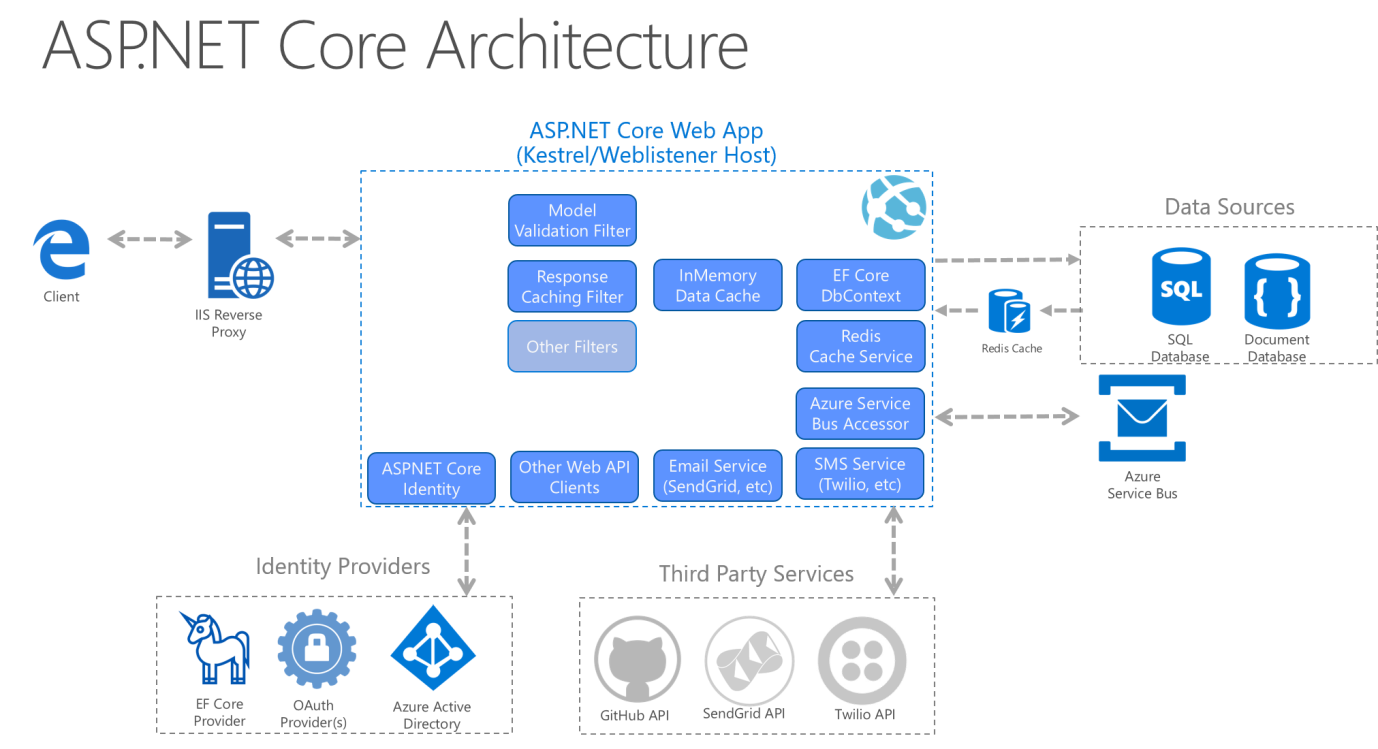 | |
| Source: Microsoft Docs |
Furthermore, some web servers can run operating system calls and programs, like IIS ISAPI or PHP-CGI.
Microservices
We can think of microservices as independent components of the web application, which in most cases are programmed for one task only.
The communication between these microservices is stateless, which means that the request and response are independent. This is because the stored data is stored separately from the respective microservices.
The use of microservices is considered service-oriented architecture (SOA), built as a collection of different automated functions focused on a single business goal.
They can be written in different programming languages and still interact. Microservices benefit from easier scaling and faster development of applications, which encourages innovation and speeds upmarket delivery of new features. Some benefits of microservices include:
- Agility
- Flexible scaling
- Easy deployment
- Reusable code
- Resilience
This AWS whitepaper provides an excellent overview of microservice implementation.
Serverless
Cloud providers such as AWS, GCP, Azure, among others, offer serverless architectures. These platforms provide application frameworks to build such web applications without having to worry about the servers themselves. These web applications then run in stateless computing containers (Docker, for example). This type of architecture gives a company the flexibility to build and deploy applications and services without having to manage infrastructure; all server management is done by the cloud provider, which gets rid of the need to provision, scale, and maintain servers needed to run applications and databases.
Front End vs. Back End
Front End
These components make up the source code of the web page we view when visiting a web application and usually include HTML, CSS, and JavaScript, which is then interpreted in real-time by our browsers.
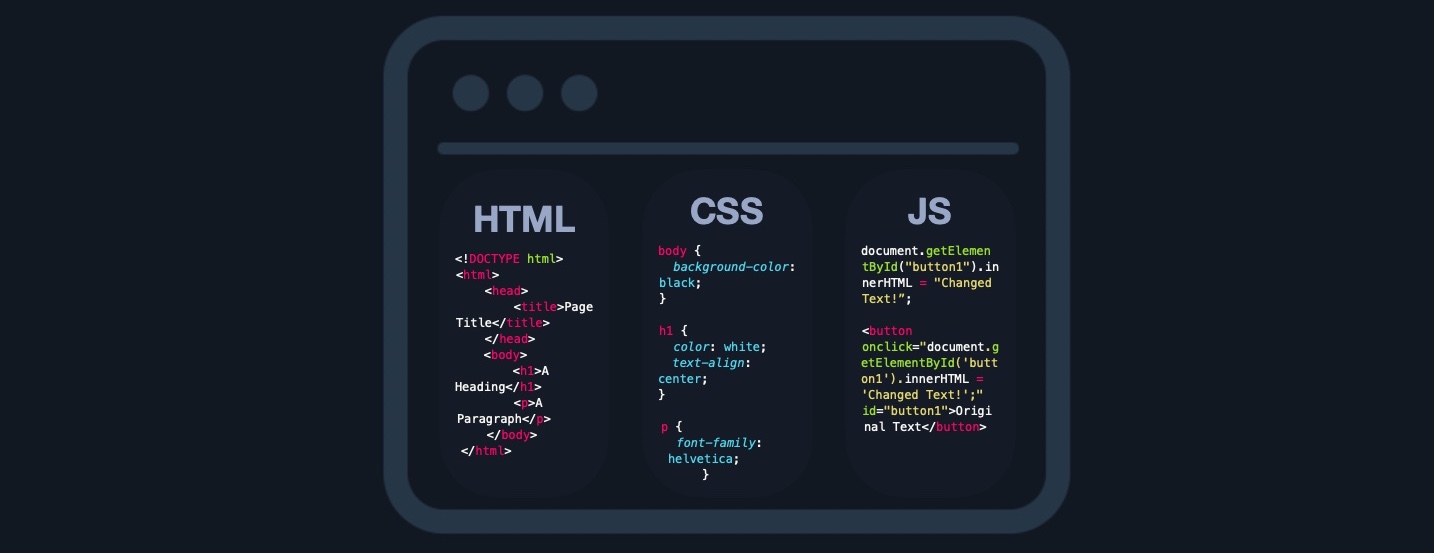 Aside from frontend code development, the following are some of the other tasks related to front end web application development:
- Visual Concept Web Design
- User Interface (UI) design
- User Experience (UX) design
Back End
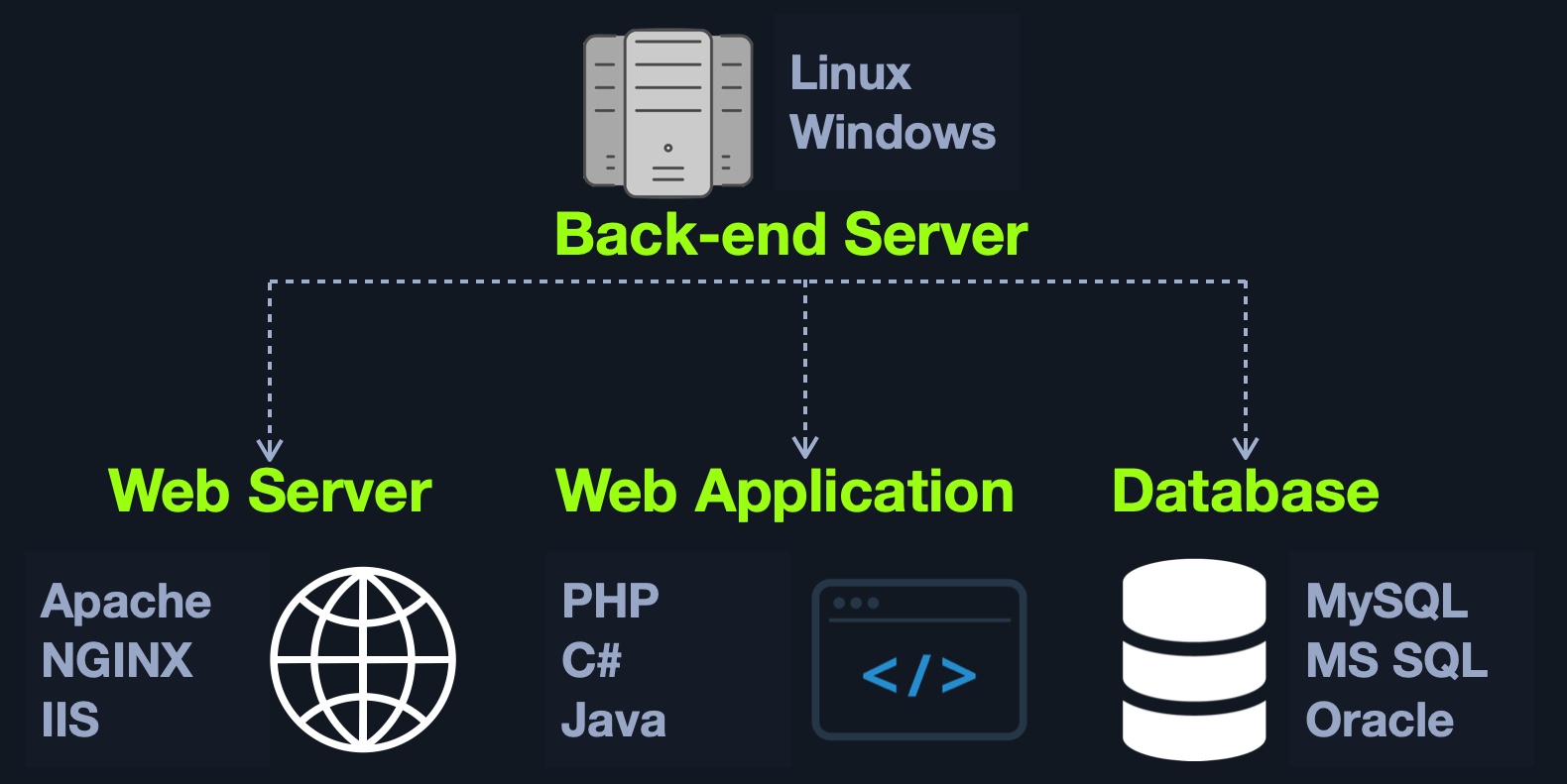
There are four main back end components for web applications:
| Component | Description |
|---|---|
Back end Servers | The hardware and operating system that hosts all other components and are usually run on operating systems like Linux, Windows, or using Containers. |
Web Servers | Web servers handle HTTP requests and connections. Some examples are Apache, NGINX, and IIS. |
Databases | Databases (DBs) store and retrieve the web application data. Some examples of relational databases are MySQL, MSSQL, Oracle, PostgreSQL, while examples of non-relational databases include NoSQL and MongoDB. |
Development Frameworks | Development Frameworks are used to develop the core Web Application. Some well-known frameworks include Laravel (PHP), ASP.NET (C#), Spring (Java), Django (Python), and Express (NodeJS JavaScript). |
 | |
| It is also possible to host each component of the back end on its own isolated server, or in isolated containers, by utilizing services such as Docker. | |
| To maintain logical separation and mitigate the impact of vulnerabilities, different components of the web application, such as the database, can be installed in one Docker container, while the main web application is installed in another, thereby isolating each part from potential vulnerabilities that may affect the other container(s). | |
| Some of the main jobs performed by back end components include: |
- Develop the main logic and services of the back end of the web application
- Develop the main code and functionalities of the web application
- Develop and maintain the back end database
- Develop and implement libraries to be used by the web application
- Implement technical/business needs for the web application
- Implement the main APIs for front end component communications
- Integrate remote servers and cloud services into the web application
Securing Front/Back End
When we have full access to the source code of front end components, we can perform a code review to find vulnerabilities, which is part of what is referred to as Whitebox Pentesting. On the other hand, back end components’ source code is stored on the back end server, so we do not have access to it by default, which forces us only to perform what is known as Blackbox Pentesting.
The top 20 most common mistakes web developers make that are essential for us as penetration testers are:
| No. | Mistake |
|---|---|
1. | Permitting Invalid Data to Enter the Database |
2. | Focusing on the System as a Whole |
3. | Establishing Personally Developed Security Methods |
4. | Treating Security to be Your Last Step |
5. | Developing Plain Text Password Storage |
6. | Creating Weak Passwords |
7. | Storing Unencrypted Data in the Database |
8. | Depending Excessively on the Client Side |
9. | Being Too Optimistic |
10. | Permitting Variables via the URL Path Name |
11. | Trusting third-party code |
12. | Hard-coding backdoor accounts |
13. | Unverified SQL injections |
14. | Remote file inclusions |
15. | Insecure data handling |
16. | Failing to encrypt data properly |
17. | Not using a secure cryptographic system |
18. | Ignoring layer 8 |
19. | Review user actions |
20. | Web Application Firewall misconfigurations |
| These mistakes lead to the OWASP Top 10 vulnerabilities for web applications, which we will discuss in other modules: |
| No. | Vulnerability |
|---|---|
1. | Broken Access Control |
2. | Cryptographic Failures |
3. | Injection |
4. | Insecure Design |
5. | Security Misconfiguration |
6. | Vulnerable and Outdated Components |
7. | Identification and Authentication Failures |
8. | Software and Data Integrity Failures |
9. | Security Logging and Monitoring Failures |
10. | Server-Side Request Forgery (SSRF) |
| NEXT: Front End Components |