Simple cURL commands:
curl -O domainName.com/path.name ⇒ download the given file and save it locally with same name.
Use the -o flag to specify explicit name for file in which the response is saved.
You can force curl to accept invalid certificate by -k flag. curl -k https://inlanefreight.com
To view the full HTTP request and response, we can simply add the -v verbose flag to our earlier commands, and it should print both the request and response:
curl inlanefreight.com -v. The -vvv flag shows an even more verbose output.
-i Print response headers and response body (-I for only response Headers.)
curl -u admin:admin http://<SERVER_IP>:<PORT>/ Set HTTP basic authorization credentials
curl -X POST -d 'username=admin&password=admin' http://<SERVER_IP>:<PORT>/ Send POST request with POST data
cURL also allows us to set request headers with the -H flag.
we can use the -A to set our User-Agent:
curl https://www.inlanefreight.com -A 'Mozilla/5.0'
If we want to follow the redirection with cURL, we can use the
-Lflag.
silent any unneeded cURL output with -s
HTTP → HTTPS Handshake
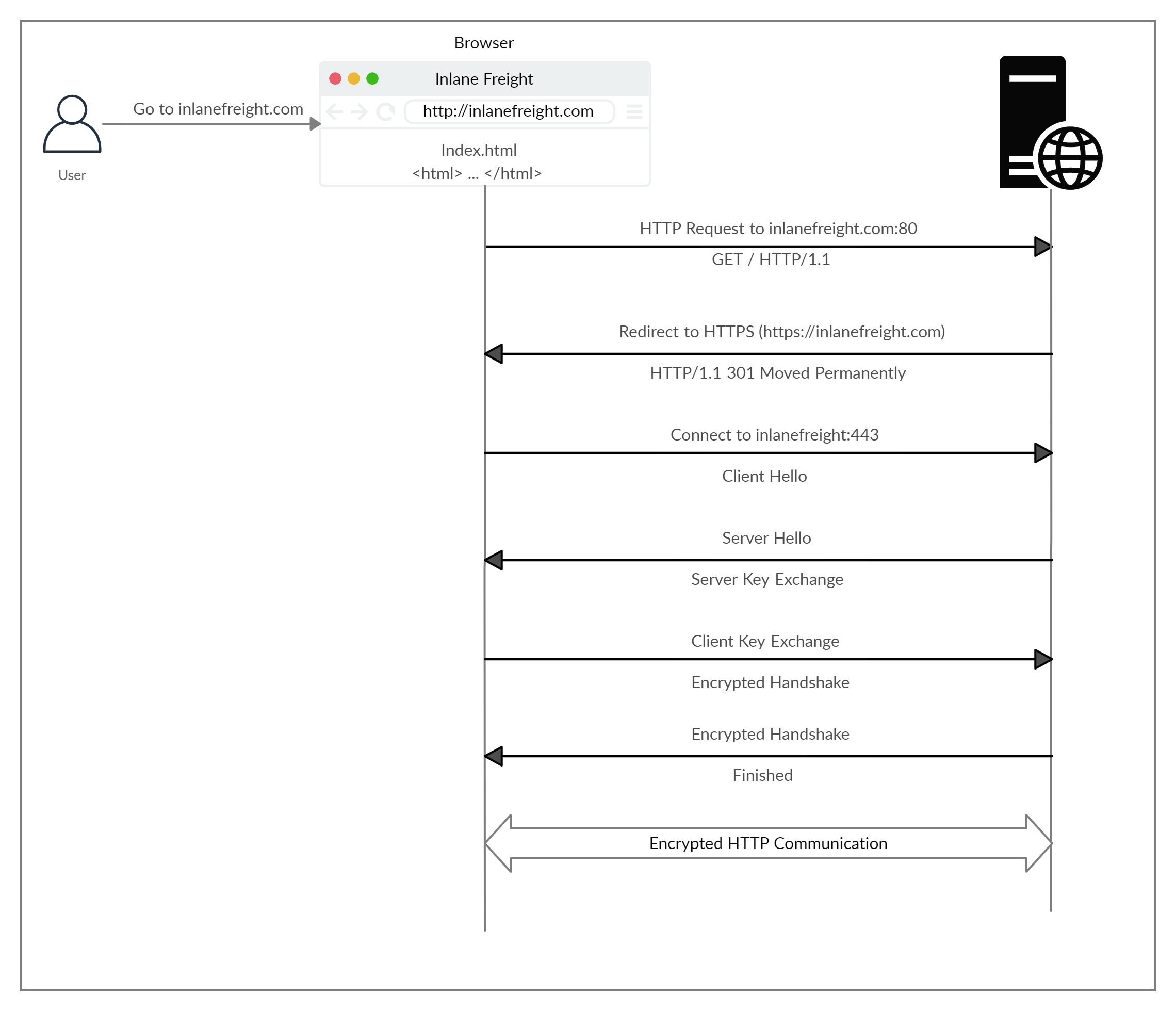
You can force curl to accept invalid certificate by -k flag. curl -k https://inlanefreight.com
HTTP Request
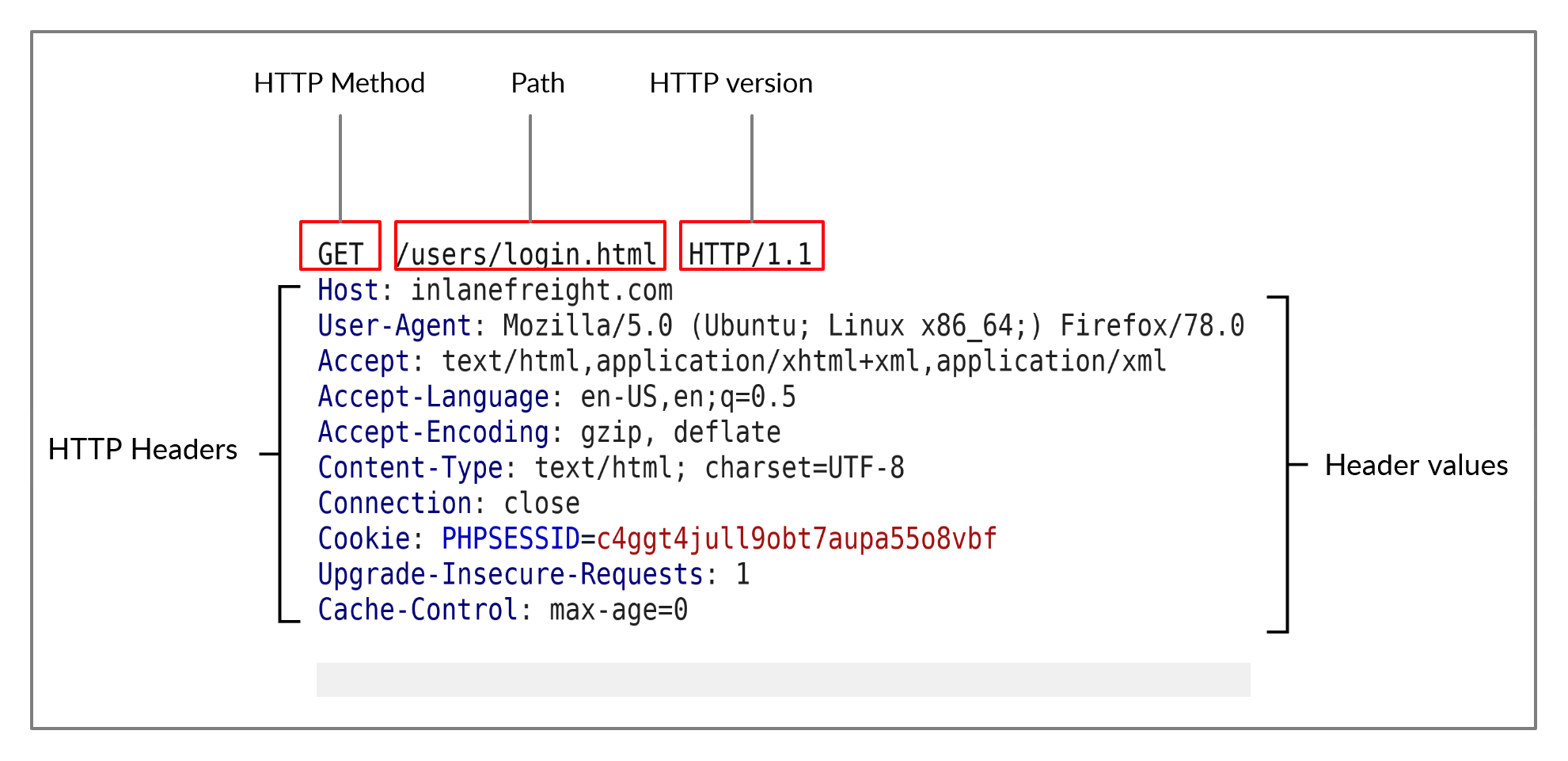 The first line of any HTTP request contains three main fields ‘separated by spaces’: HTTP Method & Path & HTTP Version.
The next set of lines contain HTTP header value pairs, like
The first line of any HTTP request contains three main fields ‘separated by spaces’: HTTP Method & Path & HTTP Version.
The next set of lines contain HTTP header value pairs, like Host, User-Agent, Cookie
The headers are terminated with a new line, which is necessary for the server to validate the request.
Finally, a request may end with the request body and data.
Note: HTTP version 1.X sends requests as clear-text, and uses a new-line character to separate different fields and different requests. HTTP version 2.X, on the other hand, sends requests as binary data in a dictionary form.
HTTP Response
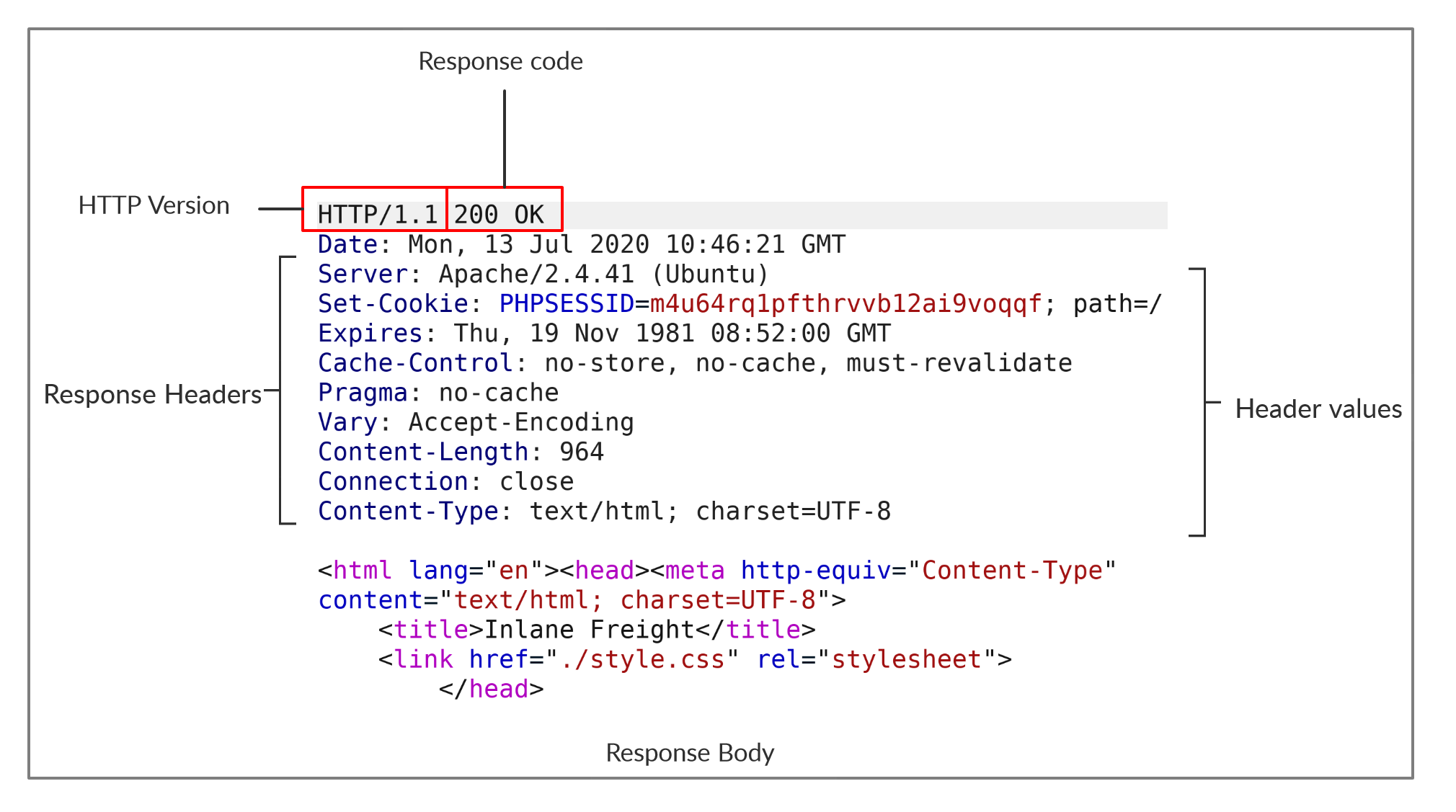 The first line of an HTTP response contains two fields separated by spaces. The first being the
 HTTP version and the second denotes the HTTP response code (e.g. 200 OK).
After the first line, the response lists its headers, similar to an HTTP request.
Finally, the response may end with a response body, which is separated by a new line after the headers. Response body may be HTML or JSON or images based on what server returns and client asked for.
To view the full HTTP request and response, we can simply add the `-v` verbose flag to our earlier commands, and it should print both the request and response:
`curl inlanefreight.com -v`.
The `-vvv` flag shows an even more verbose output.
Browser DevTools
Shortcut Key: CTRL+SHIFT+I.
HTTP Headers
Headers can have one or multiple values, appended after the header name and separated by a colon. We can divide headers into the following categories:
General HeadersEntity HeadersRequest HeadersResponse HeadersSecurity Headers
General Headers
They are contextual and are used to describe the message rather than its contents. E.g. Date , Connection, etc.
Entity Headers
Can be common to both the request and response. These headers are used to describe the content (entity) transferred by a message.
They are usually found in responses and POST or PUT requests.
E.g. Content-Type,(Content-Type:text/html) Media-Type (Media-Type:application/pdf), Boundary(boundary=“b4e4fbd93540”), Content-Length, Content-Encoding (Content_Encoding: gzip)
Request Headers
Used in requests only. E.g. Host, User-Agent, Referer, Accept (Which media type client can understand), Cookie, Authorization
Complete List
Response Headers
Used in HTTP Response. E.g. Server, Set-Cookie, WWW-Authenticate(Notify client abt type of auth required to access the requested resource)
Security Headers
HTTP Security headers are a class of response headers used to specify certain rules and policies to be followed by the browser while accessing the website.
E.g. Content-Security-Policy (Dictates the website’s policy towards external injected resources. Content-Security-Policy: scrpt-src ‘self’), Strict-Transport-Security (Prevents browser from accessing website over plain HTTP and forces HTTPS. Strict-Transport-Security: max-age=31536000), Referrer-Policy(origin by default).
cURL
We can use the -I flag to send a HEAD request and only display the response headers.
cURL also allows us to set request headers with the -H flag.
HTTP Methods and Codes
Complete List
We mainly use GET and POST. Some REST APIs may use PUT and DELETE.
Response Codes
| Type | Description |
|---|---|
1xx | Provides information and does not affect the processing of the request. |
2xx | Returned when a request succeeds. |
3xx | Returned when the server redirects the client. |
4xx | Signifies improper requests from the client. For example, requesting a resource that doesn’t exist or requesting a bad format. |
5xx | Returned when there is some problem with the HTTP server itself. |
| Commonly used resp codes: |
| Code | Description |
|---|---|
200 OK | Returned on a successful request, and the response body usually contains the requested resource. |
302 Found | Redirects the client to another URL. For example, redirecting the user to their dashboard after a successful login. |
400 Bad Request | Returned on encountering malformed requests such as requests with missing line terminators. |
403 Forbidden | Signifies that the client doesn’t have appropriate access to the resource. It can also be returned when the server detects malicious input from the user. |
404 Not Found | Returned when the client requests a resource that doesn’t exist on the server. |
500 Internal Server Error | Returned when the server cannot process the request. |
HTTP Basic Auth
Unlike the usual login forms, which utilize HTTP parameters to validate the user credentials (e.g. POST request), this type of authentication utilizes a basic HTTP authentication, which is handled directly by the webserver to protect a specific page/directory, without directly interacting with the web application.
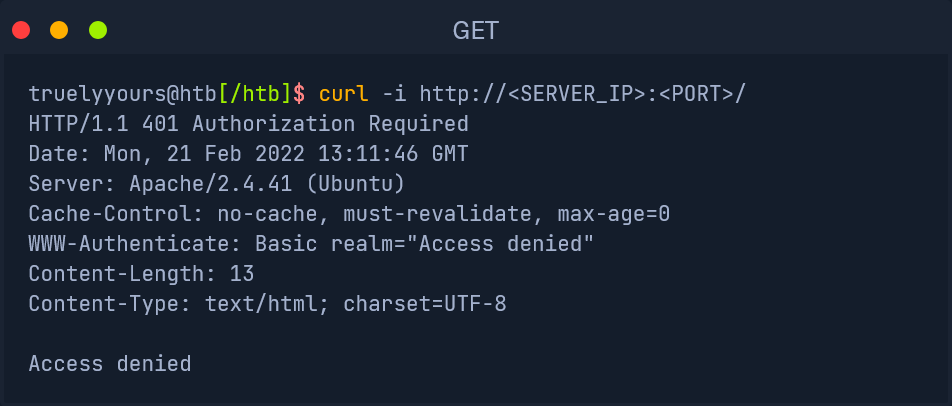 As we can see, we get
 Access denied in the response body, and we also get Basic realm="Access denied" in the WWW-Authenticate header.
As we know, to provide the credentials through cURL, we can use the -u flag, as follows:
curl -u admin:admin http://94.237.56.165:35327/ OR we can use curl http://admin:admin@94.237.56.165:35327
Checking the headers with curl -v we can see that basic HTTP auth header is set for request:
Authorization: Basic YWRtaW46YWRtaW4=
which is base64 of admin:admin. For JWT, it would be Bearer followed by the JWT token. So we can manually set the “header” field and get the same valid/authenticated response:
curl -H 'Authorization: Basic YWRtaW46YWRtaW4=' 94.237.56.165:35327
POST
HTTP POST places user parameters within the HTTP Request body.
Lack of Logging: As POST requests may transfer large files (e.g. file upload), it would not be efficient for the server to log all uploaded files as part of the requested URL, as would be the case with a file uploaded through a GET request.Less Encoding Requirements: URLs are designed to be shared, which means they need to conform to characters that can be converted to letters. The POST request places data in the body which can accept binary data. The only characters that need to be encoded are those that are used to separate parameters.More data can be sent: The maximum URL Length varies between browsers (Chrome/Firefox/IE), web servers (IIS, Apache, nginx), Content Delivery Networks (Fastly, Cloudfront, Cloudflare), and even URL Shorteners (bit.ly, amzn.to). Generally speaking, a URL’s lengths should be kept to below 2,000 characters, and so they cannot handle a lot of data.
Login Forms
Note: We can filter requests in “Network Tab” on browsers by the IP address.
In cURL, we use -X POST flag to send POST request:
curl -X POST -d 'username=admin&password=admin' http://<SERVER_IP>:<PORT>/
If we want to follow the redirection with cURL, we can use the
-Lflag.
We use the -i flag to see the Cookie that has been set in Set-Cookie header.
Then we simply pass the cookie with -b (or -H) flag.
curl -b 'PHPSESSID=c1nsa6op7vtk7kdis7bcnbadf1' http://<SERVER_IP>:<PORT>/
JSON Data
The POST data appear to be in JSON format, so our request must have specified the Content-Type header to be application/json. Hence, in curl command, we specify this:
curl -X POST -d '{"search":"london"}' -b 'PHPSESSID=c1nsa6op7vtk7kdis7bcnbadf1' -H 'Content-Type: application/json' http://<SERVER_IP>:<PORT>/search.php
CRUD API
Create - Read - Update - Delete
We use these API endpoints to do operations in a database:
curl -X PUT http://<SERVER_IP>:<PORT>/api.php/city/london ...SNIP...
| Operation | HTTP Method | Description |
|---|---|---|
Create | POST | Adds the specified data to the database table |
Read | GET | Reads the specified entity from the database table |
Update | PUT | Updates the data of the specified database table |
Delete | DELETE | Removes the specified row from the database table |
Read
we can simply specify the table name after the API (e.g. /city) and then specify our search term (e.g. /london), as follows:
curl http://<SERVER_IP>:<PORT>/api.php/city/london
We will also silent any unneeded cURL output with -s.
To have it properly formatted in JSON format, we can pipe the output to the
jqutility
Create
curl -X POST http://94.237.50.242:54663/api.php/city/ -d '{"city_name":"HTB_City", "country_name":"HTB"}' -H 'Content-Type: application/json'
We don’t add the name of city at the end of url. Simply end at */city/.
Update
We use PUT, DELTE, PATCH methods to update entire entry, delete an entry and update partial row i.e. some column withing an entry, respectively.
For PUT we enter the city name at the end of the URL (or API endpoint):
curl -X PUT http://94.237.50.242:54663/api.php/city/london -d '{"city_name":"New_HTB_City", "country_name":"HTB"}' -H 'Content-Type: application/json'
For DELETE we simply do -X DELETE and pass the URL with city name endpoint.
curl -X DELETE http://<SERVER_IP>:<PORT>/api.php/city/New_HTB_City